


Zillow Reviews Widget for Real Estate Agents - Poper
Zillow Reviews Widget

Show Zillow Reviews on your agent site.

Where supported, turn on optional LocalBusiness review schema and validate it with your own search tooling. Search engines decide if and how anything appears.

No credit card required
14-day free trial
Cancel anytime

Built for no-code website teams

Timetics
Academie Digitale
Goldcast
nbcf
Seedstock
Wow
Linkxar
Gale Toyota
Skills
Rugby Sport
Lamp
Leaktronics
Steel
Theatre in Chicago
Globerto
Meetup
FYM
Zeben
Kraftix
IETraditionala
Meethires
Leadscrape
Happily
Timetics
Academie Digitale
Goldcast
nbcf
Seedstock
Wow
Linkxar
Gale Toyota
Skills
Rugby Sport
Lamp
Leaktronics
Steel
Theatre in Chicago
Globerto
Meetup
FYM
Zeben
Kraftix
IETraditionala
Meethires
Leadscrape
Happily
Available on Poper plans

This is the actual widget

Live demo, not a screenshot. Style it for your brokerage, brand it, embed it. What you see here is what ships to your agent site.

What changes in search tooling for real estate agents

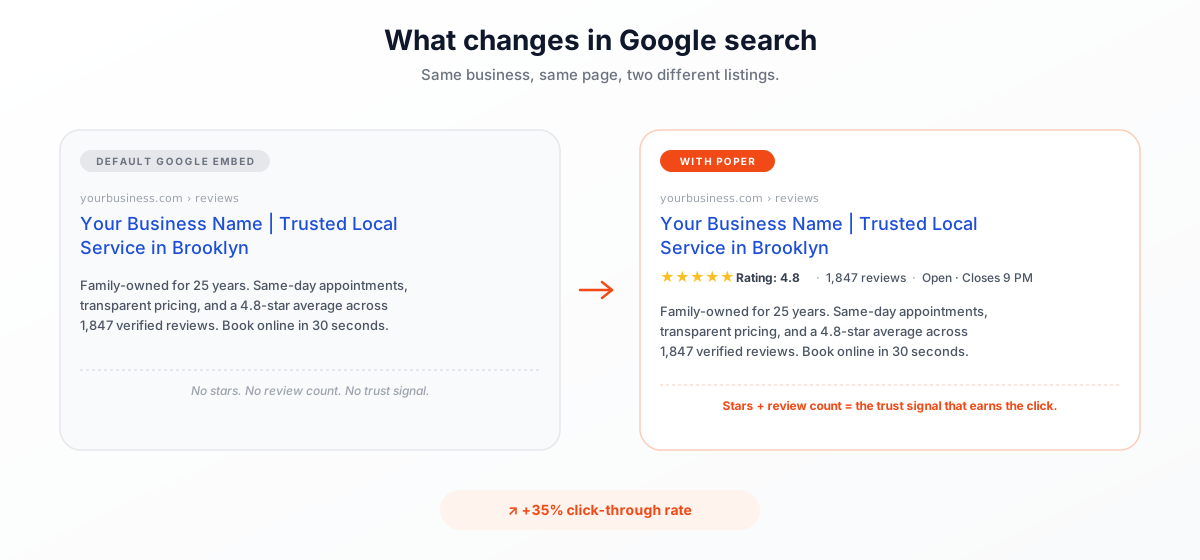
Same agent, same listing, two different search entries. The one with schema validation stands out.

Google search results comparison: default Google Reviews embed shows no stars or review count, while the Poper Google Reviews widget displays 4.8-star rating, 1,847 reviews, and Open Closes 9 PM rich snippet. Earn 35 percent more click-throughs in Google search.
+35% click-through rate

Use your own analytics to measure impact

From Zillow to your site

Your Zillow reviews. Now on your own domain.

Poper crawls the official Zillow review feed for your business and renders it inline on your website. Same reviews, your branding, your domain.

zillow.com
Zillow.com agent profile for James Sterling Premier Agent in Brooklyn showing 4.9 of 5 from 247 client reviews, 87 sales closed in 2026, $24M volume, and 3 buyer and seller testimonialsSource: ZillowOpen
Zillow.com agent profile for James Sterling Premier Agent in Brooklyn showing 4.9 of 5 from 247 client reviews, 87 sales closed in 2026, $24M volume, and 3 buyer and seller testimonials
jamessterling.realtor
James Sterling's own agent site at jamessterling.realtor with the Poper Zillow Reviews widget embedded inline showing the same 3 client reviews from the source page in deep-charcoal and warm-gold instead of Zillow bluePoper widget live
James Sterling's own agent site at jamessterling.realtor with the Poper Zillow Reviews widget embedded inline showing the same 3 client reviews from the source page in deep-charcoal and warm-gold instead of Zillow blue

Mockups for illustration. Pull your real Zillow Reviews Widget: Agent Testimonials on Your Website from Zillow and embed in 90 seconds.

How to use it

How to add Zillow Reviews to your real estate website

Three steps. with the guided setup flow. No developer needed.

  1. 01

    Copy your Zillow profile URL

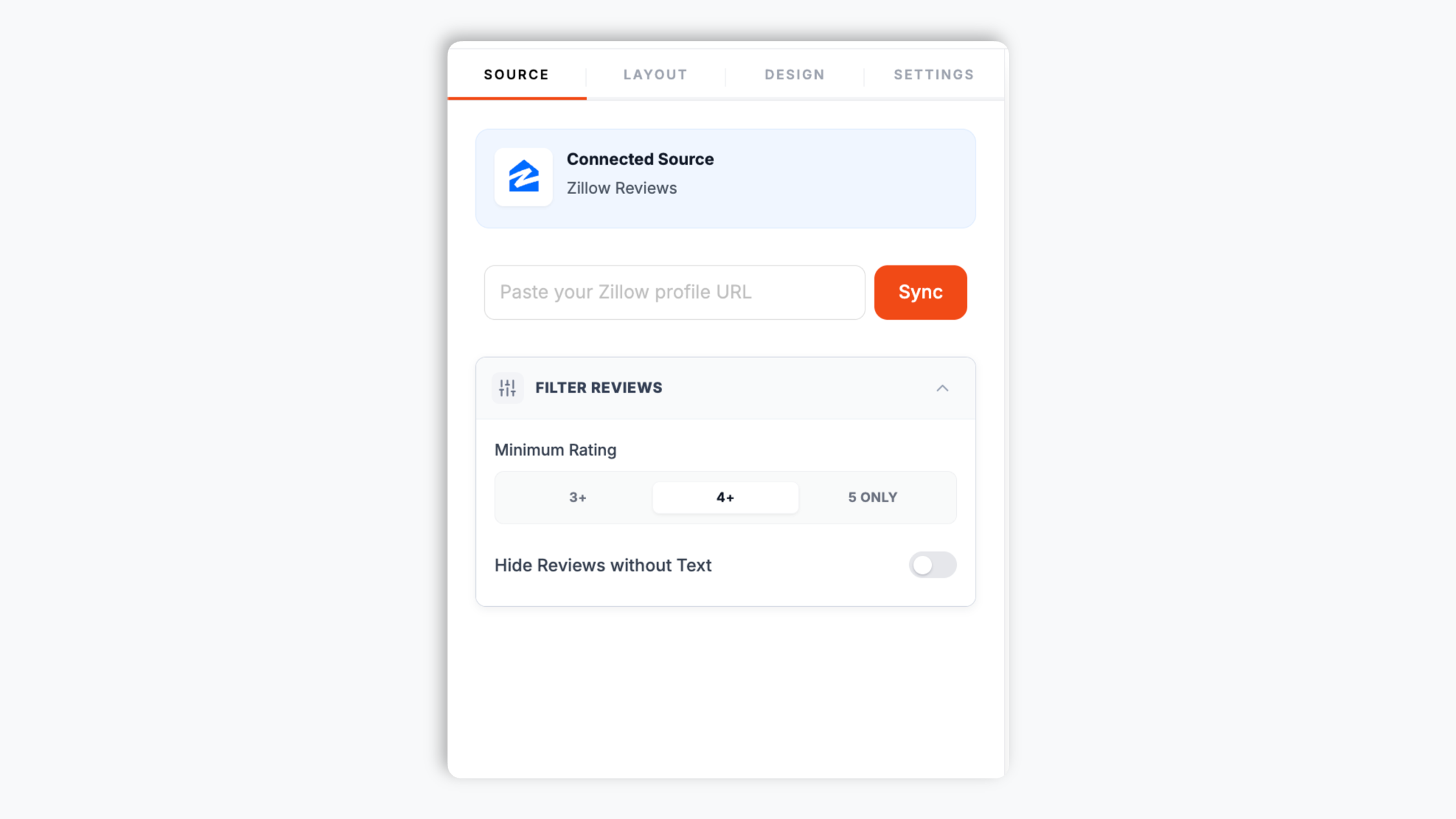
    Open your agent profile on Zillow and copy the page URL from your browser. Paste it into the Poper builder. That URL is all Poper needs to pull your client reviews and overall rating.

    Poper builder with the Zillow agent profile URL pasted into the source field, showing the fetched star rating and recent client reviews
  2. 02

    Pick a layout and brand it

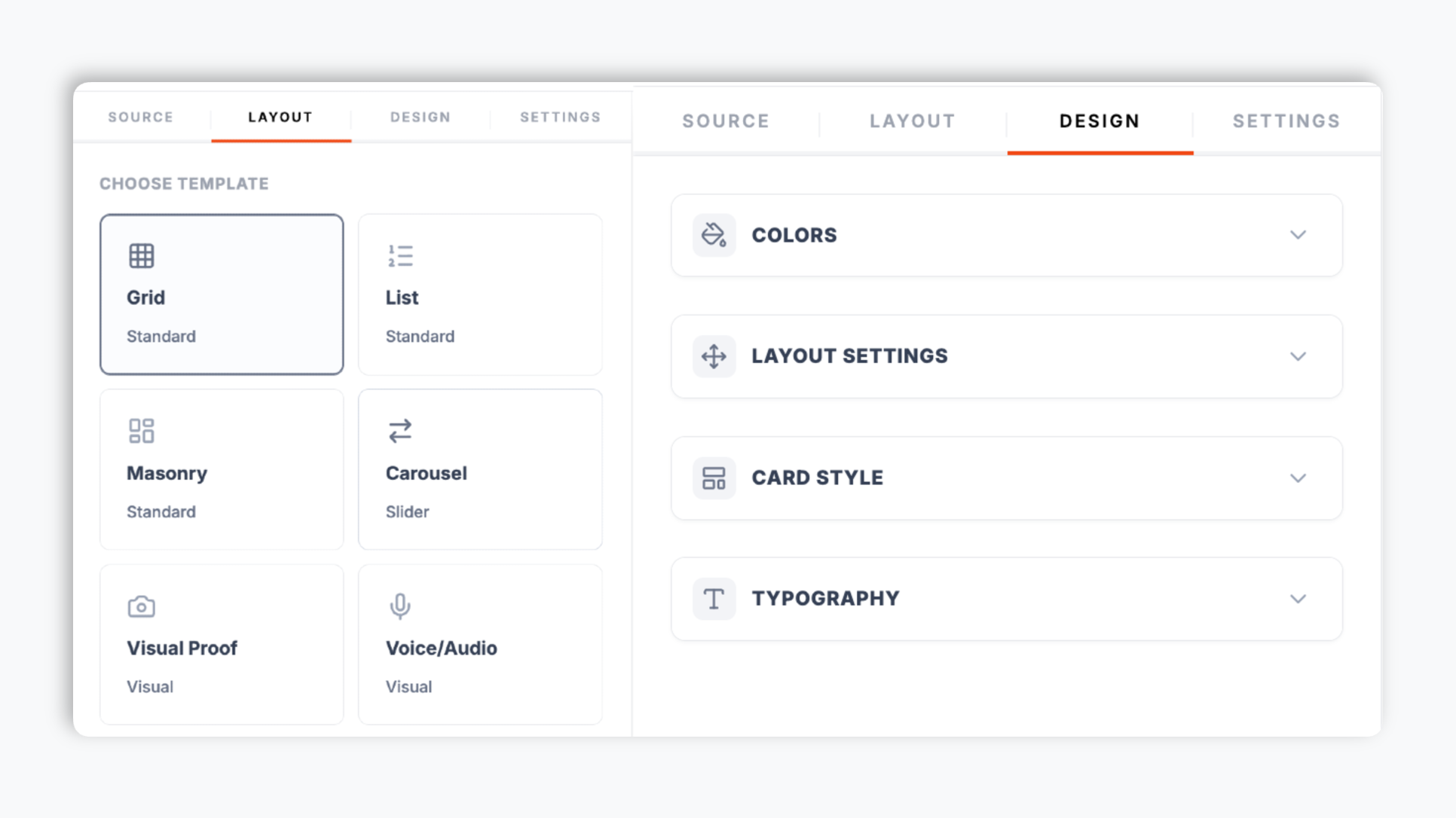
    Choose from 21 layouts including carousel, grid, masonry, list, media-capable grid, and quote wall. Match your brokerage colors, fonts, card corners, and shadow so the widget reads as part of your IDX site.

    Poper editor template chooser showing the review widget layout options with brand color, star color, and card radius controls in the side panel
  3. 03

    Copy the snippet and embed

    Where supported, turn on optional LocalBusiness review schema and validate it with your own search tooling. Search engines decide if and how anything appears.

    One-line embed script tag in a code editor with a Zillow blue Copy snippet button

Works everywhere

Works with every website platform you already use

Drop-in install on WordPress, Shopify, Wix, Squarespace, Webflow, Framer, Ghost, and any HTML-friendly stack. No build step, no developer needed.

WordPress
Shopify
Wix
Squarespace
Webflow
Framer
Ghost
HTML

Plus 250+ other platforms via the embed snippet. If your site can render a <script> tag, it can render the Zillow Reviews Widget: Agent Testimonials on Your Website.

Built for what real estate buyers actually shop for

Six things that matter when an agent or brokerage is paying for a Zillow Reviews widget, not 30 features no one uses.

Optional star ratings in real estate search

Where supported, turn on optional LocalBusiness review schema and validate it with your own search tooling. Search engines decide if and how anything appears.

yourbusiness.com
Your Business Name | Trusted Local Service
★★★★★Rating: 4.8·1,847 reviews
The only Google Reviews widget that auto-injects Schema.org markup so your listing earns rich-result stars in search.

Shows your real Zillow client reviews

The widget pulls the reviews on your public Zillow agent profile and renders them on your own site. No synthetic content. Visitors see the same reviews that appear on Zillow, in your brand.

21 review layouts

Carousel, grid, masonry, list, media-capable grid, quote wall, timeline, and more. Switch any time from the dashboard.

Brand-match styling

Background and card colors, star color, border, font, corner radius, shadow. Layout-specific controls for available controls.

Filter which reviews appear

Set a minimum rating to keep low-star outliers off your homepage carousel, and hide empty reviews that have no written text. Control exactly which reviews show on each page.

Element visibility controls

Show or hide the reviewer name, avatar, review date, star rating, Zillow logo, and the header block independently, so the same reviews render as a full card on one page and a compact strip on another.

Use cases

Where Zillow Reviews Widget: Agent Testimonials on Your Website actually moves the needle

Four buyer types who get the most lift from embedding Zillow Reviews Widget: Agent Testimonials on Your Website on their site.

Luxury Brooklyn brownstone exterior at dusk with a SOLD sign in the foreground and an agent name plate next to an embedded Zillow reviews block

Luxury real estate agents

Independent luxury agents running their own personal site with an IDX feed. Zillow reviews are the social proof that bridges the gap between a Zillow visitor and a direct lead. Embed your client reviews next to your sold-sign portfolio.
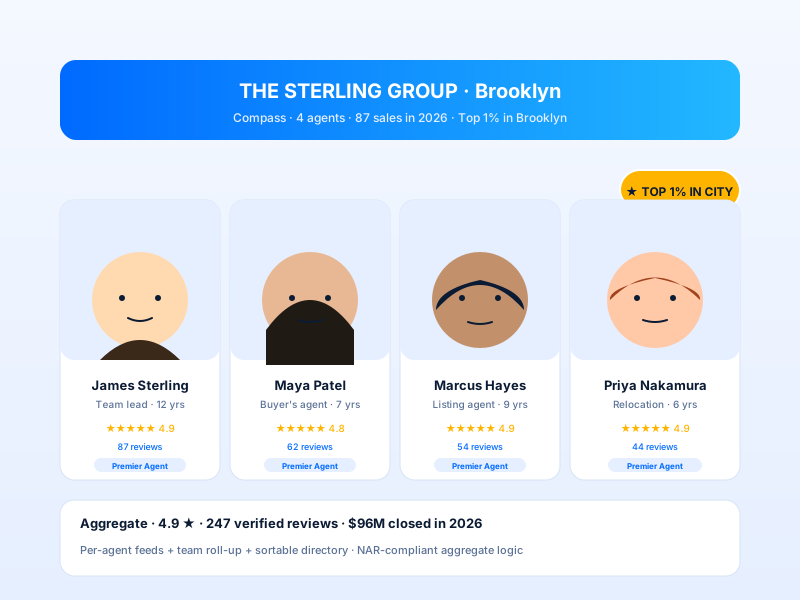
Real estate agent bio page showing an agent headshot and an embedded Zillow reviews block with the star rating

Real estate agent bio pages

Embed your Zillow client reviews on your agent bio page. A carousel above the fold turns a passive visitor into an inquiry. The widget pulls the reviews on your public Zillow profile and renders them in your brand.

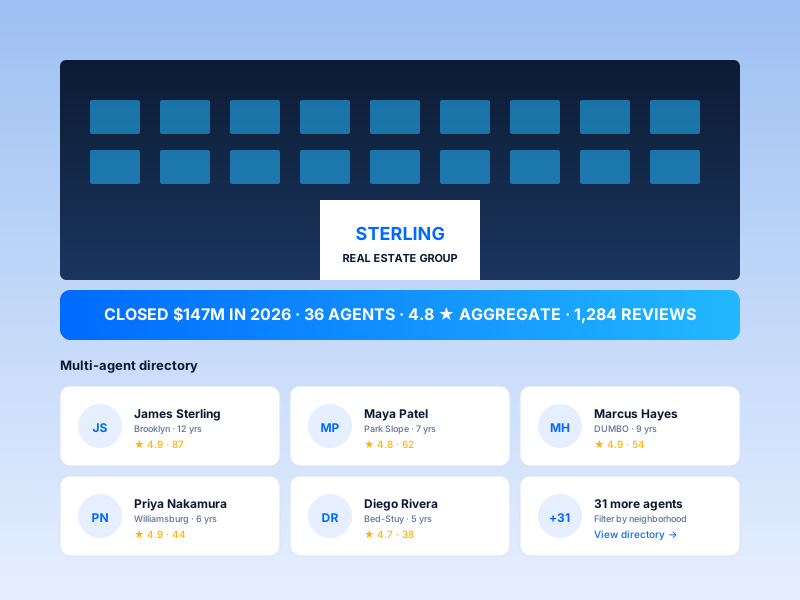
Brokerage office page with a brokerage logo and an embedded Zillow reviews block showing client testimonials

Brokerage and team sites

Show your Zillow client reviews on brokerage and team pages. Drop the widget onto each agent's bio with one snippet, branded to match the page. The reviews refresh whenever you re-sync from the builder.

Relocation services page with a world map of city pins and an embedded Zillow reviews block showing client reviews

Relocation specialists

Agents serving cross-country and international moves. Surface your Zillow reviews from buyers and sellers so prospective clients see your track record before they reach out.

Poper vs other review widget tools

How Poper compares to other widget platforms for embedding Zillow reviews on a real estate site.

 Recommended
Poper
Elfsight
Common Ninja
Poper workspace available
Limited
Limited
Number of review layouts
21
Limited
Limited
Optional LocalBusiness review schema
Limited
Limited
Customize layout, colors, typography
Limited
Limited
Filter by minimum rating, hide empty reviews
Limited
Limited
Element visibility toggles (name, avatar, date, logo)
Limited
Limited
Bundled with popups, forms, more widgets
Active campaigns by plan
5
1
1
Starting paid price (yearly billing)
Plan details vary
Vendor pricing varies

Comparison reflects external competitor positioning. Verify current details on each provider's site.

Under the hood

What Poper injects on your agent site

Turn on the optional review schema setting to add LocalBusiness review data where supported, then validate the page with your own search tooling.

<script type="application/ld+json">
{
  "@context": "https://schema.org",
  "@type": "LocalBusiness",
  "name": "Your Business Name",
  "image": "https://yourbusiness.com/logo.png",
  "url": "https://yourbusiness.com",
  "aggregateRating": {
    "@type": "AggregateRating",
    "ratingValue": "4.8",
    "reviewCount": "1847"
  },
  "review": [
    {
      "@type": "Review",
      "author": { "@type": "Person", "name": "Jane Smith" },
      "datePublished": "2026-04-12",
      "reviewRating": {
        "@type": "Rating",
        "ratingValue": "5"
      },
      "reviewBody": "Outstanding service from start to finish."
    }
  ]
}

Validated against Google's official Rich Results Test on day one.

Run the test yourself

Real agents. Real brokerages. Real outcomes.

Solo producers and brokerage marketing teams using their Zillow reviews as social proof on their own site.

Poper's Zillow widget let us bring our Zillow reviews onto our agent site without sending buyers back to the marketplace. The carousel matches our brokerage colors, and the inquiry button stays right next to the social proof.
Maya Chen
Principal Agent · Harborline Realty
Our team pages finally show each agent's Zillow feedback in a consistent brand layout. We paste the Zillow profile URL, choose a review template, and publish the widget without asking a developer to rebuild the page.
Derek Patel
Brokerage Marketing Lead · Northstar Homes
For relocation leads, having Zillow reviews on our own site changed the first conversation. Prospects can read buyer and seller feedback before they book a call, and we keep them on our domain instead of sending them away.
Elena Ruiz
Relocation Specialist · MoveWest Realty

Pricing

Simple, yearly pricing. Save up to 40%.

All plans are billed yearly. Each card shows the per-month equivalent. Start free, then upgrade only when you need more campaigns, websites, or AI credits.

Yearly billing · save up to 40%

Starter

Essential lead capture for solo creators and growing businesses.

$15/mo

billed $180/year

  • 5 active campaigns (5 widget instances)
  • 1 website, 1,000 leads/mo
  • 100+ templates, 10+ display formats
  • Smart triggers & basic analytics
  • No Poper branding
  • 500 AI credits
Start with Starter
Most popular

Pro

Full engagement suite with A/B testing, gamification & unlimited leads.

$29/mo

billed $348/year

  • Everything in Starter
  • Unlimited campaigns & leads
  • 10 websites, 5 team seats
  • A/B testing & gamification
  • Multi-step forms & quiz builder
  • Custom domain (CNAME), 2,000 AI credits
Start with Pro

Business

Unlimited everything with white-label, API access & advanced analytics.

$79/mo

billed $948/year

  • Everything in Pro
  • Unlimited websites & team seats
  • White-label (add-on) & API access
  • Logic jumps, live quizzes & polls
  • Payment forms (Stripe/PayPal)
  • Advanced analytics, 5,000 AI credits
Start with Business

Prices shown for the 50k monthly visitor tier on yearly billing. A Free Forever plan ($0) and a custom Enterprise plan are also available. No contracts, cancel anytime.

Guide · 3 min read

The complete guide to embedding Zillow Reviews on your real estate website

Zillow Reviews are trusted social proof in residential real estate, and buyers and sellers weigh them heavily when evaluating an agent. The hard part is getting those reviews off Zillow and onto your own website, where you control the layout, the brand, and the schema option. This guide walks through what works in 2026 with Poper: how the widget gets your reviews from a simple URL, picking the right layout for an agent bio or brokerage page, the optional LocalBusiness review schema option that can be validated with search tooling, and how to control which reviews appear with the built-in filters.

01

Why embed Zillow reviews on your own site instead of linking out

When a prospective client clicks through to your Zillow profile, they leave your site and land in a marketplace where several competing agents are one tap away. Embedding your Zillow reviews on your own agent bio or brokerage page keeps the visitor on your funnel, lets you control the surrounding context, and gives you the option to add LocalBusiness review schema on your own domain. The widget pulls the reviews that already exist on your public Zillow profile and renders them in your brand, so visitors see the same client feedback without ever leaving your site. That is the bet behind every serious agent website: own the trust signal, do not rent it.

02

How the Poper Zillow widget gets your reviews

Poper does not use OAuth, an account login, or a partner integration. You copy your agent profile URL from Zillow, paste it into the Poper builder, and Poper reads the public Zillow profile to pull the reviews and overall rating. That URL is the only input the widget needs. When new reviews land on Zillow, re-sync from the builder to refresh them. Because the widget reads a public page, there is nothing to authenticate and no integration to break, which makes it simple to set up on a solo agent site, a team page, or a brokerage site: one URL in, a branded review block out, embedded with a single script tag.

03

Earning LocalBusiness review data on your page for real estate keywords

Use your own analytics and search tooling to validate this widget on your site.

04

Layout choice: where each format works best on a real estate site

Poper ships 21 review layouts and you can switch between them per page from the dashboard through the normal publish flow. A few practical pairings: the carousel works well above the fold on an agent bio page where vertical space is limited and you want to show variety. The grid and list layouts suit a dedicated /reviews or /testimonials page where a visitor wants to read many reviews in full. The media-capable grid and quote wall layouts work on a homepage or about page where you want the reviews to read as a designed section. Match your brokerage brand with the color, star color, typography, corner radius, and shadow controls, and toggle the Zillow logo on or off depending on how prominent you want the source measurement.

05

Controlling which reviews appear with filters and visibility toggles

The widget gives you precise control over what shows on each page. Set a minimum rating to keep low-star outliers off a homepage carousel, and turn on hide-empty-reviews to drop ratings that have no written text. Element visibility toggles let you show or hide the reviewer name, avatar, review date, star rating, Zillow logo, and the header block independently, so the same reviews can render as a full card on a testimonials page and as a compact strip on a bio page. None of this requires code: every control is in the Poper editor, and layout-specific controls is available when you need pixel-level control inside an IDX theme.

Quick reference

What is Zillow Reviews Widget: Agent Testimonials on Your Website?

A Zillow reviews widget is an embeddable script that displays the reviews on your Zillow agent profile directly on a real estate agent or brokerage website. With Poper you paste your public Zillow profile URL and the widget renders the reviews on your own domain.

Key facts

  • The Poper widget reads your public Zillow agent profile from a URL you paste, with no OAuth, account login, or partner integration.
  • Poper offers 21 review layouts including carousel, grid, masonry, list, media-capable grid, quote wall, and timeline.
  • Where supported, turn on optional LocalBusiness review schema and validate it with your own search tooling. Search engines decide if and how anything appears.
  • Built-in filters let you set a minimum rating and hide empty reviews to control which reviews appear on each page.
  • Element visibility toggles show or hide the reviewer name, avatar, date, rating, and Zillow logo per layout.
  • The embed loads through the Poper snippet. Validate performance and styling on your own page after embedding.

Tutorial

See the Zillow Reviews Widget in action

A quick walkthrough of setting up and embedding this widget.

Tutorial video coming soon

Frequently asked questions

Can't find the answer you're looking for? Chat with our support team.

Contact Support

Stop sending visitors away to Zillow

Poper uses the guided setup flow to embed and keeps your client reviews on your own site.

Free plan available forever