
SaaS feature demos
Ship a multi-feature video tour on your homepage or product page. Visitors can move through demo clips for each major feature instead of watching one long video.
Embed a hand-curated carousel of YouTube, Vimeo, Wistia, Loom, Dailymotion, and direct MP4 videos Measure impact with your own analytics. 8 layouts, autoplay settings, and fullscreen where player controls expose it. Use the Poper builder.
Built for builder website teams























Live demo, not a screenshot. Paste your video URLs, style it, brand it, embed it. What you see here is what ships to your site.
How to use it
Measure impact with your own analytics.
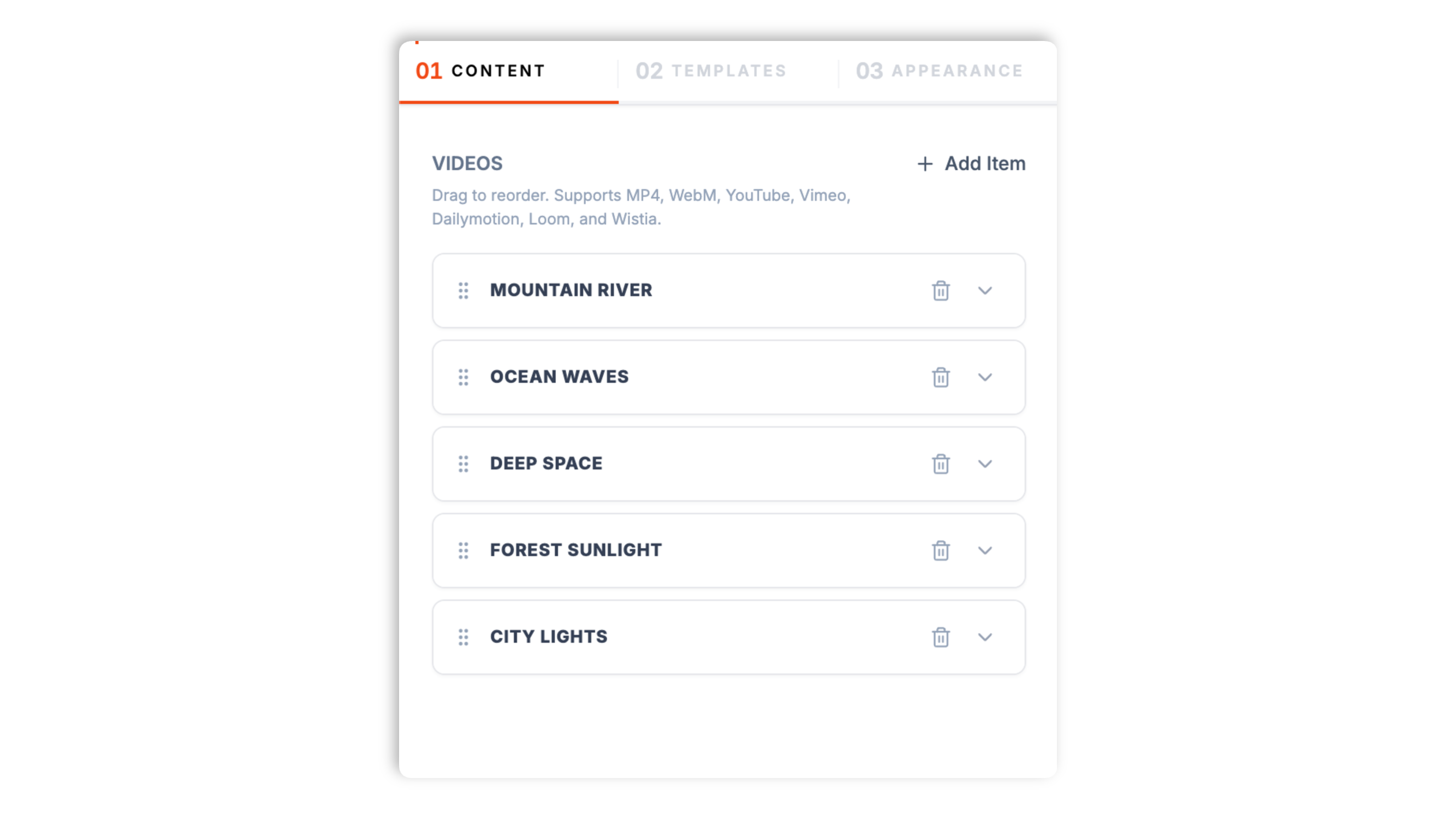
Paste YouTube, Vimeo, Wistia, Loom, Dailymotion, or direct MP4 video URLs into the Poper builder. Mix sources freely. Drag to reorder. Set a thumbnail and title per video.
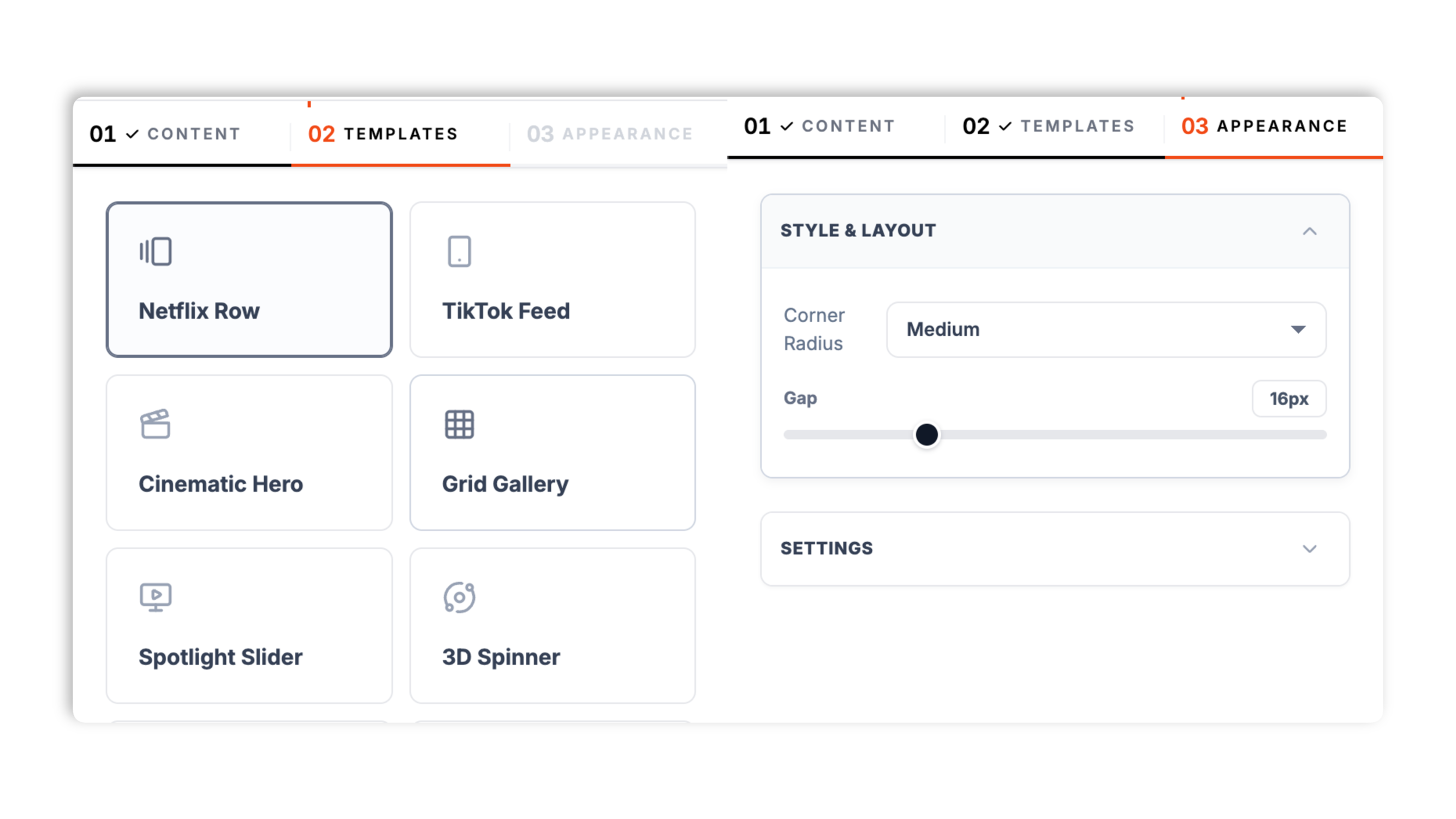
Choose Netflix Row, TikTok Feed, Cinematic Hero, Grid Gallery, Spotlight Slider, 3D Spinner, Skewed Reel, or Accordion Deck. Set available playback and appearance controls such as mute, player controls, slide gap, and corner radius.
Paste the Poper embed snippet into your site. Works anywhere your Poper embed snippet is supported.

Works everywhere
Drop-in install on WordPress, Shopify, Wix, Squarespace, Webflow, Framer, Ghost, and any HTML-friendly stack. No build step, no developer needed.


Plus 250+ other platforms via the embed snippet. If your site can render a <script> tag, it can render the Video Carousel Widget: Embed Multiple Videos in a Slider on Your Site.
Six things that matter when you are paying for a multi-video embed, not 30 features no one uses.
Most video carousel widgets only support one source. Poper auto-detects six: YouTube and youtu.be links, Vimeo, Wistia, Loom, Dailymotion, and direct video files (mp4, webm, ogg, mov, m4v, m3u8). Each video is rendered with its native player. Mix all six in the same carousel without re-uploading or re-encoding, and reorder them by dragging. A single carousel holds up to 10 videos.
Netflix Row, TikTok Feed, Cinematic Hero, Grid Gallery, Spotlight Slider, 3D Spinner, Skewed Reel, and Accordion Deck. Pick the one that fits your page; each ships with its own autoplay, controls, and spacing defaults so it looks right immediately.
Autoplay starts muted so browser policies allow it. Direct videos use a muted-fallback retry, and playsInline keeps mobile playback inline.
Set the slide gap and corner radius, and toggle autoplay, player controls, and mute. The appearance panel adjusts how each layout plays and spaces its videos.
Visitors can use fullscreen where the selected player and visible controls expose it. Navigation controls vary by layout.
The TikTok Feed layout is built vertical-first for phones, and other layouts should be tested with your real videos and page width.
Use cases
Four buyer types who get the most lift from embedding Video Carousel Widget: Embed Multiple Videos in a Slider on Your Site on their site.
Ship a multi-feature video tour on your homepage or product page. Visitors can move through demo clips for each major feature instead of watching one long video.
Show several lesson previews in a carousel above the enroll CTA. Prospective students scrub through curriculum samples without leaving the sales page.
Multi-angle product clips, how-to-use demos, unboxing, and styling videos in one carousel on the product page. More depth without a longer page.
Hand-pick your strongest customer testimonial videos and show them as a carousel on your homepage. Social proof at scale without a wall of static quotes.
Most video carousel tools support one source or paywall multi-source mixing. Here is how the popular widget builders stack up.
| Recommended Poper | Elfsight Video Gallery | POWR Video Carousel | Common Ninja Video Slider | |
|---|---|---|---|---|
| Poper workspace available | Limited views | Builder with branding | Limited views | |
| YouTube source support | ||||
| Vimeo source support | ||||
| Wistia source support | ||||
| Loom + Dailymotion support | Partial | |||
| Direct MP4 file support | Partial | |||
| Mix sources in one carousel | Paid only | Paid only | Paid only | |
| Number of carousel layouts | 8 | Limited | Limited | Limited |
| Available widget controls | Partial | Partial | ||
| Pricing for unlimited views | Plan details vary | Vendor pricing varies | Vendor pricing varies | Vendor pricing varies |
| Bundled with popups, forms, quizzes |
Comparison reflects external competitor positioning. Verify current details on each provider's site.
Marketers and product teams who switched from broken carousel widgets to Poper.
“Mixing our Wistia testimonials with YouTube product demos in one carousel was the unlock. We could keep each video on the platform where its analytics live and still show one clean collection.”

“We used the Netflix Row layout on our product page and previewed the muted autoplay behavior before publishing.”

“The TikTok Feed layout was exactly right for our short-form clips on mobile. Vertical, full-bleed, and the fullscreen viewer kept people watching.”

Pricing
All plans are billed yearly. Each card shows the per-month equivalent. Start free, then upgrade only when you need more campaigns, websites, or AI credits.
Yearly billing · save up to 40%Essential lead capture for solo creators and growing businesses.
billed $180/year
Full engagement suite with A/B testing, gamification & unlimited leads.
billed $348/year
Unlimited everything with white-label, API access & advanced analytics.
billed $948/year
Prices shown for the 50k monthly visitor tier on yearly billing. A Free Forever plan ($0) and a custom Enterprise plan are also available. No contracts, cancel anytime.
A video carousel widget is the difference between one video your visitors might watch and a curated row of clips they actually scrub through. Single-video embeds make sense for a hero video or a one-off demo, but anything richer (a multi-feature product tour, a product-page video gallery, a course preview reel, a testimonial wall) needs multiple videos in a slider. The right carousel keeps every clip on your domain, accepts videos from the platforms you already use, and gives you a layout that fits the page. This guide walks through what actually matters when you choose and configure a video carousel widget in 2026: multi-source aggregation, picking a layout, autoplay behavior and browser policies, and how a video carousel differs from a single channel feed.
A single video embed is the right primitive when you have one video that absolutely must be watched: a homepage hero video, a product demo, a founder welcome clip. Single embeds focus visual attention and push the visitor toward one play decision. A video carousel is the right primitive when no single video carries the page on its own and the value comes from breadth: a product with several features that each need a short demo, a course with multiple lesson previews, an ecommerce product with multi-angle clips, a testimonial collection where social proof compounds across faces. The line is not how many videos you have, it is whether the visitor's job is exploration (carousel) or focused viewing (single). A carousel also differs from a video feed widget such as a YouTube channel feed: carousels are hand-curated and editorial, feeds auto-sync from a single source channel. Use a carousel when you want to choose exactly which videos appear and in what order.
Real-world video collections are rarely all on one platform. A marketing team might have testimonials on Wistia for the analytics, product demos on YouTube for reach, screen recordings on Loom, and a few clips hosted as MP4 on their own CDN. A carousel widget that only accepts one source forces an unnatural choice: re-upload everything to one platform, or only show the videos that happen to be on the supported platform. The Poper video carousel accepts six sources in the same carousel: YouTube and youtu.be URLs, Vimeo URLs, Wistia URLs, Loom URLs, Dailymotion URLs, and direct video files (mp4, webm, ogg, mov, m4v, m3u8). Each URL is auto-detected and rendered with its native player, so a YouTube video plays in a YouTube iframe and a Vimeo video plays in the Vimeo player, which means platform-side analytics keep working. Available widget controls so the visitor sees one collection rather than a stitch of different players.
The Poper video carousel ships eight layouts so the same video list fits very different page designs. Netflix Row is a classic horizontal slider with autoplaying muted previews, ideal for a video gallery section. TikTok Feed is a vertical, full-bleed scroll built for mobile and short-form clips. Cinematic Hero is a large, immersive single-focus presentation. Grid Gallery lays the videos out as a tap-to-play grid. Spotlight Slider, 3D Spinner, Skewed Reel, and Accordion Deck are styled, motion-led treatments for brand-forward pages. Each layout ships with its own autoplay, controls, and spacing defaults tuned to its style, so it looks right the moment you pick it. Layouts use the same video list but expose different playback, navigation, and presentation behavior, so test the selected layout with your videos.
Browser autoplay policies require care. Chrome and Edge allow autoplay only when a video is muted, and iOS Safari needs the playsinline attribute for inline playback or the video opens fullscreen. The Poper video carousel handles this with sensible defaults: when autoplay is on it starts muted, the layouts that autoplay (Netflix Row, Cinematic Hero, Spotlight Slider, Skewed Reel, Accordion Deck) are configured that way out of the box, and direct video files use a muted-fallback retry if the first play attempt is blocked. The native video element is rendered with playsInline so mobile playback stays inline rather than jumping to fullscreen. Available widget controls in the appearance panel, so a layout where you want tap-to-play (such as Grid Gallery) simply ships with autoplay off.
A video carousel holds up to 10 videos, which is a deliberate, editorial ceiling rather than a technical one. Ten is more than enough for the jobs a carousel does well, and the discipline of choosing your best clips tends to produce a better result than dumping a whole library into a slider. Practical guidance within that limit: four to six videos for an above-the-fold placement, where a visitor will not scrub far in a hero context; six to ten for a dedicated video gallery section. Pick the videos that earn their slide, give each one a clear thumbnail and a short title so visitors can scan the collection, and lead with your strongest clip since it is the one most visitors will see first.
A video carousel widget is an embeddable script that displays a hand-curated list of videos in a slider on a website. The Poper video carousel supports six sources (YouTube, Vimeo, Wistia, Loom, Dailymotion, and direct MP4), eight layouts, and fullscreen viewing.
Last fact-checked: . We re-verify every quarter.
Tutorial
A quick walkthrough of setting up and embedding this widget.
Tutorial video coming soon
Can't find the answer you're looking for? Chat with our support team.
Contact SupportPoper lets you mix supported video sources in one carousel.
Free plan available forever