

Movie blog
Show a public Trakt profile feed next to your reviews and recaps. A clean embedded feed tells readers more about your viewing taste than a static bio paragraph.
Embed a public Trakt username feed in 90 seconds. Choose Default, Grid, or List, then style it to match your site. No-code.
Trusted by 11,000+ brands























Live demo, not a screenshot. Enter a username, pick a layout and preview the embed exactly as it ships to your site.
From Trakt to your site
Poper pulls your public Trakt feed and renders it inline on your website, fully branded to match your design. No API keys, no manual updates.
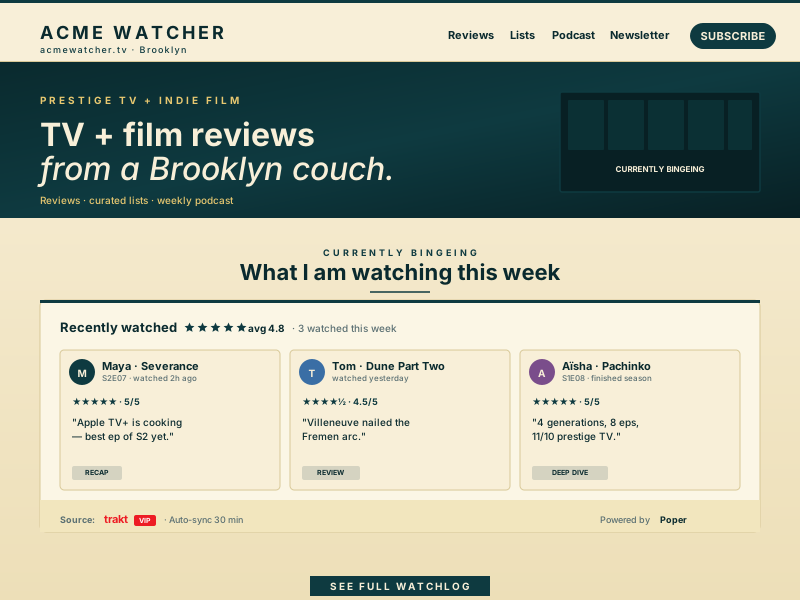 Poper widget live
Mockups for illustration. Pull your real Trakt feed and embed in 90 seconds.
How to use it
Three steps. Under two minutes. No developer needed.
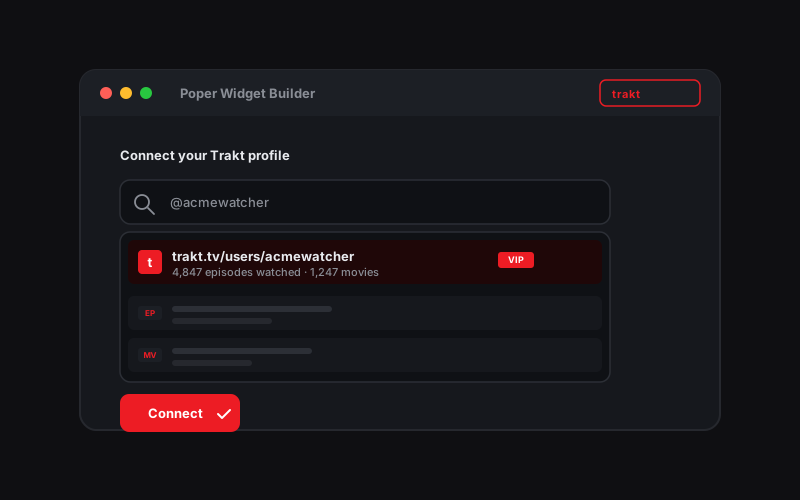
Paste a public Trakt username. Poper fetches the public data available for that single user and prepares it for your widget.
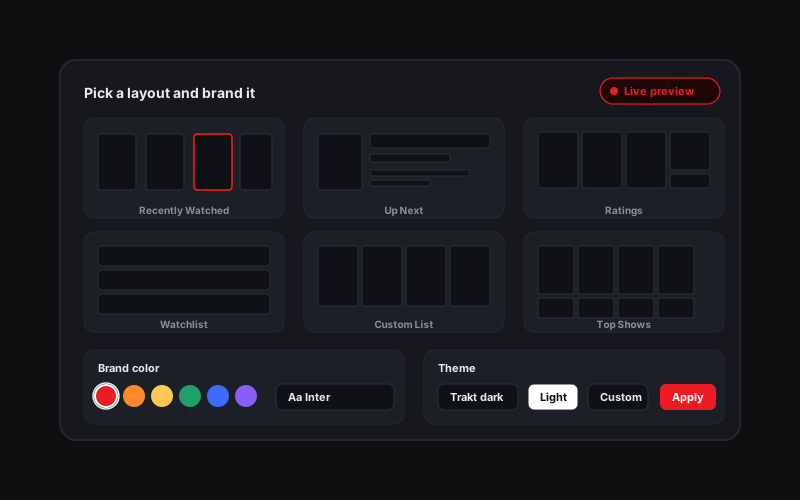
Choose one of the three supported layouts: Default, Grid, or List. Switch between Trakt dark, light, or fully custom branded themes.
Paste the one-line script tag into any page. Works on WordPress, Shopify, Wix, Squarespace, Webflow, Ghost, Framer and 250+ platforms.

Works everywhere
Drop-in install on WordPress, Shopify, Wix, Squarespace, Webflow, Framer, Ghost, and any HTML-friendly stack. No build step, no developer needed.


Plus 250+ other platforms via the embed snippet. If your site can render a <script> tag, it can render the Trakt Feed Widget: Embed a Trakt User Feed on Any Site.
Six things that matter when you are adding a focused Trakt profile feed, not 30 features no one uses.
Most Trakt embeds are screenshots, dead WordPress plugins, or static badges. Poper lets you enter a public Trakt username and render the available public feed on your own site without asking the profile owner to sign in.
The Trakt widget supports the three layouts available in the builder: Default for a balanced feed, Grid for visual browsing, and List for compact profile pages.
Each widget is tied to one Trakt username. To show more than one profile, create separate widgets and place them separately on the page.
Supported feed layouts: Default, Grid, and List.
The embed loads through the Poper snippet. Validate layout and performance on your own page after embedding.
Poper refreshes the connected public username feed on a server-side schedule and serves the cached result from the edge, keeping page loads fast and predictable.
Keep the Trakt profile feed on your own site instead of sending visitors to a bare profile link. The widget renders branded, visible content that feels native to your page.
Use cases
Four buyer types who get the most lift from embedding Trakt Feed Widget: Embed a Trakt User Feed on Any Site on their site.
Show a public Trakt profile feed next to your reviews and recaps. A clean embedded feed tells readers more about your viewing taste than a static bio paragraph.

Put your Trakt profile on your film blog without sending readers to another site. Grid and list layouts make the embed easy to scan on long-form review pages.
Embed your public Trakt username on a personal site or blog so your viewing profile sits beside the rest of your personal archive.
Embed the host's public Trakt feed on the podcast site so listeners can inspect the taste profile behind the show without leaving your domain.
Most generic widget platforms skip Trakt entirely. Here is how Poper stacks up on the simple profile-feed job this widget is built for.
| Recommended Poper | Elfsight | Common Ninja | Trakt native list embed | |
|---|---|---|---|---|
| Plan details depend on your Poper workspace. | ||||
| Dedicated Trakt feed widget | Profile link | |||
| Public username source | Manual | Manual | ||
| Default, Grid, and List layouts | Limited | Limited | ||
| Single-user feed per widget | ||||
| No sign-in required | ||||
| Custom theming past default frame | Paid only | Paid only | ||
| Poper renders watched movie activity from one public Trakt profile. | Refresh cadence follows your Poper plan: Free every 15 days, Starter every 3 days, and Pro/Business every 1 day. | 12 hours | Refresh cadence follows your Poper plan: Free every 15 days, Starter every 3 days, and Pro/Business every 1 day. | Manual refresh |
| Bundled with popups, forms, quizzes |
Comparison reflects publicly listed features as of 2026. General-purpose widget platforms like Elfsight and Common Ninja do not offer a dedicated Trakt feed widget. Verify current details on each provider's site.
Film critics, cinephile bloggers and film club curators who switched from dead WordPress plugins to Poper.
“I wanted my Trakt profile on my movie review site without making readers click away to trakt.tv. The Poper widget gave me a clean grid layout, matched my theme, and made the profile feel like part of the site.”

“Supported feed layouts: Default, Grid, and List.”

“We needed one member profile embedded on the club site as a taste signal, not a whole collaboration tool. The Trakt widget stays focused on one username and took minutes to publish.”

Pricing
All plans are billed yearly. Each card shows the per-month equivalent. Start free, then upgrade only when you need more campaigns, websites, or AI credits.
Yearly billing · save up to 40%Essential lead capture for solo creators and growing businesses.
billed $180/year
Full engagement suite with A/B testing, gamification & unlimited leads.
billed $348/year
Unlimited everything with white-label, API access & advanced analytics.
billed $948/year
Prices shown for the 50k monthly visitor tier on yearly billing. A Free Forever plan ($0) and a custom Enterprise plan are also available. No contracts, cancel anytime.
A Trakt feed widget on this page is scoped to watched movies from one public Trakt profile. This guide covers entering a public username, choosing Default, Grid, or List, keeping the widget single-profile, and styling the feed so it feels native to the page.
A Trakt feed widget turns a public Trakt profile into a branded block on your own website. Instead of linking visitors away to trakt.tv, you can show the profile feed inline on a Movie blog, film site, personal homepage, or podcast page. The widget reads one public username, renders the available profile feed, and keeps the output focused on that one source. That simplicity matters: there is no sign-in step, no team merge setup, and no separate list builder to maintain.
This widget is designed for public profile embedding. The site owner enters a Trakt username, and Poper fetches the public feed data available for that profile. Because the widget only reads public profile information, it cannot edit a Trakt account, change profile data, or perform account actions. That makes setup faster and clearer for a landing page: paste a username, preview the feed, style the layout, and publish.
Supported feed layouts: Default, Grid, and List.
The widget is best treated as a visible Trakt profile section on the page. Put it near surrounding copy that explains whose public profile it is and why it belongs on the site. Keep article titles, descriptions, and page metadata in your CMS or site code; the Trakt widget stays focused on rendering the public feed.
A Trakt profile is useful as a public identity block for film writers, critics, and cinephile sites. This widget keeps the promise narrow: watched movies from one public profile, rendered in a branded block on your own domain.
A Trakt feed widget is an embeddable script that displays watched movies from one public Trakt username on any website. Poper supports one Trakt user per widget, uses the Default, Grid, and List layouts, and lets site owners style the feed without code.
Tutorial
A quick walkthrough of setting up and embedding this widget.
Tutorial video coming soon
Can't find the answer you're looking for? Chat with our support team.
Contact SupportPlan details depend on your Poper workspace.
Free plan available forever