
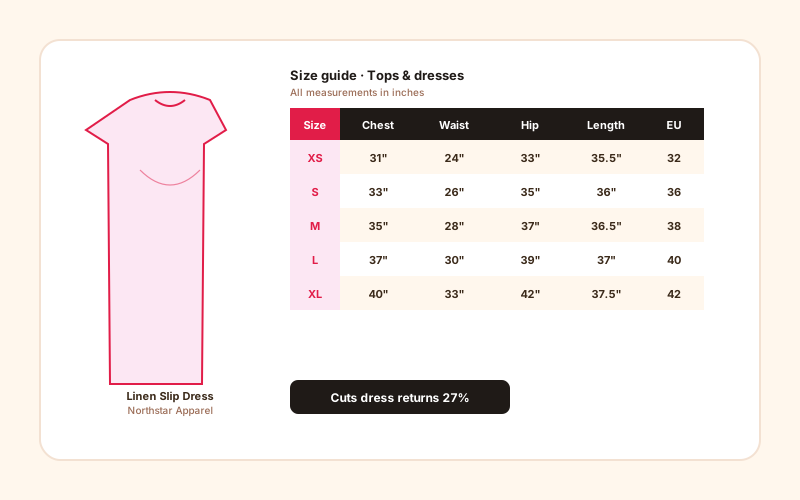
Fashion + apparel brands
Tops, bottoms, dresses, outerwear. A clear chest, waist, and length chart helps shoppers compare the measurements that matter for the product.
Embed a configurable size chart with a cm/in toggle, custom measurement columns, and a measurement image where the selected layout supports it.
Built for no-code website teams























Live demo, not a screenshot. Edit the columns, switch units, embed it. What you see here is what ships to your product pages.
Before and after Poper
Here is the widget embedded on a real page layout, before and after. Style it to match your brand, then copy one snippet to go live.
 Before
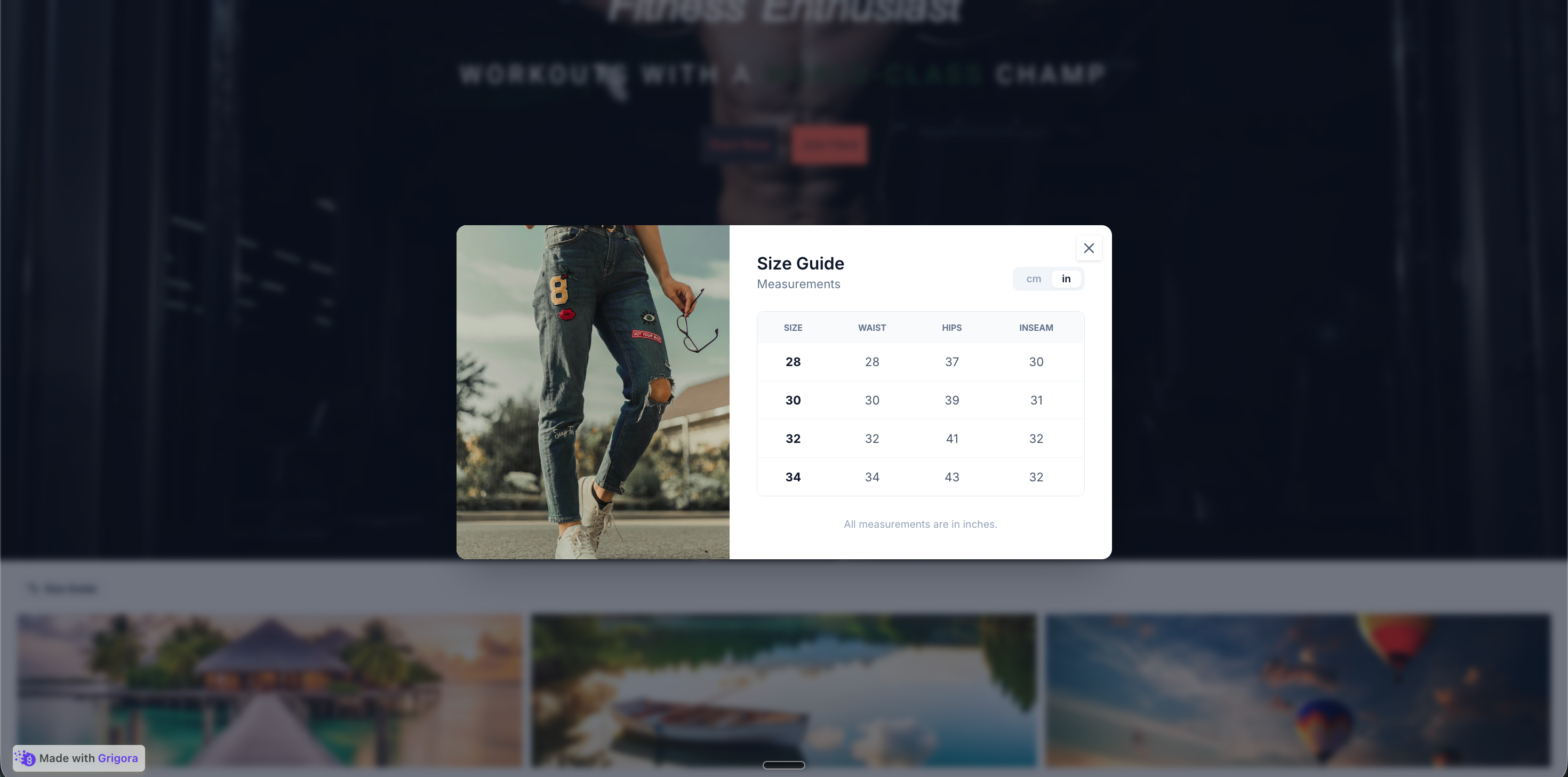 Poper widget live
Mockups for illustration. Style the widget to match your site and embed in 90 seconds.
How to use it
Add measurement rows, choose a layout, and embed where your Poper snippet is supported.
Set the table columns you need (Size, Chest, Waist, Length, or anything else), then add a row for each size. Edit any cell inline. The default chart starts as a four-size apparel table you can reshape in seconds.
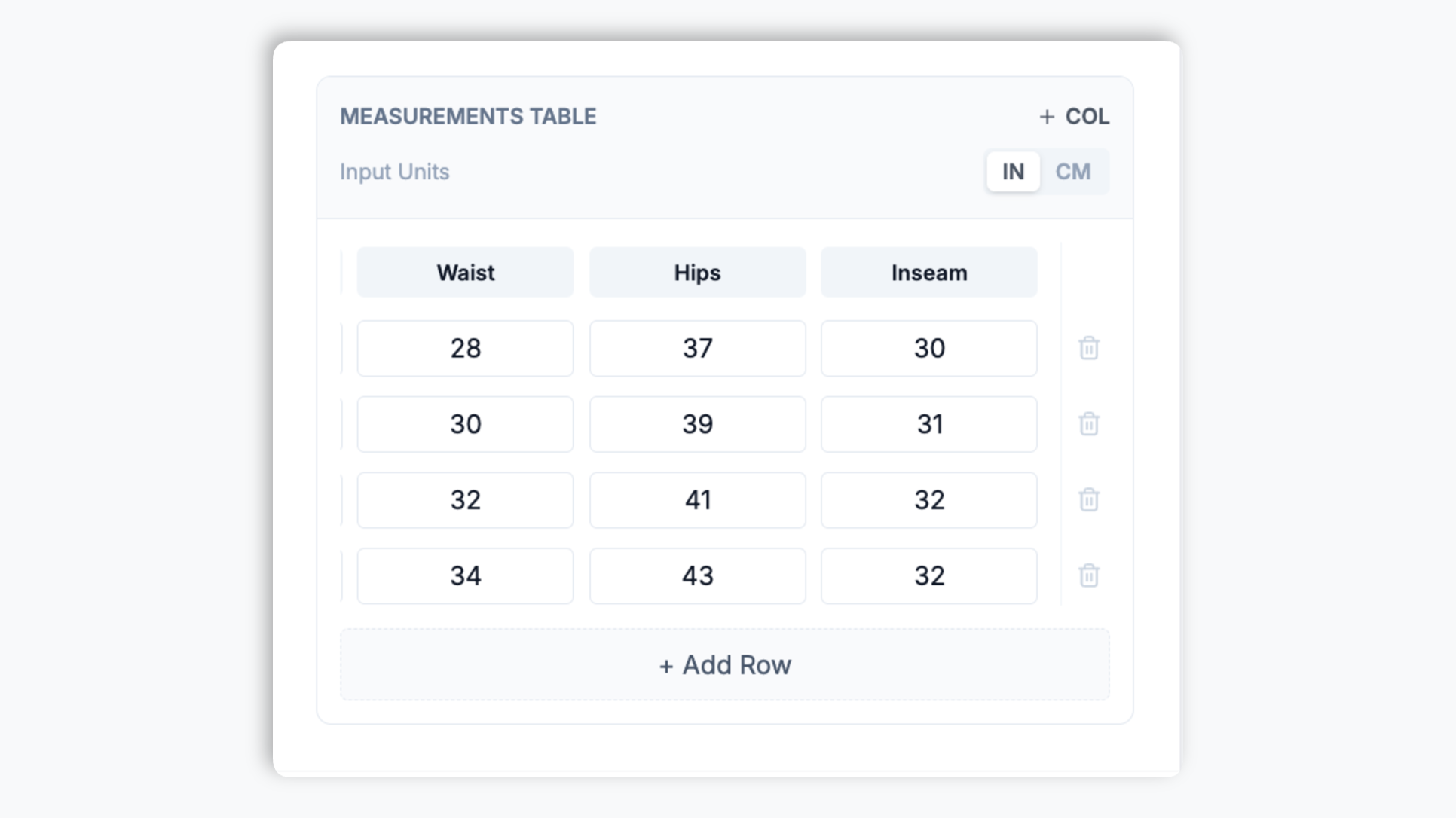
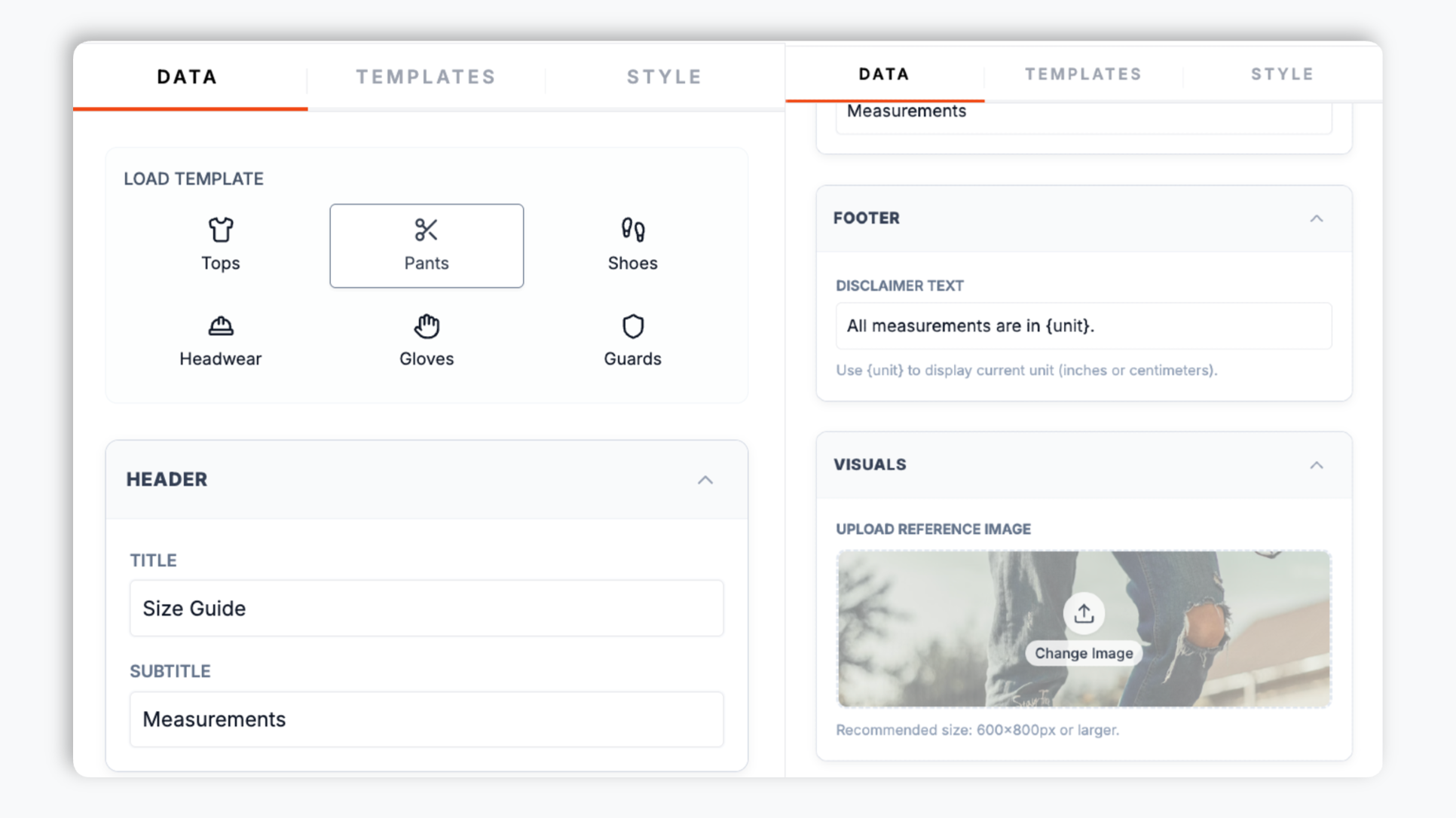
Turn on the cm/in toggle so shoppers can switch numeric measurement cells between units, attach a measurement-guide image when the selected layout renders it, and write a fit-disclaimer note.
Paste the Poper embed snippet into your site. Works anywhere your Poper embed snippet is supported.

Works everywhere
Drop-in install on WordPress, Shopify, Wix, Squarespace, Webflow, Framer, Ghost, and any HTML-friendly stack. No build step, no developer needed.


Plus 250+ other platforms via the embed snippet. If your site can render a <script> tag, it can render the Size Chart Widget: Size Chart with a Smart Size Guide.
Six things that matter when you are paying for a size chart widget, not 30 features no one uses.
A clear size chart helps shoppers compare measurements before they choose a size. Add custom columns, a cm/in toggle, and an optional measurement image so the guide is easier to read than a static JPG.
You define every column. Start from the default Size, Chest, Waist, Length table and reshape it for tops, bottoms, dresses, shoes, or accessories. Add or remove columns and rows and type any measurement value.
Turn on the unit toggle and one click flips every cell between centimeters and inches.
Attach a measurement-guide image and a fit-disclaimer note when the selected layout uses it.
A Size Guide trigger button opens the chart in the layout you pick: a centered modal, a slide-in sidebar, a modal with a split image panel, or a card grid. Switch the layout any time through the normal publish flow.
A wide measurement table on a 375px phone is unreadable. The card layout turns each size into its own card with measurement label and value pairs, so shoppers get the data without a tiny horizontal-scrolling table or pinch-zoom.
Use cases
Four buyer types who get the most lift from embedding Size Chart Widget: Size Chart with a Smart Size Guide on their site.
Tops, bottoms, dresses, outerwear. A clear chest, waist, and length chart helps shoppers compare the measurements that matter for the product.
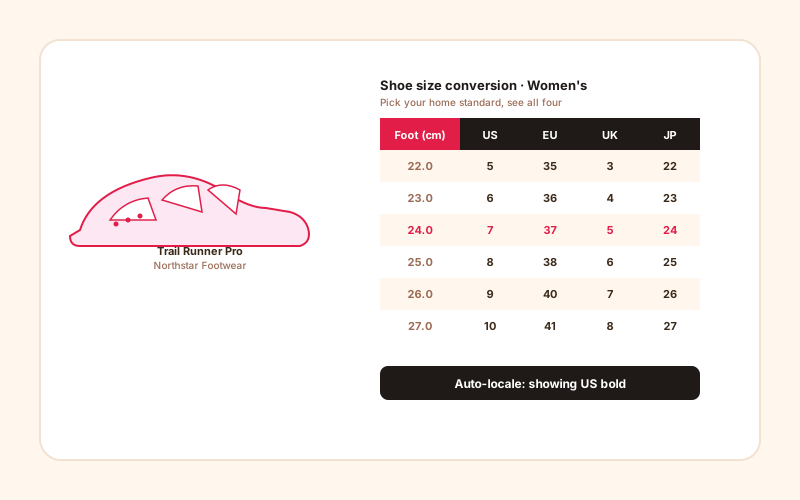
Build a footwear chart with your own columns: foot length in cm and inches alongside US, EU, and UK size columns. Custom columns mean international shoppers see the size standard they recognize.
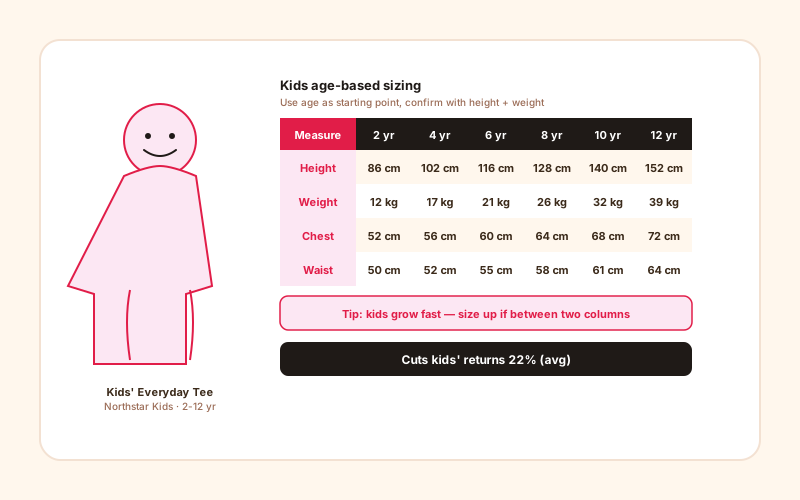
Age-based sizing 2-12 yr with height, weight, chest, and waist rows. A clear chart gives parents one place to compare the numbers before choosing a size.
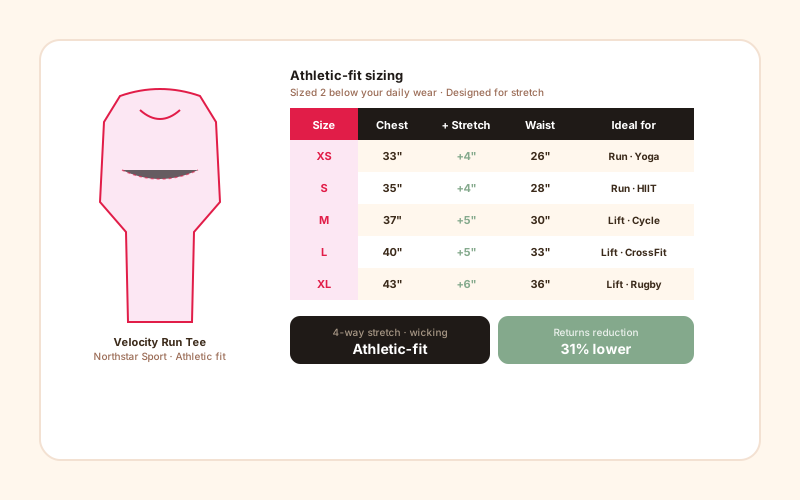
Athletic-fit sizing with chest, waist, and stretch-range columns. A clear chart with the right measurements helps shoppers buy the fit they actually want.
Most size chart widgets give you one display style and little design control. Here is how the popular ones compare.
| Recommended Poper | Elfsight Size Chart | Common Ninja Size Chart | Shopify Size Chart App | |
|---|---|---|---|---|
| Poper workspace available | ||||
| Modal, Sidebar, Split, and Card layouts | Modal only | Modal only | Modal only | |
| Cm and in unit toggle | ||||
| Fully custom measurement columns | Limited | |||
| Table layouts render table markup | Partial | Partial | ||
| Mobile card layout for narrow screens | Limited | Limited | Limited | |
| How-to-measure image on supported layouts | ||||
| Available color and font controls | Paid only | Paid only | Limited | |
| Updates use the normal publish flow | ||||
| Starter price (billed yearly) | Plan details vary | Vendor pricing varies | Vendor pricing varies | Vendor pricing varies |
| Bundled with popups, forms, quizzes, more widgets |
Comparison reflects external competitor positioning. Verify current details on each provider's site.
Apparel, footwear, and intimates brands using Poper for readable size guides.
“Swapping the old JPG chart for Poper's interactive size chart with the cm/in toggle gave shoppers a chart they could actually read.”

“We sell shoes worldwide, so we built a footwear chart with foot length in both cm and inches plus US, EU, and UK columns. Custom columns meant every market saw the size standard they recognize.”

“The card layout was the win for us. Our old image chart was unreadable on a phone, and most of our traffic is mobile. Now each size is its own card and shoppers stop guessing.”

Pricing
All plans are billed yearly. Each card shows the per-month equivalent. Start free, then upgrade only when you need more campaigns, websites, or AI credits.
Yearly billing · save up to 40%Essential lead capture for solo creators and growing businesses.
billed $180/year
Full engagement suite with A/B testing, gamification & unlimited leads.
billed $348/year
Unlimited everything with white-label, API access & advanced analytics.
billed $948/year
Prices shown for the 50k monthly visitor tier on yearly billing. A Free Forever plan ($0) and a custom Enterprise plan are also available. No contracts, cancel anytime.
Size and fit questions are common on apparel, footwear, and accessory product pages. The fix is not a generic chart pasted as a JPG. It is a readable size chart embedded directly on the product page, with a unit toggle, an optional measurement image, and a layout that reads on a phone. This guide walks through what actually matters when you choose and configure a size chart widget in 2026: choosing the right measurement columns, the cm versus inch toggle, the mobile UX of wide tables, and where fit-recommendation tools fit in.
A return is not just shipping cost: it can include restocking labor, payment-processing fees, depreciation of returned items, and customer-support time. A size chart cannot guarantee lower returns, but it can answer one common source of hesitation: which measurements correspond to each size. Put the chart close to the size selector and make it easy to open before the shopper chooses.
A size chart is only useful if it shows the measurements that decide fit for your product. Tops often need chest, waist, and length. Bottoms often need waist, hip, inseam, and rise. Footwear is about foot length far more than a size number. The mistake many brands make is reusing one generic table across very different product categories. Decide the columns per category and put the measurement the shopper will actually take with a tape before the abstract size label. The Poper widget gives you editable columns, so you can build charts with category-specific measurement rows.
Apparel ecommerce is global, and your visitors do not all measure in the same unit. A chart printed only in one unit forces some shoppers to do mental math. The fix is a unit toggle in the chart header that converts numeric measurement cells in one click. The Poper size chart includes this toggle: enable it, set the chart's default unit, and visitors can flip to the unit they think in. Size labels are left untouched.
An apparel size chart often has 5-8 columns: size, chest, waist, hip, length, sleeve, shoulder. On a desktop browser this fits comfortably. On a 375px phone, it does not. The two failed approaches you see most often: horizontal scroll inside a tiny container (visitors cannot tell which column they are looking at), or shrinking the text until it is unreadable. The better approach is to turn each table row into its own card on narrow screens, where the card shows measurement label and value pairs stacked vertically. This pattern, originally documented by Heydon Pickering and refined by Filament Group, preserves the data relationships and stays legible. The Poper widget ships a card layout built for exactly this, so the chart reads on a phone without a tiny horizontal-scrolling table.
Fit-recommendation tools and body-measurement products can be useful for larger apparel programs, but they are a different category from a size chart. They often require extra data, integrations, and commercial evaluation. For many stores, the first step is still a clear interactive size chart on product pages: editable columns, a unit toggle, an optional measurement image, and a mobile-friendly layout.
A size chart widget is an embeddable script that displays a size guide on a product page as an HTML table with the measurement columns you choose, a centimeter and inch unit toggle, and a measurement-guide image where the selected layout supports it. A Size Guide button opens it in a modal, sidebar, split panel, or card layout.
Last fact-checked: . We re-verify every quarter.
Tutorial
A quick walkthrough of setting up and embedding this widget.
Tutorial video coming soon
Can't find the answer you're looking for? Chat with our support team.
Contact SupportGive shoppers a readable chart with unit controls.
Free plan available forever