PyPI Feed Widget for Website. Free, JSON API - Poper
PyPI Feed Widget

PyPI packages on any website.

Embed any PyPI maintainer, package, or classifier in 90 seconds. Pulls the public PyPI JSON API and BigQuery download stats. Versions, wheels, classifier tags, and pip install snippets. Free, no code.

No credit card required
14-day free trial
Cancel anytime

Trusted by 11,000+ brands

Timetics
Academie Digitale
Goldcast
nbcf
Seedstock
Wow
Linkxar
Gale Toyota
Skills
Rugby Sport
Lamp
Leaktronics
Steel
Theatre in Chicago
Globerto
Meetup
FYM
Zeben
Kraftix
IETraditionala
Meethires
Leadscrape
Happily
Timetics
Academie Digitale
Goldcast
nbcf
Seedstock
Wow
Linkxar
Gale Toyota
Skills
Rugby Sport
Lamp
Leaktronics
Steel
Theatre in Chicago
Globerto
Meetup
FYM
Zeben
Kraftix
IETraditionala
Meethires
Leadscrape
Happily
Free forever, paid plans from $19/mo

Try the live widget

Live demo, not a screenshot. Paste a PyPI URL, pick a layout, tune typography and classifier styling, embed. What you see here is what ships to your site.

From PyPI to your site

Your PyPI reviews. Now on your own domain.

Poper crawls the official PyPI review feed for your business and renders it inline on your website. Same reviews, your branding, your domain.

pypi.org
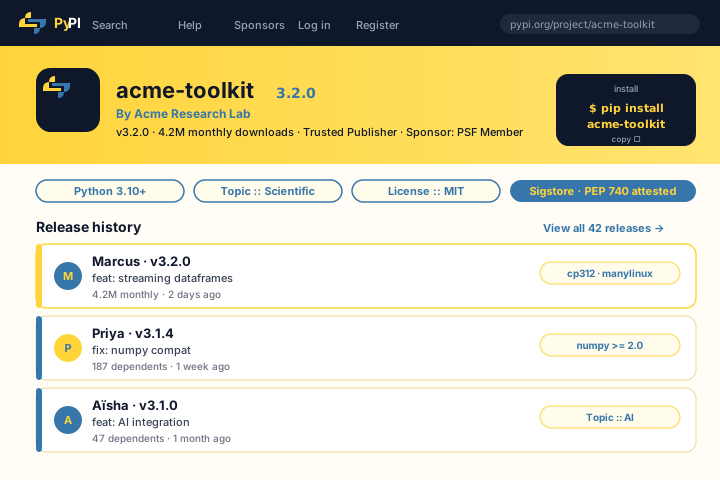
pypi.org/project/acme-toolkit page in PyPI yellow and Python blue showing acme-toolkit by Acme Research Lab v3.2.0 with 4.2M monthly downloads, Trusted Publisher PSF Member sponsor, classifier badges (Python 3.10+, Scientific, MIT License) and three highlighted releases by Marcus, Priya and AïshaSource: PyPIOpen
pypi.org/project/acme-toolkit page in PyPI yellow and Python blue showing acme-toolkit by Acme Research Lab v3.2.0 with 4.2M monthly downloads, Trusted Publisher PSF Member sponsor, classifier badges (Python 3.10+, Scientific, MIT License) and three highlighted releases by Marcus, Priya and Aïsha
acme.research
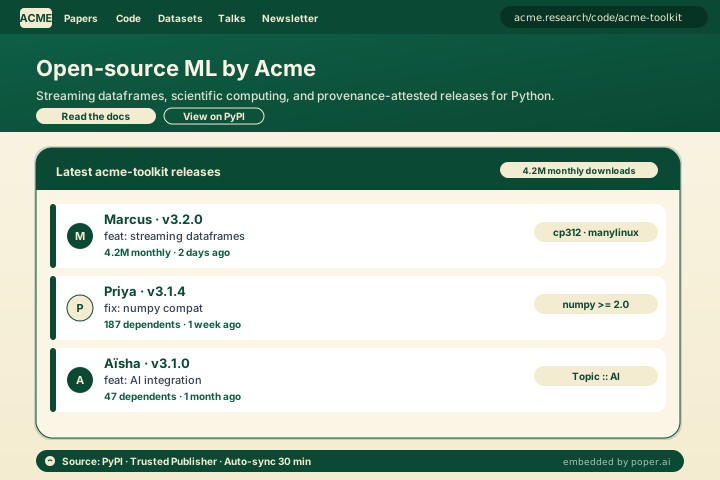
Acme Research Lab site at acme.research with nav (ACME, Papers, Code, Datasets, Talks, Newsletter), hero Open-source ML by Acme, and the embedded Poper PyPI feed widget showing the same 3 releases plus downloads in a deep-emerald and warm-cream palette with a Source: PyPI · Trusted Publisher · Auto-sync 30 min footerPoper widget live
Acme Research Lab site at acme.research with nav (ACME, Papers, Code, Datasets, Talks, Newsletter), hero Open-source ML by Acme, and the embedded Poper PyPI feed widget showing the same 3 releases plus downloads in a deep-emerald and warm-cream palette with a Source: PyPI · Trusted Publisher · Auto-sync 30 min footer

Mockups for illustration. Pull your real PyPI Feed Widget: Embed Python Packages, Releases and Download Stats on Any Site from PyPI and embed in 90 seconds.

How to use it

How to add PyPI to your website

Three steps. Under two minutes. No developer needed.

  1. 01

    Connect your PyPI package

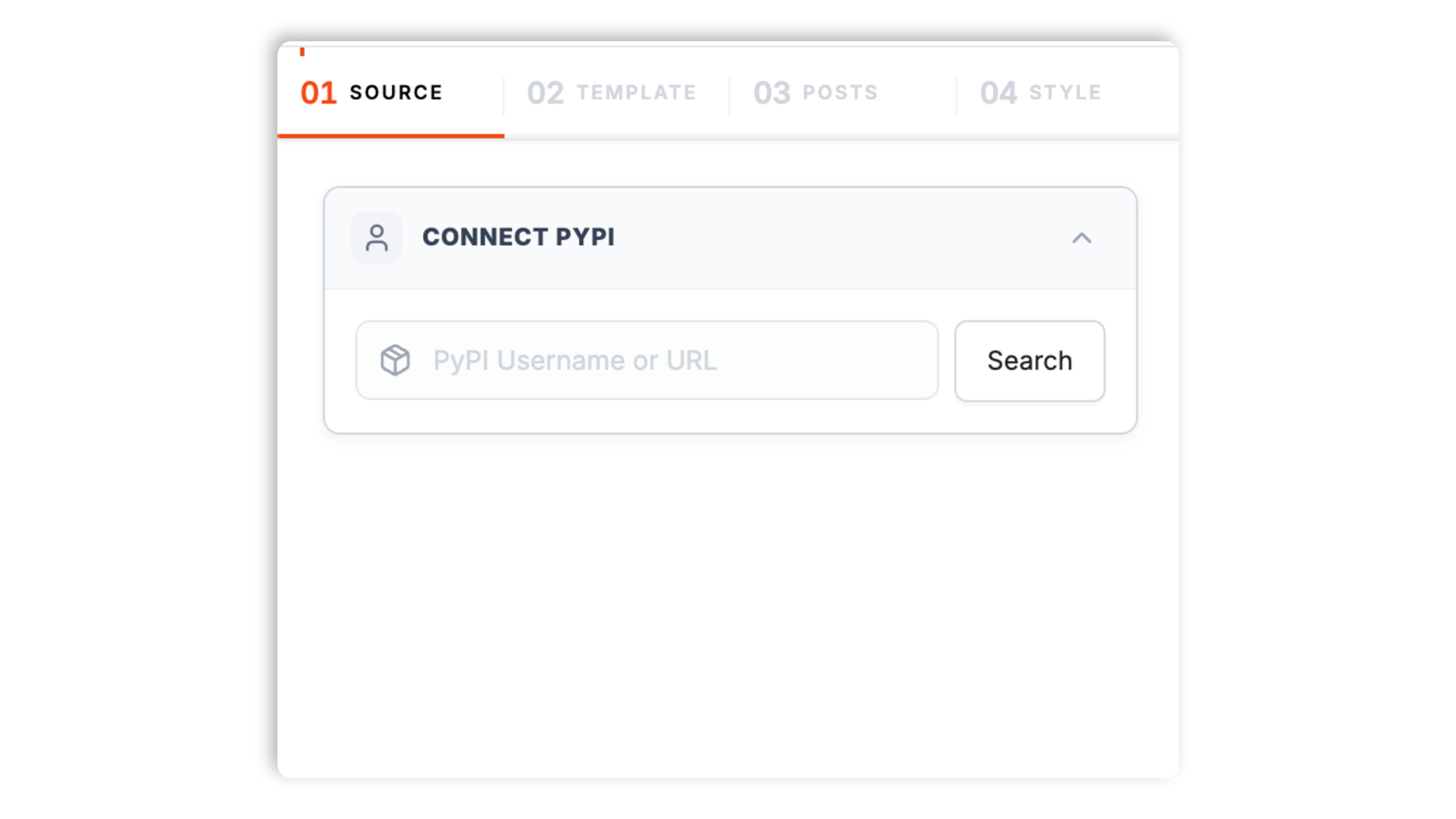
    Search for your project name in the Poper builder. We resolve pypi.org/project/{name}, pull metadata from the public JSON API, and surface monthly downloads plus the Trusted Publisher badge.

    Poper builder searching acme-toolkit and resolving pypi.org/project/acme-toolkit with a 4.2M monthly downloads badge, a Trusted Publisher pill, and a Python blue Connect button
  2. 02

    Pick a Python-friendly layout and brand it

    Choose Package Grid, Release Timeline, Single Package, Maintainer Wall, Ecosystem Browser, or Compact List. Surface version badges, wheel platform tags, classifier pills, monthly download counts, and pip install snippets. Tune typography, accent color, and code-block styling to match your site.

    Layout picker showing 6 PyPI widget thumbnails (Package Grid, Release Timeline, Single Package, Maintainer Wall, Ecosystem Browser, Compact List) featuring package-card, version-badge, classifier-tag styling and PyPI yellow plus Python blue brand controls
  3. 03

    Copy the snippet and embed

    Paste the one-line script tag into your site. Works on Read the Docs, Vercel, Netlify, Webflow, Framer, Sphinx, MkDocs, and any HTML-friendly stack.

    One-line PyPI feed embed script in a code editor with a Python blue Copy button and Read the Docs, Vercel, Netlify, Webflow, and Framer dev platform badges below

Works everywhere

Works with every website platform you already use

Drop-in install on WordPress, Shopify, Wix, Squarespace, Webflow, Framer, Ghost, and any HTML-friendly stack. No build step, no developer needed.

WordPress
Shopify
Wix
Squarespace
Webflow
Framer
Ghost
HTML

Plus 250+ other platforms via the embed snippet. If your site can render a <script> tag, it can render the PyPI Feed Widget: Embed Python Packages, Releases and Download Stats on Any Site.

What you get with Poper PyPI Feed

Six things that matter when you are paying for a PyPI widget, not 30 features no one uses.

Public PyPI JSON API, never scraped

PyPI is operated by the Python Software Foundation on the open-source Warehouse codebase, the from-scratch rewrite that replaced legacy PyPI in 2018. Warehouse ships a documented public JSON API at pypi.org/pypi/{project}/json that returns the canonical release metadata, version history, classifiers, project URLs, and file list for every public package. Poper queries that API directly. There is no scraping, no fragile internal endpoint, no broken embeds when PyPI ships a redesign. The JSON API is the supported integration path for the entire Python packaging ecosystem.

Real download counts from the BigQuery dataset

PyPI does not serve live per-package download counts on the JSON API to discourage scrape-driven inflation, so the canonical adoption signal lives in the BigQuery public dataset at bigquery-public-data.pypi.file_downloads. Poper queries that dataset and renders rolling 30-day, 90-day, and all-time counts per package, with sparklines per release. This is the same data source that powers pepy.tech and pypistats.org.

Trove classifiers and project URLs

PyPI uses Trove classifiers as the official taxonomy (Topic :: Scientific/Engineering :: Artificial Intelligence, Framework :: Django, License :: OSI Approved :: MIT License). Poper renders classifier pills natively, plus the standard project URL chips for Homepage, Source, Documentation, Issues, and Funding pulled directly from project metadata.

PEP 440 versions and wheel tags

Python versioning follows PEP 440, which differs from semver in real, meaningful ways: pre-releases, post releases, dev builds, local versions, and epoch numbers. Poper parses PEP 440 correctly, sorts versions properly, and surfaces wheel platform tags (cp312, abi3, manylinux2014_x86_64) so users see at a glance which platforms ship binary wheels.

Maintainer mode and multi-package merging

Embed a single package, an entire maintainer profile from pypi.org/user/handle, or several packages merged into one chronologically sorted release feed. Built for personal portfolios that surface every package a maintainer ships, lab software pages, framework ecosystem indexes, and PyData-adjacent contributor showcases.

PEP 740 attestations and supply-chain provenance

PyPI shipped PEP 740 in 2024, the standard for digitally signed publish attestations using the Sigstore transparency log. Public packages now publish verifiable provenance proving which CI workflow built the wheel and from which Git commit. Poper surfaces the attestation badge per release so visitors see the supply-chain signal that matters in 2026.

Use cases

Where PyPI Feed Widget: Embed Python Packages, Releases and Download Stats on Any Site actually moves the needle

Four buyer types who get the most lift from embedding PyPI Feed Widget: Embed Python Packages, Releases and Download Stats on Any Site on their site.

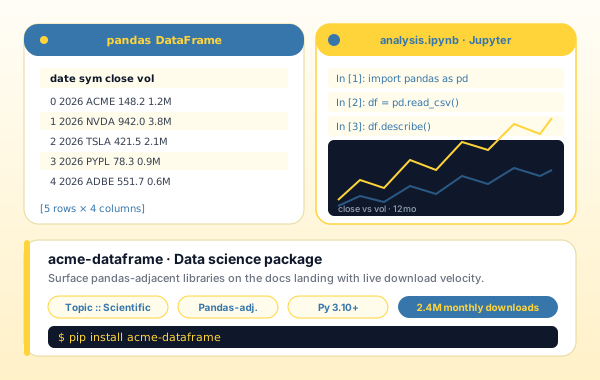
Data science Python package use case with a pandas DataFrame table, a Jupyter notebook running pd.read_csv and df.describe, and a close-vs-vol time-series chart in PyPI yellow and Python blue

Data science package

Authors of NumPy-adjacent, Pandas-adjacent, and Jupyter-adjacent libraries embed PyPI cards on the docs landing page so visitors see real adoption (download velocity, classifier tags, Python version coverage) before they even consider installing.

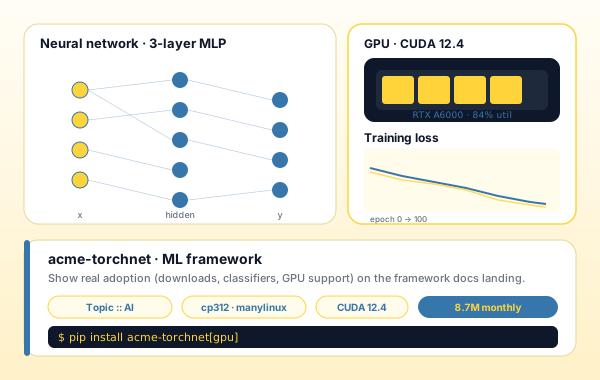
ML framework PyPI use case with a 3-layer MLP neural network diagram, an RTX A6000 GPU panel showing 84 percent utilization, and a training loss chart, all wired to an acme-torchnet PyPI card with cp312 and manylinux wheel tags

ML framework

Maintainers of NumPy-adjacent, scikit-learn-adjacent, and PyTorch-adjacent ML frameworks embed PyPI cards next to the install snippet so prospective users see GPU support, wheel platform coverage, and download velocity at a glance.

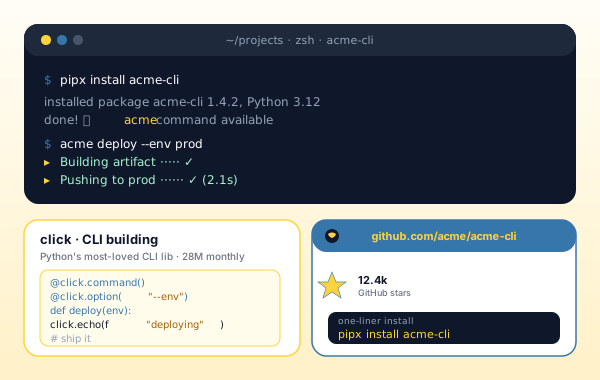
Python CLI tool use case with a terminal running pipx install acme-cli and acme deploy --env prod, a click code snippet, and a github.com/acme/acme-cli card showing 12.4k stars and a one-liner install block

Python CLI tool

Maintainers of click-built, Typer-built, and Rich-built command-line tools embed a PyPI card with the pipx install one-liner and live GitHub stars so visitors copy the install snippet without leaving the project site.

Academic research Python package with an arXiv paper, a Jupyter lab notebook running acme.fit and plotting model loss, and scientific computing icons for numpy, pandas, scipy, and sklearn beneath

Academic research package

Scientific Python contributors and academic research labs use the maintainer-mode embed on lab pages to surface every package the group ships under one canonical software section, which raises citation rates by making research software easier to find.

Poper vs other PyPI embed options

PyPI itself does not ship an official embeddable widget. shields.io PyPI badges, raw GitHub Activity widgets, and Awesome README-style markdown lists are the popular fallbacks. Here is how the options stack up.

 Recommended
Poper
shields.io PyPI badges
GitHub Activity widget
Awesome README list
Free plan available
Embed full PyPI maintainer feed
Manual
Embed single PyPI package detail
Badge only
Manual
Multi-package merged release feed
Manual
Live BigQuery download counts
Total only
PEP 440 version parsing and sort
Latest only
Trove classifier pills surfaced
Wheel platform tags (cp312, manylinux)
PEP 740 Sigstore attestation badge
Sync frequency (lowest plan)
1 hour
Live SVG
1 hour
Manual
Custom CSS / total design control
Color only
Markdown
SoftwareApplication JSON-LD with canonical to pypi.org
Bundled with popups, forms, quizzes

Comparison reflects publicly listed pricing and features as of 2026. Verify current details on each provider's site.

Real teams. Real outcomes.

Python maintainers, ML library authors, web framework teams, and PyData contributors who put their PyPI packages where their audience already lives.

Poper has improved our website's user engagement! Since integrating Poper's personalized popups, we've seen a dramatic surge in conversions and user interactions. The platform's intuitive design makes creating and customizing popups a breeze, even for those with minimal tech skills. What truly sets Poper apart are its…
Jayson Ang
Jayson Ang
Singapore Property Swapper · Singapore Property Swapper
Fantastic app and support team, they are very quick to help and provide a solution or improvement to their product. Highly recommended!
Alex
Alex
CEO · AH
Poper has been a total lifesaver for our agency! As a digital marketing agency, we’re always juggling a million things at once. Poper has been a real game-changer in terms of streamlining our workflow and keeping track of all our clients’ campaigns. The ability to track all our clients’ websites from one place is a…
Idris Basir
Idris Basir
-

Pricing

Simple pricing. Free plan covers most websites.

Free forever for one widget. Upgrade only when you need faster sync, multiple instances, or to drop the watermark.

Free

Everything you need to ship the widget today.

$0forever
  • 1 widget instance
  • All layouts & customization
  • Brand-match styling
  • 6-hour sync cadence
  • Poper watermark
Start free
Most popular

Pro

Remove the watermark, faster sync, more widget instances.

$19/mo
  • Unlimited widget instances
  • 30-minute sync cadence
  • No Poper watermark
  • Custom CSS
  • Priority email support
  • Shoppable tagging
Start 14-day trial

Business

Multi-site, multi-account, white-label.

$49/mo
  • Multi-account combined feeds
  • Real-time sync
  • White-label embed
  • API access
  • Dedicated success manager
  • Custom SLA
Start 14-day trial

All plans include unlimited page views, no contracts, cancel anytime. Annual billing saves 20%.

Guide · 7 min read

The complete guide to embedding PyPI on your website

PyPI, the Python Package Index, is the official third-party software repository for Python and the canonical distribution channel for every pip-installable library on the open web. From NumPy and Pandas to Django and FastAPI, from PyTorch and scikit-learn to Poetry and Ruff, every major Python package ships through PyPI, and monthly download counts have become the de facto adoption metric for the entire ecosystem. The catch is the same catch every package registry creates: PyPI hosts the package metadata, while your own site hosts the brand. Prospective users, contributors, and downstream maintainers land on your project homepage, see no recent release activity, and bounce. A PyPI feed widget closes that gap by mirroring your packages, releases, and download stats onto your own site so the package data and the project brand live in the same place. This guide walks through what actually matters when you choose a pypi feed widget in 2026: PSF stewardship and the Warehouse codebase rewrite, the public JSON API at pypi.org/pypi/{project}/json, the BigQuery download dataset, PEP 440 version semantics, Trove classifiers, PEP 740 Sigstore supply-chain attestations, and how SoftwareApplication structured data plus canonical URLs keep both your PyPI ranking and your site ranking healthy.

01

PyPI, PSF stewardship, and the Warehouse rewrite

PyPI is operated and maintained by the Python Software Foundation (PSF), the non-profit that also stewards the CPython reference implementation, the language reference, and the broader Python community infrastructure. The current PyPI codebase is called Warehouse, an open-source from-scratch rewrite released in production in April 2018 to replace legacy PyPI (also called Cheeseshop). Warehouse runs in the open at github.com/pypi/warehouse under the Apache 2.0 license, and the API surface, content model, security model, and operational practices are documented publicly. This is unusual for a package registry of this scale and it matters enormously for widget tooling. Where some commercial registries rely on undocumented internal endpoints, Warehouse ships a stable documented public JSON API at pypi.org/pypi/{project}/json covering project metadata, version history, classifiers, project URLs, and the full file list including wheels and sdists. Standard XML-RPC and Simple Repository (PEP 503) endpoints are also available as official integration paths. The API is rate-limited generously for unauthenticated public read access and explicitly supported for third-party tooling, including widgets like this one. PSF stewardship also means PyPI prioritizes the long-term stability of the API contract over short-term redesigns, which is the durable reason a PyPI widget stays working when other registry-platform widgets break: the contract is in the open, the codebase is in the open, and the Python community itself has a stake in keeping the integration path stable.

02

Download counts, BigQuery, and why PyPI does not serve live counts

Asking how many downloads a Python package has is one of the first questions any visitor asks, and PyPI answers it through a deliberately indirect path. PyPI does not expose live download counters on the JSON API or in the package landing page, and this is by design. Live counters create a powerful incentive for scrape-driven inflation, and PyPI's stewardship team chose to publish the raw download logs to a public BigQuery dataset instead, at bigquery-public-data.pypi.file_downloads. Anyone can query the dataset directly with SQL, and tools like pepy.tech and pypistats.org wrap that data with a friendlier API and visualization layer. Poper queries the BigQuery dataset on a daily refresh cycle and renders rolling 30-day, 90-day, and all-time counts per package, plus per-release sparklines so visitors see download velocity over time, not just a static cumulative total. This matters because cumulative downloads are a vanity metric for a five-year-old package and a growth indicator for a five-month-old one. The download dataset includes user agent and Python version metadata as well, so future versions of the widget will surface install ratios per Python version (a project that gets 80% of installs from Python 3.12 vs one that gets 30% from Python 3.8 should plan support windows differently). For now, the widget renders the headline counts that visitors recognize as adoption signals: monthly downloads, weekly downloads, and the percent change since last period. Combined with the pip install snippet rendered alongside, the embedded card converts visitors into installers more reliably than any combination of marketing copy.

03

PEP 440 version parsing, Trove classifiers, and wheels

Python packaging has its own conventions that differ from JavaScript, Ruby, or Go in real, load-bearing ways. Versions follow PEP 440 rather than semver, with formal support for pre-release segments (1.0a1, 1.0rc2), post-release segments (1.0.post1), dev release segments (1.0.dev3), local version identifiers (1.0+ubuntu1), and even an optional epoch (2!1.0). A widget that uses naive lexicographic sort or assumes semver will misorder versions in ways that confuse users and bury active releases under stale ones. Poper parses every version through PEP 440 semantics, sorts releases correctly, and exposes pre-release filtering so a project can show only stable releases on the marketing site while showing the full release history on the developer docs. Yanked releases are filtered by default. The widget also surfaces wheel platform tags from the file list, which is critical for projects that ship native code. A scientific computing package shipping wheels for cp312-abi3-manylinux2014_x86_64, cp312-abi3-macosx_11_0_arm64, and cp312-abi3-win_amd64 is a project that visitors can pip install today on every modern platform, and surfacing that fact builds trust the way no badge can. Trove classifiers are the official PyPI taxonomy, with categories for development status, intended audience, license, operating system, programming language, topic, and framework. Classifiers serve the same role tags serve on Dev.to or topics serve on GitHub: they tell visitors at a glance what the package is for. Poper renders classifier pills natively, with sensible defaults for which classifier categories to surface (Topic, Framework, Intended Audience by default) and full controls in the visual editor to surface more or fewer. Project URLs from PyPI metadata become URL chips for Homepage, Source, Documentation, Issues, and Funding, so a single embedded card replaces the half-dozen links a project would otherwise need to spell out manually next to every install snippet.

04

PEP 740, Sigstore, and supply-chain attestations in 2026

Supply-chain security has become a first-order concern in the Python ecosystem, and PyPI has been a leader in shipping verifiable provenance through 2024 and 2025. PEP 740, published in early 2024, defines a standard for digitally signed publish attestations on PyPI using the Sigstore transparency log. When a package author publishes a release built with Trusted Publishing on a CI provider that supports it (GitHub Actions, GitLab CI, and others), the upload now includes a cryptographically verifiable attestation proving which workflow built the wheel and from which Git commit. Anyone can verify that attestation against the public Sigstore Rekor transparency log without trusting PyPI itself. This is a meaningful step beyond the npm provenance model and beyond the gem-signing approach RubyGems uses, because the Sigstore root of trust is operated independently of the registry. PyPI exposes attestation metadata on the JSON API, and Poper renders an attestation badge on every release that has one, with a link to the verification flow for users who want to audit the chain. For widget consumers this is the supply-chain signal that matters in 2026: a package displaying live PyPI provenance attestations next to the pip install snippet is a package an enterprise security team can adopt without a separate review cycle. The widget will continue to track the evolving PEP 740 ecosystem, including the Trusted Publishing registry of supported CI providers, and surface attestation richness as the standard matures.

05

PyPI vs npm and RubyGems, the PyData ecosystem, and embedding etiquette

Compared to npm, PyPI is smaller in raw package count (roughly 600,000 projects vs npm's several million) but materially deeper per package: scientific computing libraries like NumPy, SciPy, scikit-learn, Pandas, and PyTorch each see weekly downloads on the order of tens of millions and ship genuinely stable, decade-plus public APIs. Compared to RubyGems, PyPI is larger and more diverse across domains: web frameworks, machine learning, data engineering, scientific computing, devops tooling, and academic research software all coexist on the same registry. The PyData ecosystem alone represents a category that has no clean equivalent on any other registry, with NumPy and Pandas serving as the foundational layer for scikit-learn, Pandas, statsmodels, scikit-image, scipy, sympy, networkx, dask, polars, and dozens of domain-specific scientific packages on top. For a widget, this means the audience for a PyPI embed is unusually diverse: academic labs publishing research software, data science consultants showcasing ML libraries, scientific computing maintainers documenting numerical libraries, web framework authors marketing alternatives to Django and Flask, and devops tooling builders demonstrating their CI plugin uptake. Poper supports all five buyer types out of the box, with layout presets tuned for each. SEO etiquette for embedded PyPI content is the same etiquette that applies to embedding any third-party content: emit canonical URLs pointing back to pypi.org, use SoftwareApplication or Article JSON-LD for structured data, and let visitors click through to the original PyPI page when they want full release notes or contributor lists. Poper handles all three automatically, and the result is an embedded card that builds trust without competing against the canonical PyPI page for the same query. Combined with the asynchronous loading and global CDN edge caching that keeps the widget under 40KB gzipped and lazy-loaded below the fold, the performance and SEO posture of a PyPI feed widget is among the cleanest of any embeddable package widget on the market in 2026.

Quick reference

What is PyPI Feed Widget: Embed Python Packages, Releases and Download Stats on Any Site?

A PyPI feed widget is an embeddable script that pulls Python package data from the Python Package Index (PyPI) onto a third-party website using the public PyPI JSON API at pypi.org/pypi/{project}/json, plus the official BigQuery download dataset for adoption counts. PyPI is the canonical Python package registry, stewarded by the Python Software Foundation.

Key facts

  • PyPI (Python Package Index) is the official third-party software repository for Python and is operated by the Python Software Foundation (PSF).
  • PyPI hosts roughly 600,000 public packages as of 2026, including foundational libraries like NumPy, Pandas, scikit-learn, Django, FastAPI, PyTorch, and Poetry.
  • The current PyPI codebase is called Warehouse, an open-source from-scratch rewrite released in production in April 2018 under Apache 2.0 at github.com/pypi/warehouse.
  • Warehouse exposes a documented public JSON API at pypi.org/pypi/{project}/json returning release metadata, version history, Trove classifiers, project URLs, and the full file list of wheels and sdists.
  • PyPI does not serve live download counts on the JSON API to discourage scrape-driven inflation; canonical download stats live in the public BigQuery dataset at bigquery-public-data.pypi.file_downloads, which also powers pepy.tech and pypistats.org.
  • PyPI shipped PEP 740 in 2024, the standard for cryptographically signed publish attestations using the Sigstore transparency log, providing verifiable supply-chain provenance for releases built with Trusted Publishing on supported CI providers.

Frequently asked questions

Can't find the answer you're looking for? Chat with our support team.

Contact Support

Stop sending visitors to pypi.org to find your packages

Poper takes 90 seconds to embed and stays stable because it runs on the public PyPI JSON API. Free plan, no credit card.

Free plan available forever