Visual artists and illustrators
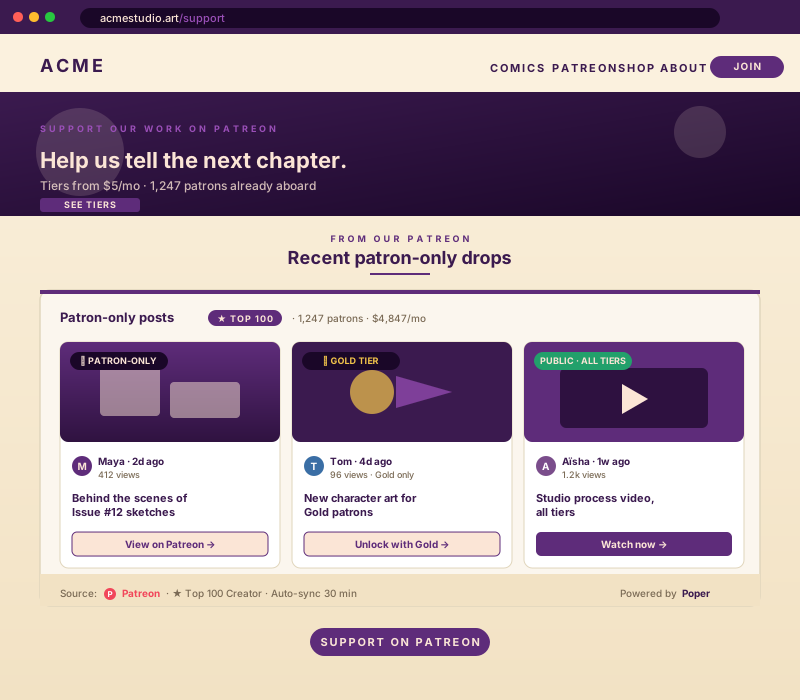
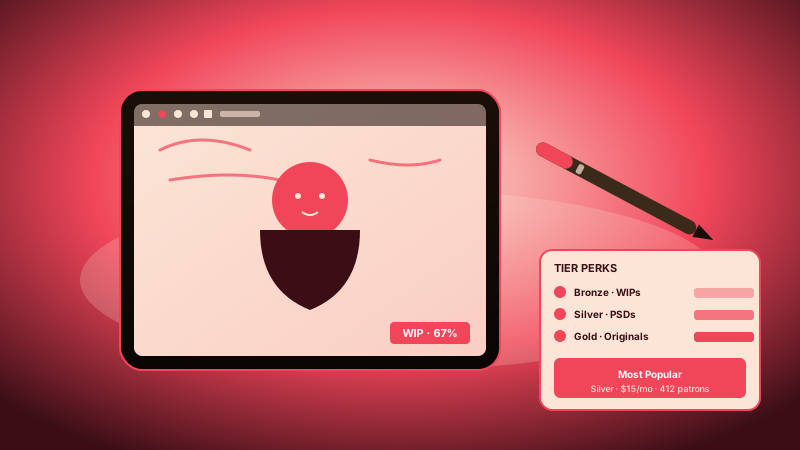
Webcomic artists, illustrators, and concept-art creators who post weekly drops. Embed your tier grid right under your portfolio so visitors who love your gallery can lock in a monthly pledge before they close the tab.
Embed your tiers, public posts, and supporter count in 90 seconds. Paid-tier posts stay locked. Patreon API v2 with OAuth. Free, no code.
Trusted by 11,000+ creators and brands


Live demo, not a screenshot. Style it, brand it, embed it. What you see here is what ships to your site.
From Patreon to your site
Poper crawls the official Patreon review feed for your business and renders it inline on your website. Same reviews, your branding, your domain.
Mockups for illustration. Pull your real Patreon Feed Widget: Embed Tiers, Public Posts, and Supporter Count on Any Site from Patreon and embed in 90 seconds.
How to use it
Three steps. Under two minutes. No developer needed.
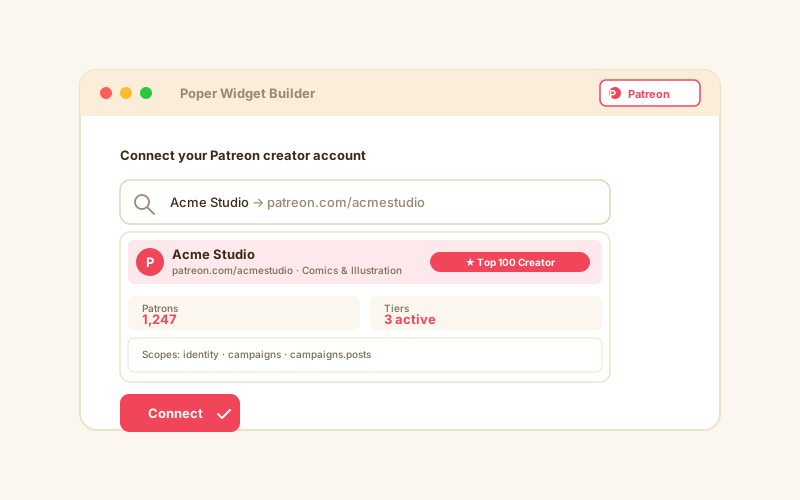
Sign in via Patreon's official OAuth flow. The connection takes 30 seconds and is fully revocable from your Patreon settings any time.
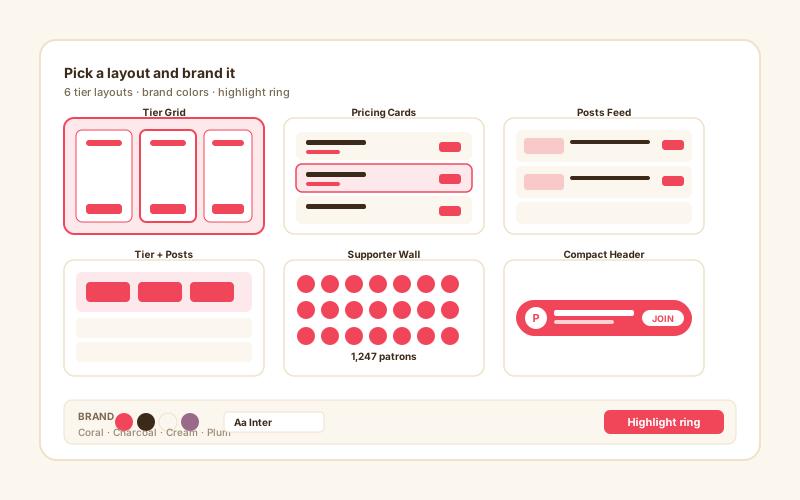
Choose Tier Grid, Pricing Cards, Posts Feed, Tier-plus-Posts, Supporter Wall, or Compact Header. Tweak colors, fonts, spacing, and tier highlight to match your site exactly.
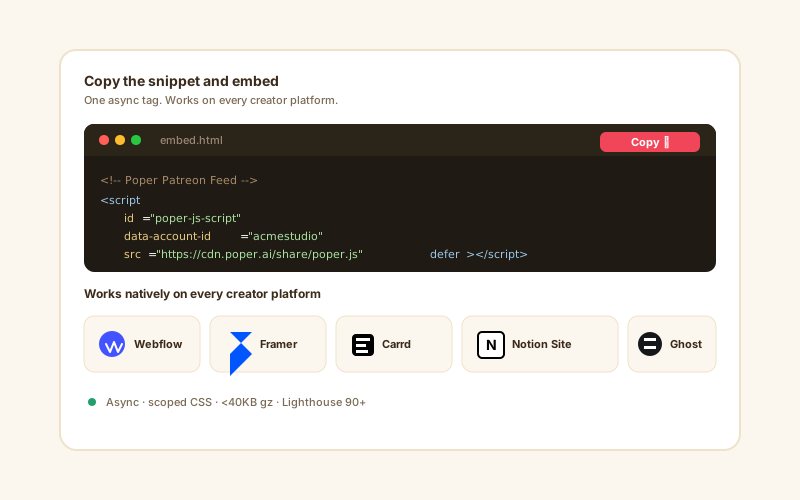
Paste the one-line script tag into your site. Works on Webflow, Framer, Carrd, Notion Sites, Ghost, and 250+ platforms.
Works everywhere
Drop-in install on WordPress, Shopify, Wix, Squarespace, Webflow, Framer, Ghost, and any HTML-friendly stack. No build step, no developer needed.
Plus 250+ other platforms via the embed snippet. If your site can render a <script> tag, it can render the Patreon Feed Widget: Embed Tiers, Public Posts, and Supporter Count on Any Site.
Six things that matter when you are paying for a Patreon widget, not 30 features no one uses.
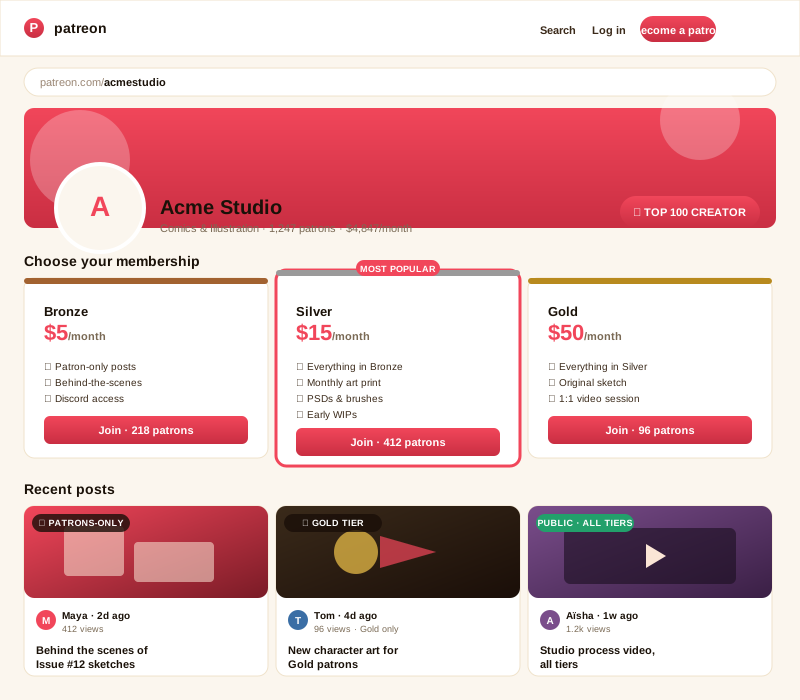
Paid-tier posts always show as locked previews with title and date only, exactly the way Patreon itself handles them. Public posts render in full. The widget reads tier visibility directly from the Patreon API v2 access tier field, so creators never accidentally leak member-only content. Any post you mark as patrons-only on Patreon stays patrons-only on your embed, no extra config required.
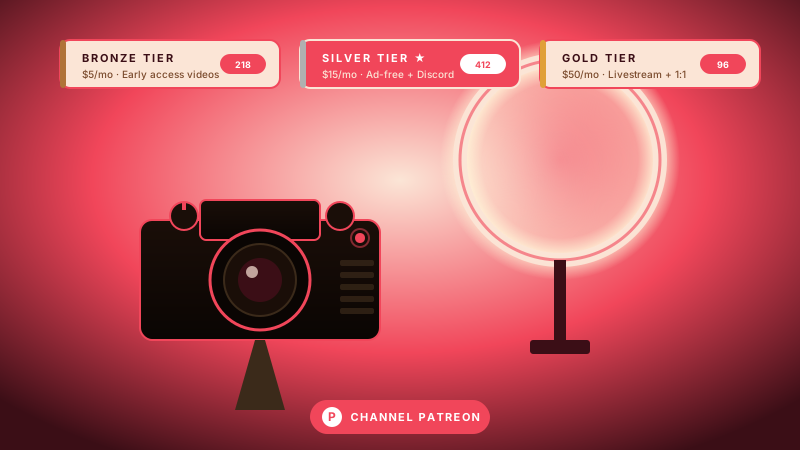
Show every tier with price, benefits, current supporter count, and a highlight slot for your recommended option. Pick any tier as Most Popular and Poper adds a glowing accent ring to nudge fans toward your best-converting pledge level.
Every tier card links straight to Patreon's join page with the pledge amount pre-filled. Visitors go from interested to supporter in two clicks.
Patreon API v2 OAuth 2.0 with rotating refresh tokens. We never see your password, and you can revoke access from your Patreon settings any time.
Lazy-loaded below the fold, async-injected, scoped CSS that does not bleed into your design system. Under 40KB gzipped. No CLS, no LCP regression, no Lighthouse hit. Lighthouse Mobile stays 90+ even when you embed three Patreon widgets on one page.
Publish a new public post or add a new tier on Patreon and it appears on your site automatically. Free plan syncs every 6 hours, Pro syncs every 30 minutes, Business syncs in near real time. No re-embedding, no manual updates, no stress.
Use cases
Four buyer types who get the most lift from embedding Patreon Feed Widget: Embed Tiers, Public Posts, and Supporter Count on Any Site on their site.
Webcomic artists, illustrators, and concept-art creators who post weekly drops. Embed your tier grid right under your portfolio so visitors who love your gallery can lock in a monthly pledge before they close the tab.
Podcast hosts who run a paid-tier feed on Patreon for ad-free episodes, bonus shows, and behind-the-mic content. Show tiers and your latest public episode notes on your podcast site so listeners support you from the same page they discovered the show.
YouTubers who use Patreon for a deeper community: ad-free videos, livestream access, and Discord roles. Embed your tier grid on a companion blog or your channel landing page so subscribers convert into supporters without leaving your domain.
Newsletter writers, fiction authors, and zinesters who publish on Patreon. Drop your tiers and latest public posts at the bottom of every article so readers finish a piece, feel connected, and back you right there in the flow.
Patreon's own embed code is free but minimal. The other creator-funding widgets each cover one platform. Here is how the popular ones stack up against Poper on what matters.
| Recommended Poper | Patreon Embed Code | Buy Me a Coffee | Ko-fi widget | |
|---|---|---|---|---|
| Patreon API v2 with OAuth | ||||
| Multi-tier display with prices and benefits | Limited | Limited | ||
| Recommended tier highlight | ||||
| Public posts feed | Posts only | Posts only | ||
| Paid-tier locked previews | Title only | N/A | N/A | |
| Live supporter count | ||||
| Sync frequency (lowest plan) | 6 hours | On reload | On reload | On reload |
| Custom CSS / total design control | Paid only | Paid only | ||
| Core Web Vitals safe (under 40KB gz) | iframe heavy | iframe heavy | ||
| Pricing for unlimited creators | $19/mo (Starter) | Free | Free | Free |
| Bundled with popups, forms, quizzes |
Comparison reflects publicly listed pricing and features as of 2026. Verify current details on each provider's site.
Webcomic artists, podcasters, YouTubers, and writers who switched from the default Patreon iframe to Poper.
“Poper has improved our website's user engagement! Since integrating Poper's personalized popups, we've seen a dramatic surge in conversions and user interactions. The platform's intuitive design makes creating and customizing popups a breeze, even for those with minimal tech skills. What truly sets Poper apart are its…”

“Fantastic app and support team, they are very quick to help and provide a solution or improvement to their product. Highly recommended!”

“Poper has been a total lifesaver for our agency! As a digital marketing agency, we’re always juggling a million things at once. Poper has been a real game-changer in terms of streamlining our workflow and keeping track of all our clients’ campaigns. The ability to track all our clients’ websites from one place is a…”

Pricing
Free forever for one widget. Upgrade only when you need faster sync, multiple instances, or to drop the watermark.
Everything you need to ship the widget today.
Remove the watermark, faster sync, more widget instances.
Multi-site, multi-account, white-label.
All plans include unlimited page views, no contracts, cancel anytime. Annual billing saves 20%.
Patreon turns 13 in 2026, has more than 250,000 active creators on the platform, and remains the dominant home for direct fan-to-creator monetization on the open web. Founder Jack Conte launched Patreon in 2013 after realizing his own YouTube views did not translate to a sustainable income, and the company has now distributed more than $4 billion to creators since launch. The catch with embedding Patreon on your own website is that the official Patreon iframe is minimal and unstyled, the third-party widgets each have quirks and limitations, and Patreon's API v2 has specific OAuth scopes you need to understand before you can build a reliable integration. This guide walks through what actually matters when you choose and configure a Patreon widget in 2026: the API and OAuth surface, tier-based content visibility, multi-tier display strategy, performance and Core Web Vitals, GDPR and privacy considerations for member-only embeds, and the creator-economy economics that determine which platform you should embed at all. By the end you will know exactly what to look for in a Patreon widget, why the recommended-tier pattern matters so much for conversion, and how to use a single embed layer to feature Patreon alongside Ko-fi, Substack, Buy Me a Coffee, and Gumroad on a unified creator site.
Patreon API v2 (the current major version) uses OAuth 2.0 with the authorization code flow and a small set of well-defined scopes. The most important ones for an embed widget are identity (the basic creator profile), identity[email] (the creator email address, optional), campaigns (your campaign metadata including title, summary, patron count, and pledge sum), campaigns.members (to read patron lists, optional and only used for supporter-wall layouts), campaigns.posts (to read your post archive), and w:campaigns.posts (write scope, only needed if you want to publish posts from your widget, which Poper does not request by default). Older Patreon API v1 widgets relied on personal access tokens scoped to a single campaign, but Patreon strongly recommends API v2 OAuth for any production integration because the v1 endpoints are now legacy and lack the field-level permissioning that powers tier-aware visibility. Poper requests only the read scopes needed to populate your widget and never asks for write permissions unless you explicitly enable a Pro feature like the Schedule Post integration. Access tokens last for one month, refresh tokens last indefinitely until revoked, and the rotation is handled silently by our token service so your widget never goes stale. Tokens are stored encrypted at rest using AES-256, and you can revoke them from your Patreon account settings under Apps and Integrations any time. If a creator only wants to display the public side of someone else's Patreon page (for example, on a fan curation site), the widget can fall back to public-only mode that pulls the same content the patreon.com profile page exposes without any OAuth handshake at all. This dual-mode design means the same widget config powers both creator-owned embeds and curation-style embeds without forcing the user to pick a different product.
Every Patreon post has a visibility setting: public (anyone can read), patrons-only (only paying patrons can read, often gated to a specific minimum tier), or scheduled (not yet live). When the Poper widget syncs your post archive via the API, each post object includes a current_user_can_view field, an access_tier reference, and a published_at timestamp. The widget reads current_user_can_view, and if the value is false (meaning the post is patrons-only and the connected OAuth identity does not have access at the right tier), it renders the post as a locked preview card showing only the title, the publish date, and the access tier required. The actual post body, attached audio, and attached video are never fetched into the browser, so the private content cannot leak even if a determined visitor inspected the network tab in DevTools. This is the same paywall behavior Patreon's own website uses, just on your domain. Some competitor widgets implement this incorrectly by fetching all post content into the browser and then hiding it with CSS, which means a bit of view-source poking or a quick fetch from the JavaScript console exposes the full text. Poper does the gating server-side, before the post body ever touches the browser, by stripping the body field from the API response in our edge function before serving the widget HTML. We also strip embedded media URLs from the post object so a curious visitor cannot deep-link to the unpublished asset on Patreon's CDN. This server-side stripping is the difference between a real paywall and a CSS hide-and-pray paywall, and it is the single most important thing to verify in any third-party Patreon widget.
Most Patreon creators run between two and five tiers, with the typical sweet spot being three. Behavioral pricing research from Dan Ariely and the field of decoy pricing consistently shows that when buyers are presented with three options, the middle option wins disproportionately because it acts as the anchor against the cheap and the premium tiers. On Patreon specifically, the public data Patreon publishes about creator earnings shows that creators with three to four tiers and a clearly highlighted recommended tier earn 40 to 60 percent more per visitor than creators with a single tier or with five-plus tiers and no highlight. The Poper widget exposes a Recommended toggle on every tier so you can pick which one gets a glowing accent ring, a Most Popular badge, and a slightly larger card size. We default the recommendation to your second-cheapest tier (the classic anchor position), but you can override that to spotlight whichever tier you want to push. The widget also supports tier benefits as a structured list rather than a free-text blob, so each benefit gets its own checkmark row that scans in a fraction of a second instead of forcing visitors to read a paragraph. Tier currency follows your Patreon campaign setting (USD, EUR, GBP, AUD, CAD, JPY, BRL, MXN, and a dozen others), so a creator running a euro-denominated campaign sees euro amounts instead of converted USD. Pledge frequency is also surfaced (monthly versus per-creation), which matters because per-creation tiers convert very differently from monthly tiers and visitors should see that distinction up front.
There are two distinct embed use cases for a Patreon widget. The first: you are the creator, you have an active Patreon campaign, and you want to embed your own tiers and posts on your own creator website to convert organic traffic into paying patrons. For this case you sign in via OAuth, get the full creator view including paid-tier visibility logic, the recommended-tier highlight, the supporter wall layout, and the member-aware embed mode where signed-in patrons see full post bodies on your domain. The second: you run a curation site, a community page, a podcast network site, or a fan blog and you want to feature one or more public Patreon creators without authenticating as them. For this case Poper offers a Public-Only mode that pulls only the public-facing content (creator name, bio, public-post archive, public tier list, and the visible supporter count) using the same routes as patreon.com itself. This second mode is what powers fan-curation sites that round up the best webcomic creators on Patreon, podcast networks that feature member shows from their roster, and aggregator sites that list creators by genre or interest. Public-only mode obviously cannot show member-aware paywall logic (because there is no logged-in patron context to check against), but it can still link directly to the join flow for each tier so a visitor who discovers a creator through your curation site can pledge in two clicks. The dual-mode design is unique among Patreon widgets; most competitor tools force you to pick one mode or the other at install time, which means a multi-creator network site has to maintain two different embed codes and two different builder flows.
Patreon is the original membership platform but no longer the only one. Ko-fi positions itself as the free alternative with a simple tip jar and optional Gold membership for $6 a month flat (with 0 percent platform fee on tips, only payment processing). Substack pivoted from email newsletters into full membership and podcast hosting and takes 10 percent plus payment fees on paid subscriptions, with a strong bias toward written and audio content. Buy Me a Coffee blends one-off tipping with monthly memberships and takes 5 percent, popular among visual creators and one-person businesses. Gumroad takes a flat 10 percent on digital product sales and is best suited for one-time purchases rather than recurring memberships. Patreon itself takes 8 percent on its Pro plan and 12 percent on Premium plus payment processing fees of about 2.9 percent plus $0.30 per transaction, but offers the deepest tier and post tooling, the best mobile app for creators, and a dedicated creator success team for accounts above a certain threshold. The choice between platforms is largely about audience expectation (writers tend toward Substack, podcasters and YouTubers toward Patreon, visual artists toward Ko-fi or Buy Me a Coffee, digital-product creators toward Gumroad) and feature mix (Patreon has the deepest tier and post tooling, Substack has the best email and podcast publishing, Ko-fi the lowest fees, Buy Me a Coffee the simplest one-off-tip flow). The Poper widget supports embedding from Patreon out of the box, with sister widgets for Ko-fi, Buy Me a Coffee, Gumroad, and Substack so creators who want to feature multiple monetization channels on one site can do so without juggling four different embed codes from four different vendors. This makes Poper the closest thing to a unified creator-monetization embed layer for the open web. For most creators, the right answer is to pick one primary platform (usually Patreon for tier-heavy memberships, Substack for newsletter-heavy memberships, Ko-fi for tip-heavy support) and use the secondary widgets for opportunistic surfaces like a one-off tip jar at the bottom of a viral blog post or a single-product Gumroad embed for a special release.
A Patreon feed widget is an embeddable script that displays a creator's Patreon tiers, public posts, and supporter count on any website using the Patreon API v2 with OAuth, while keeping paid-tier content gated.
Can't find the answer you're looking for? Chat with our support team.
Contact SupportPoper takes 90 seconds to embed and keeps your Patreon tiers and posts in sync forever. Free plan, no credit card.
Free plan available forever