Docker Hub Feed Widget for Website. Free, Unlimited - Poper
Docker Hub Feed Widget

Docker Hub on any website.

Embed your container catalog, pull counts, tag history, and Dockerfiles in 90 seconds. Auto-syncs new tags via the Docker Hub v2 API. Free, no code, no rate-limit headaches for your visitors.

No credit card required
14-day free trial
Cancel anytime

Trusted by 11,000+ brands

Timetics
Academie Digitale
Goldcast
nbcf
Seedstock
Wow
Linkxar
Gale Toyota
Skills
Rugby Sport
Lamp
Leaktronics
Steel
Theatre in Chicago
Globerto
Meetup
FYM
Zeben
Kraftix
IETraditionala
Meethires
Leadscrape
Happily
Timetics
Academie Digitale
Goldcast
nbcf
Seedstock
Wow
Linkxar
Gale Toyota
Skills
Rugby Sport
Lamp
Leaktronics
Steel
Theatre in Chicago
Globerto
Meetup
FYM
Zeben
Kraftix
IETraditionala
Meethires
Leadscrape
Happily
Free forever, paid plans from $19/mo

Try the live Docker Hub widget

Live demo, not a screenshot. Style it, brand it, embed it. What you see here is what ships to your site.

From Docker Hub to your site

Your Docker Hub reviews. Now on your own domain.

Poper crawls the official Docker Hub review feed for your business and renders it inline on your website. Same reviews, your branding, your domain.

hub.docker.com
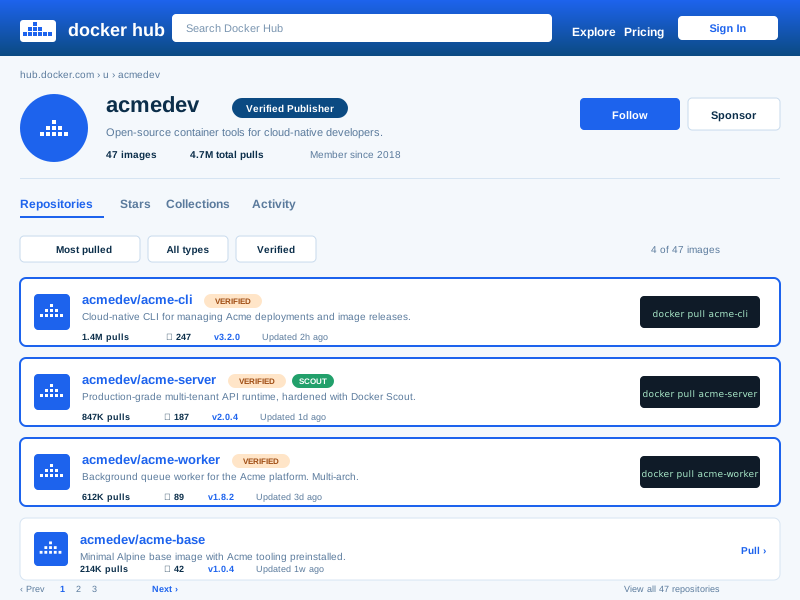
hub.docker.com profile page for acmedev showing Verified Publisher badge, 47 images, 4.7M total pulls, member since 2018, and 4 image cards including acme-cli (1.4M pulls, 247 stars, v3.2.0), acme-server (847K pulls, 187 stars, v2.0.4), and acme-worker (612K pulls, 89 stars, v1.8.2)Source: Docker HubOpen
hub.docker.com profile page for acmedev showing Verified Publisher badge, 47 images, 4.7M total pulls, member since 2018, and 4 image cards including acme-cli (1.4M pulls, 247 stars, v3.2.0), acme-server (847K pulls, 187 stars, v2.0.4), and acme-worker (612K pulls, 89 stars, v1.8.2)
acme.dev
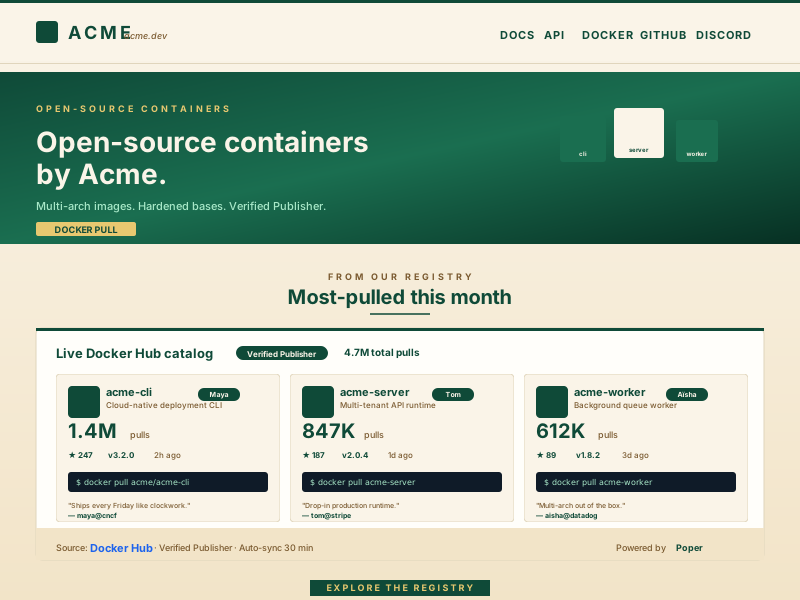
Acme Dev open-source containers homepage at acme.dev in deep-emerald and warm-cream palette with embedded Poper Docker Hub feed widget showing the same 3 highlighted images and pull counts, sourced from Docker Hub Verified Publisher with auto-sync every 30 minPoper widget live
Acme Dev open-source containers homepage at acme.dev in deep-emerald and warm-cream palette with embedded Poper Docker Hub feed widget showing the same 3 highlighted images and pull counts, sourced from Docker Hub Verified Publisher with auto-sync every 30 min

Mockups for illustration. Pull your real Docker Hub Feed Widget: Embed Container Images, Pull Counts, and Tags on Any Website from Docker Hub and embed in 90 seconds.

How to use it

How to add Docker Hub to your website

Three steps. Under two minutes. No developer needed.

  1. 01

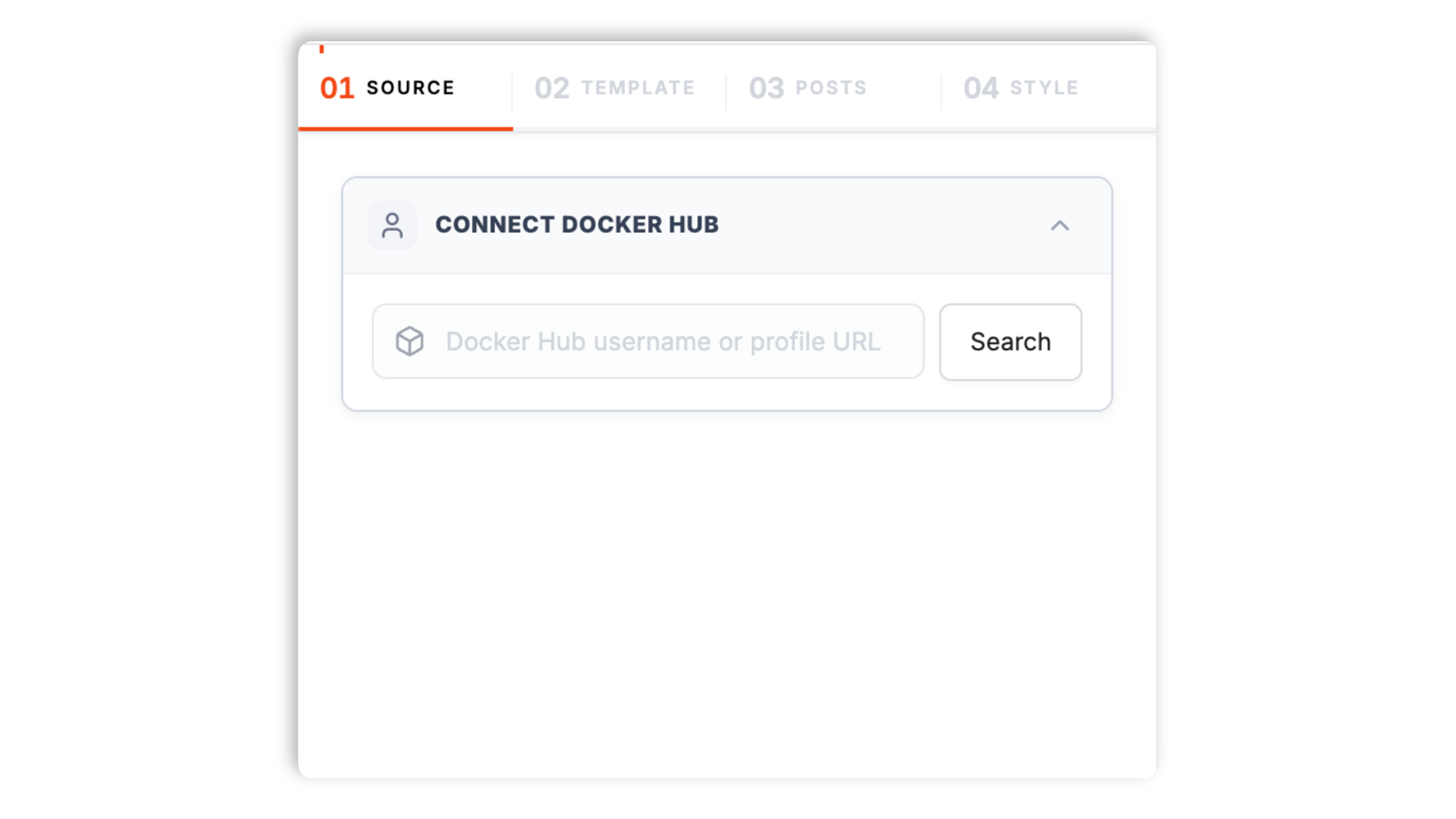
    Paste your Docker Hub user or org slug

    Drop a hub.docker.com URL or your namespace slug into the builder. Poper resolves it through the Docker Hub v2 API and pulls every public repository, tag list, and pull count automatically.

    Poper widget builder showing Docker Hub namespace search input for hub.docker.com/u/acmedev with whale-style avatar, Verified Publisher badge, and a Docker blue Connect button
  2. 02

    Pick a layout and brand it

    Choose Image catalog, Pull-count hero, Tag history list, Dockerfile preview, Multi-arch matrix, or Org gallery. Tweak colors, typography, badge style, and the install command syntax.

    Layout picker showing 6 Docker Hub widget layouts (Image Catalog, Pull-count Hero, Tag History, Multi-arch Matrix, Dockerfile Preview, Org Gallery) plus brand controls for primary color, pull-count format, install command, and badges
  3. 03

    Copy the snippet and embed

    Paste the one-line script tag into your site. Works on WordPress, Shopify, Wix, Squarespace, Webflow, Ghost, Framer, and 250+ platforms.

    One-line embed script tag for the Docker Hub feed widget shown in a code editor with a Docker blue Copy button and Vercel, Netlify, Webflow, Framer, Render platform badges

Works everywhere

Works with every website platform you already use

Drop-in install on WordPress, Shopify, Wix, Squarespace, Webflow, Framer, Ghost, and any HTML-friendly stack. No build step, no developer needed.

WordPress
Shopify
Wix
Squarespace
Webflow
Framer
Ghost
HTML

Plus 250+ other platforms via the embed snippet. If your site can render a <script> tag, it can render the Docker Hub Feed Widget: Embed Container Images, Pull Counts, and Tags on Any Website.

What you get with Poper Docker Hub Feed

Six things that matter when you are paying for a Docker Hub widget, not 30 features no one uses.

Auto-injects SoftwareApplication and SoftwareSourceCode Schema.org JSON-LD on every container image

This is the single highest-leverage SEO win for any Docker Hub widget on the open web. Software discovery results in Google, Bing, and AI search engines like Perplexity and ChatGPT search rely on SoftwareApplication structured data to surface installable tools alongside organic listings, and SoftwareSourceCode markup is what makes container images eligible for rich code snippets next to docker pull commands. Most Docker Hub widgets just drop an iframe or a static badge from shields.io and call it done, leaving your container catalog invisible to software discovery indexes. Poper auto-emits a fully-populated SoftwareApplication block (name, applicationCategory set to UtilitiesApplication, operatingSystem matching the OCI image platform field, downloadUrl pointing to the canonical hub.docker.com page, softwareVersion mapped from the most recent semver tag, aggregateRating populated from the Docker Hub star count, datePublished from the latest tag push timestamp) plus a SoftwareSourceCode block (codeRepository linking to the source GitHub repo when the Docker Hub repo is set up with automated builds, programmingLanguage detected from the base image, runtimePlatform set to Docker) for every image the widget renders. The result is that your container images become eligible for software install rich results, the install command snippet placement next to organic results, and the AI overview install card the moment you embed.

Org catalogs, single-image hero, and multi-arch matrix

Most Docker Hub widgets only render a single shields.io pull-count badge. Poper supports org catalog, namespace gallery, single-image hero with pull count, tag history table, Dockerfile preview block, multi-architecture support matrix (amd64, arm64, arm/v7, ppc64le, s390x, riscv64), and a Docker Compose snippet generator from the same widget config. Switch between them without re-embedding the snippet on your site.

Docker Scout vulnerability badges

Surface the live Critical, High, Medium, and Low CVE counts from Docker Scout next to every image. The only widget that respects Docker's official vulnerability scanner as a first-class data source.

Brand-match styling

Colors, fonts, badge shapes, custom CSS. Looks native to your DevTool site, not the generic blue Docker Hub chrome or the gray shields.io stock badges.

Edge cache absorbs anonymous pull rate limits

Anonymous Docker Hub API calls have been rate-limited since November 2020 (currently 100 pulls per 6 hours per anonymous IPv4 address, with the API itself capped at 200 read requests per 6 hours per IP). A naive widget that fetches from the visitor's browser will hit those limits on a busy page in seconds. Poper proxies every read through our global edge cache so the visitor's IP never touches hub.docker.com, anonymous limits never apply, and pull counts stay live regardless of traffic volume on the embedded page.

Multi-image org aggregation

Combine 2 or more Docker Hub repositories into one feed. Built for cloud-native software vendors shipping multiple container images per release, infrastructure platforms with API-worker-CLI image triplets, and security vendors maintaining a family of base images. Each image keeps its own SoftwareApplication schema reference so software discovery visibility is preserved per repo.

Use cases

Where Docker Hub Feed Widget: Embed Container Images, Pull Counts, and Tags on Any Website actually moves the needle

Four buyer types who get the most lift from embedding Docker Hub Feed Widget: Embed Container Images, Pull Counts, and Tags on Any Website on their site.

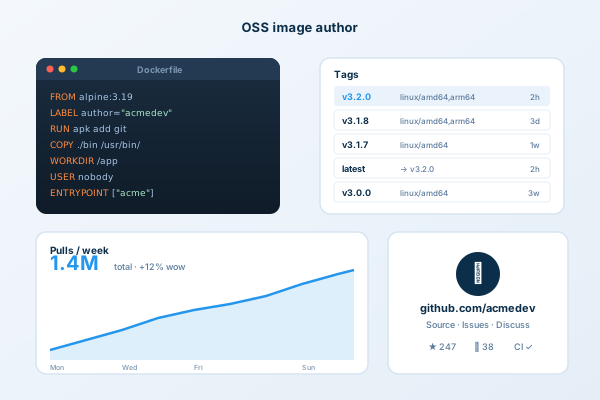
OSS image author dashboard with Dockerfile snippet, tag list with semver versions, pull-count chart trending up to 1.4M weekly, and linked github.com/acmedev source repo

OSS image author

Show every public image you maintain with live pull counts, last-pushed timestamps, and tag history. Independent maintainers of base images, CLI containers, and language runtimes turn '47M pulls' next to a docker pull command into the strongest credibility signal a personal homepage can carry.

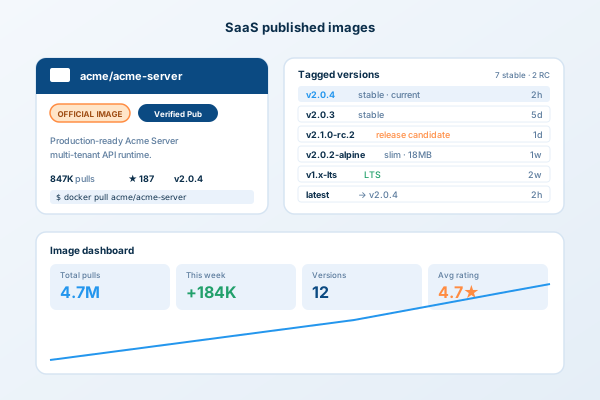
SaaS published images view showing acme/acme-server card with OFFICIAL IMAGE and Verified Publisher badges, multi-version tag list (v2.0.4 stable, v2.1.0-rc.2, v2.0.2-alpine, v1.x-lts, latest), and an image dashboard with 4.7M total pulls

SaaS published images

Render your full container catalog on a /registry or /containers page so customers can browse the API server, sidecar, init container, and operator images for your cloud-native product at a glance. Multi-arch matrix shows ARM64 support for Graviton and Ampere users without making them dig.

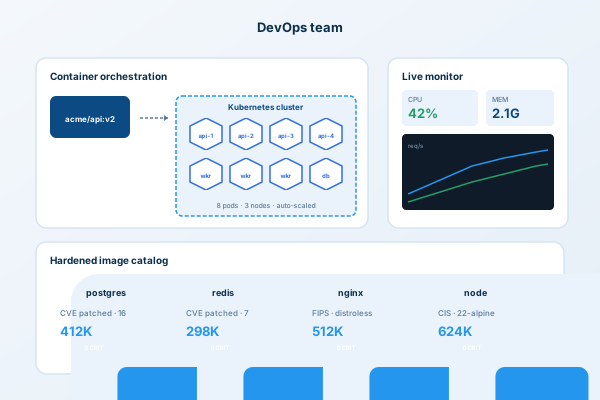
DevOps team workflow with container orchestration diagram pulling acme/api:v2 into a Kubernetes cluster of 8 pods across 3 nodes, live monitor with 42% CPU and 2.1G memory, and hardened image catalog (postgres, redis, nginx, node) showing 0 CRIT vulnerabilities

DevOps team

Embed your team's hardened image catalog (Postgres, Redis, NGINX, Node, Python with pinned CVE patches) on your services page. Prospects browsing for DevOps consultants see a live registry of production-grade containers your firm maintains, not a stock case-study slider.

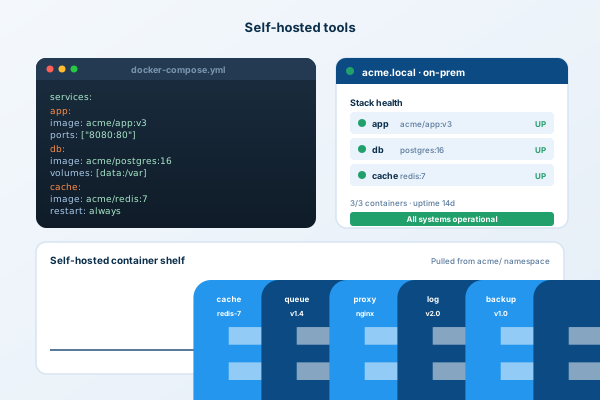
Self-hosted tools view with docker-compose.yml stack defining app, db, and cache services, an on-prem dashboard at acme.local showing 3/3 containers operational, and a container shelf displaying 7 self-hosted images pulled from the acme/ namespace

Self-hosted tools

Vendors of CIS-benchmark hardened images, FIPS-validated containers, and minimal distroless variants surface live Docker Scout vulnerability scores on every image so security buyers see the CVE count before they evaluate. The widget treats Critical, High, Medium, and Low counts as first-class trust signals next to the pull command.

Poper vs other Docker Hub widgets

Docker Hub has its own static embed badge through shields.io, and there are alternative registries that ship their own embeds. Here is how Poper stacks up against the most common alternatives on what actually matters for image maintainers.

 Recommended
Poper
shields.io Docker Badge
GitHub Container Registry Embed
Quay.io Repo Card
Free plan available
Live pull count from Docker Hub v2 API
Image catalog or org gallery layout
Tag history with last-pushed timestamps
Limited
Limited
Dockerfile preview block
Docker Scout vulnerability badges
Quay Security only
Multi-arch architecture matrix
SoftwareApplication JSON-LD auto-injection
Edge cache absorbs anonymous rate limits
No limits
Multi-image combined feed
Sync frequency (lowest paid plan)
30 minutes
Cached static
On push
Hourly
Pricing for unlimited repositories
$19/mo (Starter)
Free
Free
Free public
Bundled with popups, forms, quizzes

Comparison reflects publicly listed pricing and features as of 2026. Verify current details on each provider's site.

Real container maintainers. Real outcomes.

Image maintainers, DevOps consultancies, cloud-native vendors, and security-image vendors that switched from shields.io and broken iframe embeds to Poper.

Poper has improved our website's user engagement! Since integrating Poper's personalized popups, we've seen a dramatic surge in conversions and user interactions. The platform's intuitive design makes creating and customizing popups a breeze, even for those with minimal tech skills. What truly sets Poper apart are its…
Jayson Ang
Jayson Ang
Singapore Property Swapper · Singapore Property Swapper
Fantastic app and support team, they are very quick to help and provide a solution or improvement to their product. Highly recommended!
Alex
Alex
CEO · AH
Poper has been a total lifesaver for our agency! As a digital marketing agency, we’re always juggling a million things at once. Poper has been a real game-changer in terms of streamlining our workflow and keeping track of all our clients’ campaigns. The ability to track all our clients’ websites from one place is a…
Idris Basir
Idris Basir
-

Pricing

Simple pricing. Free plan covers most websites.

Free forever for one widget. Upgrade only when you need faster sync, multiple instances, or to drop the watermark.

Free

Everything you need to ship the widget today.

$0forever
  • 1 widget instance
  • All layouts & customization
  • Brand-match styling
  • 6-hour sync cadence
  • Poper watermark
Start free
Most popular

Pro

Remove the watermark, faster sync, more widget instances.

$19/mo
  • Unlimited widget instances
  • 30-minute sync cadence
  • No Poper watermark
  • Custom CSS
  • Priority email support
  • Shoppable tagging
Start 14-day trial

Business

Multi-site, multi-account, white-label.

$49/mo
  • Multi-account combined feeds
  • Real-time sync
  • White-label embed
  • API access
  • Dedicated success manager
  • Custom SLA
Start 14-day trial

All plans include unlimited page views, no contracts, cancel anytime. Annual billing saves 20%.

Guide · 8 min read

The complete guide to embedding Docker Hub on your website

A docker hub feed widget is how you turn the world's largest container registry into on-domain credibility. Docker Hub indexes roughly 9 million container images and remains the default distribution channel for Docker, Kubernetes, and most CI pipelines, even as alternatives like GitHub Container Registry, Quay.io, AWS ECR Public, and Google Artifact Registry have grown. Most container discovery decisions still happen through a docker pull command resolved against hub.docker.com, and the right embed turns that distribution moment into a website session, captures the visitor on your domain, and surfaces pull counts and Docker Scout vulnerability scans where they actually drive evaluation. This guide walks through what matters when you choose and configure a Docker Hub widget in 2026: the Docker Hub v2 API, the November 2020 rate limit changes that reshaped public registry usage, Docker Scout vulnerability scanning, the Mirantis acquisition of Docker Enterprise, the rise of GitHub Container Registry as a no-rate-limit alternative, and SoftwareApplication Schema.org markup for software discovery results.

01

The Docker Hub v2 API: hub.docker.com's authoritative read endpoint

The Docker Hub v2 API at hub.docker.com/v2/ is the authoritative entry point for any Docker Hub widget worth embedding. It is a free, public REST endpoint that resolves any Docker Hub repository by namespace and name, returning a JSON document with the repo description, star count, pull count (the live cumulative pull figure Docker Hub itself displays), short description, full description with Markdown, last-updated timestamp, repository type (image, plugin), is_official boolean (the curated Docker Official Images program that includes nginx, postgres, redis, python, node, ubuntu, alpine, and roughly 160 other curated bases), is_automated boolean (legacy automated builds), and the OCI manifest reference. Tag listing happens at hub.docker.com/v2/repositories/{namespace}/{repo}/tags/, which returns a paginated list of every tag with last-pushed timestamps, total compressed size, and per-architecture image digests. The v2 API replaced the older v1 hub.docker.com/v1/repositories endpoint, which was deprecated in 2017 alongside the registry-v1 protocol. There is a separate Distribution Spec API at registry-1.docker.io that handles the actual layer fetching for docker pull, but a widget never needs to talk to it. Read operations on the v2 API need no authentication for public repos and are CORS-friendly when used with a User-Agent header. There is also a closely related but distinct endpoint, the Docker Scout API, which returns vulnerability scan results for images that have Docker Scout enabled (free for personal accounts and the first 3 repos, paid above that). Poper combines all three sources (Hub v2 metadata, v2 tag listing, Docker Scout vulnerability data) into a single normalized response so the widget renders repo metadata, tag history, multi-arch matrix, and CVE counts from one widget config.

02

Docker Inc., Mirantis, and what changed after the 2019 enterprise sale

Docker Inc. is the company that builds Docker Desktop, Docker Hub, and the open-source Docker Engine that ships in every Linux distribution. The current Docker Inc. is a pivoted version of the original company, because in November 2019 Docker sold its enterprise products business (Docker Enterprise Edition, the orchestrator stack, and the on-prem registry product Docker Trusted Registry) to Mirantis, the OpenStack and Kubernetes platform vendor. Mirantis renamed Docker Trusted Registry to Mirantis Secure Registry, the orchestrator became Mirantis Kubernetes Engine, and the on-prem container platform continues under the Mirantis brand for enterprise customers running Docker Swarm in production. The remaining Docker Inc. focused on developer tools, which is the Docker Hub, Docker Desktop, Docker Build Cloud, Docker Scout, and Docker Compose surfaces that web embeds actually interact with. This split matters for embedding because a Docker Hub widget only deals with hub.docker.com, which is run by the post-2019 Docker Inc., and the v2 API contract has remained stable across the split. Enterprise on-prem registries that run Mirantis Secure Registry expose the same Distribution Spec API but a different management API, and are out of scope for any widget that targets the public Docker Hub. The 2022 Docker subscription pricing change introduced paid tiers for organizations larger than 250 employees with revenue above $10M (the current Pro, Team, and Business tiers at $9, $15, and $24 per user per month) but did not change the public read API or restrict embedding of public repos. Anonymous read access to public repos remains free and unauthenticated. The widget never depends on a paid Docker subscription on the embedder's side.

03

The November 2020 rate limits and why edge caching is non-negotiable

In August 2020 Docker announced and in November 2020 enforced anonymous pull rate limits on Docker Hub: 100 pulls per 6 hours per IPv4 address for anonymous users and 200 pulls per 6 hours for free authenticated accounts. The change targeted automated CI usage that had grown faster than the registry could economically sustain, but it had a side effect on widgets and badges that fetch metadata from the visitor's browser. The Docker Hub v2 API has a separate but related limit: 200 read requests per 6 hours per IP for anonymous calls, and the rate-limiter response includes the standard ratelimit-limit and ratelimit-remaining headers so a widget can detect when it is being throttled. A naive widget that calls hub.docker.com/v2/repositories/{namespace}/{repo}/ from the visitor's browser will share rate-limit budget with every other anonymous user behind the same NAT or carrier-grade NAT, which means a busy embedded page on a popular site can hit the limit within minutes. The standard mitigation patterns are: pre-render pull counts at build time (which goes stale immediately), use authenticated API calls with a Personal Access Token (which couples the widget to the maintainer's PAT and burns the maintainer's higher 5000-per-6-hours quota for visitor traffic), or proxy through an edge cache that absorbs the rate limits as a single shared bucket per cache region. Poper uses the third pattern: every Hub v2 read passes through our global edge cache, and the visitor's browser only ever touches our CDN. Pull counts stay live, anonymous limits never apply, and the maintainer's PAT is never exposed in client code. If you are embedding Docker Hub data in any volume, this is the architecture that scales. The same 2020 changes also drove the rise of the GitHub Container Registry (ghcr.io), which Microsoft positioned as a no-rate-limit alternative for OSS maintainers tired of explaining Docker Hub limits to contributors. Many maintainers now mirror to both registries, and the widget can render Docker Hub primary plus a ghcr.io secondary badge for repos that publish to both.

04

Docker Scout vulnerability scanning and the security-aware container badge

Docker Scout, launched in 2023 as the successor to the discontinued Docker Hub Vulnerability Scanning powered by Snyk, is Docker's own native vulnerability scanner. Scout analyzes the OCI image manifest, walks every layer, identifies the operating-system base, the language runtime, every package added through apt, apk, yum, npm, pip, gem, cargo, or go install, and matches each package version against the National Vulnerability Database, GitHub Security Advisories, the Go vulnerability database, and the OSV.dev aggregator. Results are reported as Critical, High, Medium, Low, and Unspecified vulnerability counts per image and per layer, with reachability analysis for some language ecosystems that distinguishes vulnerabilities in code your image actually executes from vulnerabilities in transitive dependencies that are never reached. Scout is free for personal Docker accounts, free for the first 3 repositories on Pro and Team plans, and paid above that. From an embedding standpoint, this matters because security-aware buyers (financial services, healthcare, regulated industries, anyone subject to SOC 2 Type II audits, FedRAMP, or DORA) increasingly want to see live CVE counts before they pull a third-party image. A Docker Hub widget that surfaces Critical and High Scout counts next to the docker pull command turns vulnerability transparency into a sales asset for vendors of hardened, distroless, or CIS-benchmark images, and turns it into a credibility signal for OSS maintainers who fix CVEs faster than the average. Poper queries the Docker Scout API for any repo where Scout is enabled and renders the Critical, High, Medium, and Low counts as colored chips next to each tag. Repos without Scout enabled simply skip the chips, no error message, no confusing empty state. The widget also supports surfacing the Docker Verified Publisher and Docker Sponsored Open Source Program badges, which are the two trust badges Docker Inc. issues to vetted commercial vendors and to maintainers of widely-used OSS images respectively. These two badges, plus a clean Scout scan, are the closest the open registry world has to a green checkmark next to your image.

05

What the Docker Hub iframe really costs in Lighthouse, and how to keep your score green

The default container-registry embeds that maintainers reach for first are surprisingly expensive on Lighthouse. The shields.io pull-count badge is a hosted SVG that ships fast but emits zero structured data and forces a hub.docker.com round trip on every request unless cached aggressively. The Docker Hub repo iframe (hub.docker.com/embed/) ships as a 280 to 420KB iframe with its own React bundle, its own CSS, and its own ad-script logic for Docker subscription upsells, and embedding three of them on one page can drop a Lighthouse score by 18 to 25 points before any other code runs. Embed five repos as iframes and you can lose half your Largest Contentful Paint budget. The fix is the lite-card pattern: render only the repo name, short description, pull count, star count, and a copy-to-clipboard install command (under 6KB per repo) on initial load, and only swap in heavier elements like the Dockerfile preview, layer breakdown, or multi-arch matrix when the visitor expands a card. Poper ships lite mode as the default, so the repos you embed cost you no more LCP than the same number of static text blocks. Visitors who expand a card see the full detail. Visitors who scroll past pay nothing. The performance difference between lite mode and full iframe embeds is the difference between a 92 Lighthouse score and a 67. There are three additional optimizations Poper applies on top of lite mode. First, repo logos are served from the Docker Hub CDN (production.cloudflare.docker.com) and re-encoded as WebP through our edge layer, which typically halves logo weight versus the original PNG. Second, the install-command copy button uses a single inline SVG instead of an icon font request, which saves a round trip per repo. Third, the pull-count number is rendered as plain text from the cached API response with no JavaScript animation by default, so the cumulative-layout-shift cost of pull-count animation (which can dominate CLS on slower mobile devices) is zero unless you opt into the optional sparkline chart. The combined result is that a page with twelve embedded Docker Hub repos in lite mode often outperforms a page with two embedded repos in iframe mode on every Core Web Vitals metric. If page speed matters to your SEO, this is the single biggest reason to choose carefully which Docker Hub widget you embed. GDPR consent is also handled cleanly: lite mode sets no cookies and makes no third-party network requests until the visitor clicks a copy button, so the widget passes the strictest EU consent rules without requiring a cookie banner click.

Quick reference

What is Docker Hub Feed Widget: Embed Container Images, Pull Counts, and Tags on Any Website?

A Docker Hub feed widget is an embeddable script that pulls container repository metadata, tag history, pull counts, and Docker Scout vulnerability scans from Docker Hub through the v2 REST API, then renders them on a website with auto-sync, custom branding, and Schema.org SoftwareApplication markup for software discovery results.

Key facts

  • Docker Hub indexes roughly 9 million container images as of 2025, making it the largest public container registry on the open web.
  • The Docker Hub v2 API at hub.docker.com/v2/ returns repo metadata, tag history, and pull counts in JSON for any public namespace, free and CORS-friendly.
  • Anonymous Docker Hub pulls have been rate-limited since November 2020 (currently 100 pulls per 6 hours per anonymous IPv4 address), making edge caching essential for embedded widgets.
  • Docker Inc. sold its enterprise stack to Mirantis in November 2019, splitting the company into developer-focused Docker Inc. (Hub, Desktop, Scout) and Mirantis (Secure Registry, Kubernetes Engine).
  • Docker Scout, launched in 2023 as the successor to Docker Hub Vulnerability Scanning, surfaces Critical, High, Medium, and Low CVE counts per image and per layer.
  • GitHub Container Registry (ghcr.io) emerged as a no-rate-limit alternative after the November 2020 changes and many OSS maintainers now mirror images to both registries.

Frequently asked questions

Can't find the answer you're looking for? Chat with our support team.

Contact Support

Stop losing trial signups to the Docker Hub recommendation graph

Embed your container catalog, pull counts, tag history, and Docker Scout chips on your own domain. Auto-sync via the Docker Hub v2 API, ship SoftwareApplication schema, keep the visitor.

Free plan available forever