
District Reviews Widget for Website. Free - Poper
District Reviews Widget

District movie reviews on any website.

Embed District movie reviews and star ratings on any page in 90 seconds. Paste a District movie URL, choose a layout, match your brand, and the widget renders the reviews on your site.

No credit card required
14-day free trial
Cancel anytime

Trusted by 11,000+ brands

Timetics
Academie Digitale
Goldcast
nbcf
Seedstock
Wow
Linkxar
Gale Toyota
Skills
Rugby Sport
Lamp
Leaktronics
Steel
Theatre in Chicago
Globerto
Meetup
FYM
Zeben
Kraftix
IETraditionala
Meethires
Leadscrape
Happily
Timetics
Academie Digitale
Goldcast
nbcf
Seedstock
Wow
Linkxar
Gale Toyota
Skills
Rugby Sport
Lamp
Leaktronics
Steel
Theatre in Chicago
Globerto
Meetup
FYM
Zeben
Kraftix
IETraditionala
Meethires
Leadscrape
Happily
Free forever, paid plans from $19/mo

Try the live widget

Live demo, not a screenshot. Style it, brand it, embed it. What you see here is what ships to your site.

From District to your site

Your District reviews. Now on your own domain.

Poper crawls the official District review feed for your business and renders it inline on your website. Same reviews, your branding, your domain.

district.in
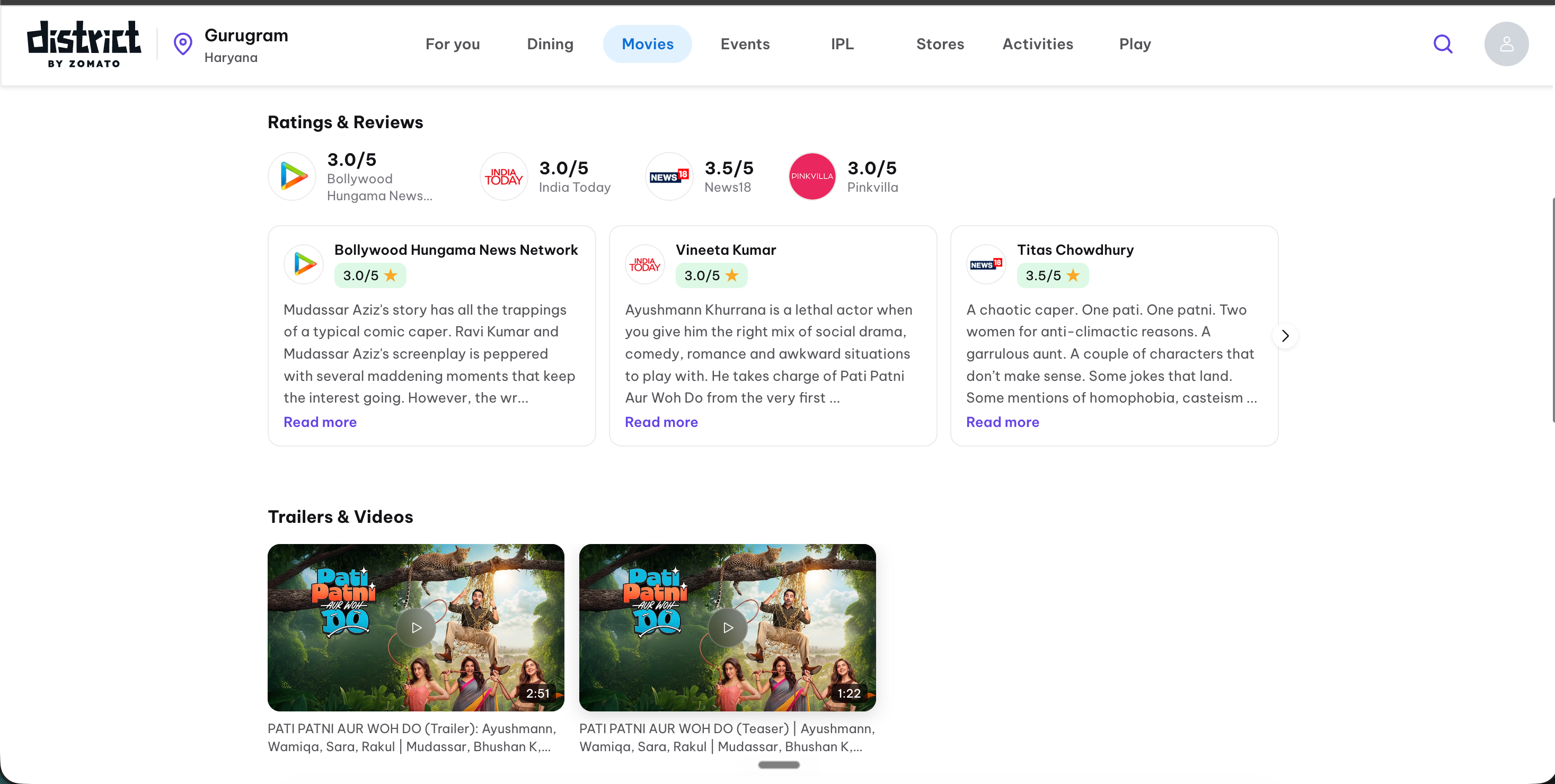
District.in movie page showing a film poster, a star rating, an audience review distribution, and three viewer reviewsSource: DistrictOpen
District.in movie page showing a film poster, a star rating, an audience review distribution, and three viewer reviews
your-film-site.com
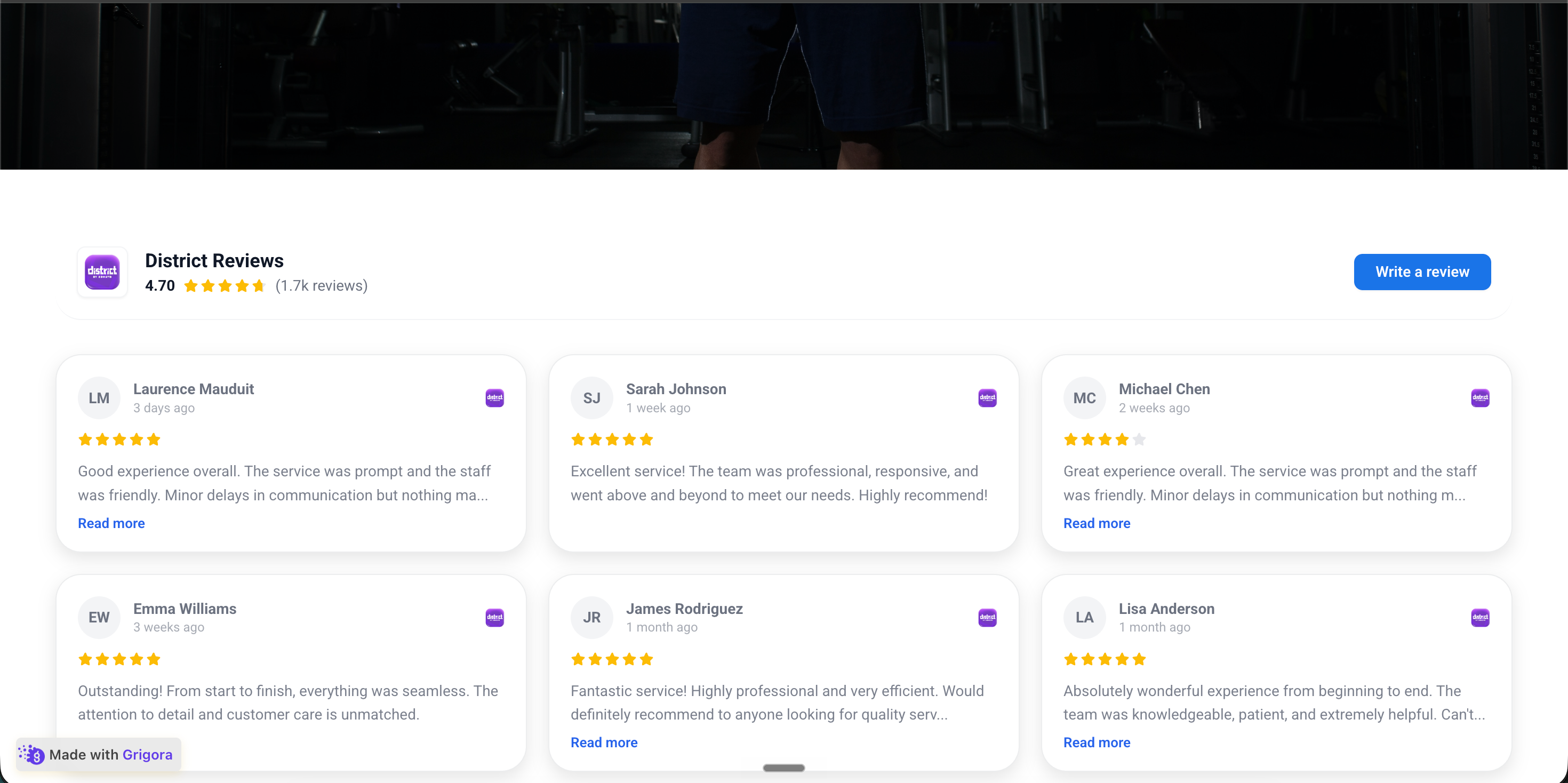
A film promo website with the Poper District reviews widget embedded inline showing the same three viewer reviews in the site's own brand palettePoper widget live
A film promo website with the Poper District reviews widget embedded inline showing the same three viewer reviews in the site's own brand palette

Mockups for illustration. Pull your real District Reviews Widget: Embed District Movie Reviews on Any Website from District and embed in 90 seconds.

How to use it

How to add District reviews to your website

Three steps. Under two minutes. No developer needed.

  1. 01

    Copy your District movie URL

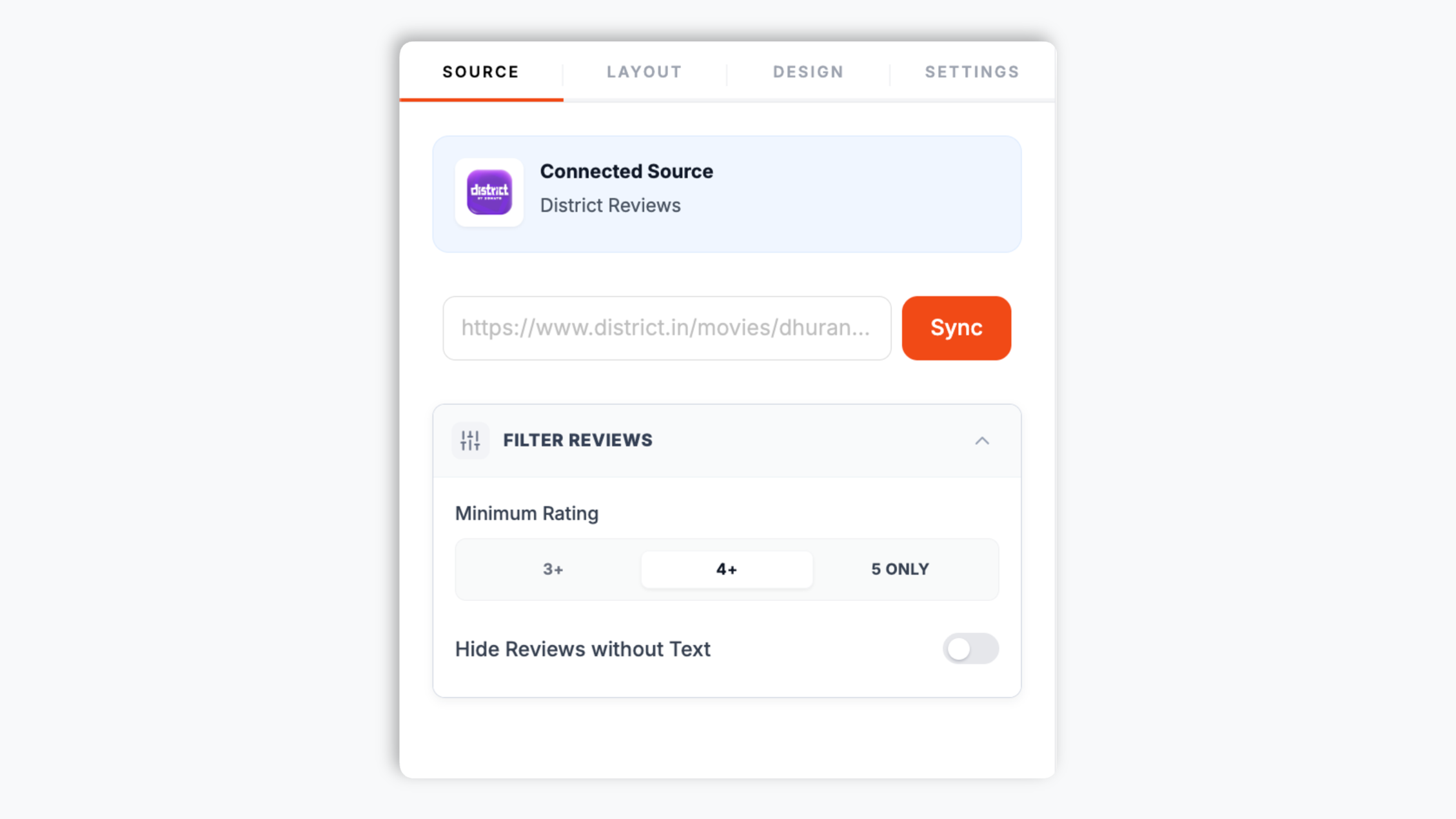
    Open the movie page on district.in, copy the page URL, and paste it into the Poper builder. That URL is the only input the widget needs. Poper fetches the movie reviews from that page automatically.

    Poper builder with the District URL field showing a district.in movie page link pasted in and a Sync button
  2. 02

    Pick a layout and brand it

    Choose a layout for your reviews, then match your brand colors, fonts, card style, star color, and corner radius in the live editor. The preview updates as you tweak.

    Poper editor template chooser showing the review widget layout options with brand color and font controls
  3. 03

    Copy the snippet and embed

    Paste the one-line script tag into your site. Works on WordPress, Shopify, Wix, Squarespace, Webflow, Framer, Ghost, and any HTML stack.

    One-line embed snippet for the District reviews widget shown in a code editor with a Copy button and WordPress, Shopify, Wix, Squarespace, Webflow, Framer, and Ghost platform badges

Works everywhere

Works with every website platform you already use

Drop-in install on WordPress, Shopify, Wix, Squarespace, Webflow, Framer, Ghost, and any HTML-friendly stack. No build step, no developer needed.

WordPress
Shopify
Wix
Squarespace
Webflow
Framer
Ghost
HTML

Plus 250+ other platforms via the embed snippet. If your site can render a <script> tag, it can render the District Reviews Widget: Embed District Movie Reviews on Any Website.

What you get with Poper District Reviews

The things that matter when you embed District movie reviews, not 30 features no one uses.

Auto-injects star-rating Schema.org markup

Most review widgets just paste a badge. Poper goes further: turn on the SEO schema toggle and we inject AggregateRating and Review JSON-LD directly into your page so Google can show a star rating next to your listing in search results. For a film promo page competing on organic search, this is one of the highest-ROI moves available.

Multiple review layouts, all responsive

Grid, list, masonry, carousel, photo grid, quote wall, and more. Switch in the dashboard without re-embedding. Works at every viewport from mobile up to large displays.

Shows real District reviews

Pulls the reviewer name, rating, date, and review text from the District movie page.

Brand-match styling

Colors, fonts, spacing, corner radius, custom CSS. Native to your site.

Core Web Vitals safe

Lazy-loaded below the fold, async-injected, scoped CSS that does not bleed into your design system. Under 40 KB gzipped. Zero CLS, zero LCP regression. Your Lighthouse score does not move when you add this widget.

Filter reviews by rating and text

Show only reviews at or above a star threshold and hide reviews that have no written text, so only the reviews you want to show appear. The header still reflects the full rating.

Use cases

Where District Reviews Widget: Embed District Movie Reviews on Any Website actually moves the needle

Four buyer types who get the most lift from embedding District Reviews Widget: Embed District Movie Reviews on Any Website on their site.

Film promo landing page mockup with a movie poster, a trailer block, and an embedded review widget showing viewer ratings

Film promo and movie landing pages

A film's promo site has one job: convince a visitor the movie is worth watching. Embed the District audience reviews and star rating on the landing page so visitors see real viewer reactions next to the trailer and showtimes.
Production studio website mockup with a grid of film titles, each card showing an embedded star rating from District reviews

Production and studio websites

Studios and production houses list their releases on their own site. Adding the District reviews for each title turns a static film listing into a page that shows how audiences actually rated the release.

Entertainment blog article mockup with a film review, a poster, and an embedded District audience review widget below the post

Entertainment blogs and review sites

Entertainment writers cover new releases and want audience sentiment alongside their own take. Embed the District reviews for the film in the post so readers see the audience rating without leaving the article.

Cinema now-showing landing page mockup with film cards, showtimes, and an embedded District review widget per film

Cinema and ticketing landing pages

A cinema or ticketing page lists what is showing this week. Embedding the District reviews next to each title gives undecided visitors the audience rating they need before they pick a showtime.

Poper vs other District reviews widgets

Most review-widget tools paywall the features that actually move conversion. Here is how the popular ones stack up.

 Recommended
Poper
Elfsight
Common Ninja
EmbedSocial
Free plan available
Limited
Limited
Shows reviewer name, rating, date, and text
Multiple review layouts included
Limited
Filter by minimum rating
Paid only
Paid only
Paid only
Hide reviews without text
Auto-injects Review and AggregateRating Schema
Paid only
Paid only
Custom CSS and full design control
Paid only
Paid only
Yearly pricing from
$15/mo (Starter)
$6/mo+
$5/mo+
$29/mo
Bundled with popups, forms, more widgets

Comparison reflects publicly listed pricing and features as of 2026. Verify current details on each provider's site.

Real teams. Real outcomes.

Film marketers, studio web leads, and entertainment editors who embed District reviews with Poper.

More ticket clicks
We embedded the District reviews on our film's promo page right under the trailer. Visitors see the audience rating without leaving the site, and the page converts trailer views into ticket clicks far better than it did before.
Janelle Park
Janelle Park
Marketing Lead · Indie film promo
Stars in search in 2 weeks
Star ratings showed up in our Google search snippet within 2 weeks of embedding the widget. Setup was a single URL paste and one line of script.
Diego Marin
Diego Marin
Editor · Entertainment blog
Reviews on every title
We list every release on our studio site, and adding the District reviews per title turned static film cards into pages that show how audiences actually rated each one.
Priya Shah
Priya Shah
Web Lead · Production studio

Pricing

Simple, yearly pricing. Save up to 40%.

All plans are billed yearly. Each card shows the per-month equivalent. Start free, then upgrade only when you need more campaigns, websites, or AI credits.

Yearly billing · save up to 40%

Starter

Essential lead capture for solo creators and growing businesses.

$15/mo

billed $180/year

  • 5 active campaigns (5 widget instances)
  • 1 website, 1,000 leads/mo
  • 100+ templates, 10+ display formats
  • Smart triggers & basic analytics
  • No Poper branding
  • 500 AI credits
Start with Starter
Most popular

Pro

Full engagement suite with A/B testing, gamification & unlimited leads.

$29/mo

billed $348/year

  • Everything in Starter
  • Unlimited campaigns & leads
  • 10 websites, 5 team seats
  • A/B testing & gamification
  • Multi-step forms & quiz builder
  • Custom domain (CNAME), 2,000 AI credits
Start with Pro

Business

Unlimited everything with white-label, API access & advanced analytics.

$79/mo

billed $948/year

  • Everything in Pro
  • Unlimited websites & team seats
  • White-label (add-on) & API access
  • Logic jumps, live quizzes & polls
  • Payment forms (Stripe/PayPal)
  • Advanced analytics, 5,000 AI credits
Start with Business

Prices shown for the 50k monthly visitor tier on yearly billing. A Free Forever plan ($0) and a custom Enterprise plan are also available. No contracts, cancel anytime.

Guide · 3 min read

The complete guide to embedding District reviews on your website

District lists movies and lets audiences rate and review them. For anyone running a film promo page, a studio site, an entertainment blog, or a cinema landing page, the District reviews for a title are a ready-made source of audience social proof. Embedding those reviews on your own site is one of the fastest ways to show visitors how real audiences responded to a film, right next to your trailer, poster, or showtimes. This guide walks through what actually matters when you choose and configure a District reviews widget in 2026: copying the District movie URL, the Schema.org markup that earns star ratings in search, choosing a layout for the page the widget lives on, and filtering reviews so your strongest feedback shows.

01

Why District movie reviews on your own site convert visitors

A visitor on a film promo page is deciding whether the movie is worth their time. Your own marketing copy can describe the film, but it cannot carry the weight of an audience reaction. The District reviews for the title do exactly that: real viewer ratings and review text from people who watched the film. When you embed the District reviews widget on the page, the visitor sees that audience sentiment without leaving your site to go search for it. The widget shows the reviewer name, rating, date, and review text as written, so the social proof reads as audience opinion, not marketing. Place it near the trailer or the showtimes block, where a visitor is closest to the decision, and the reviews do the persuading that promo copy cannot.

02

Earning star ratings in Google search results via Schema.org

When Google sees a properly formatted AggregateRating JSON-LD block on your page, it can render gold stars next to your organic search result. The Northwestern Spiegel research found that adding stars to a SERP listing lifts CTR by an average of 17%. The technical requirement is straightforward: a JSON-LD script tag containing AggregateRating with ratingValue, ratingCount, and itemReviewed fields, plus individual Review entities. Most review widgets do not inject this for you, or only offer it on paid plans. Poper injects it when you turn on the SEO schema toggle. Validate your page after embedding using Google's Rich Results Test at search.google.com/test/rich-results, and you should see Review and AggregateRating both detected. For a film page competing for the movie title in organic search, the star treatment is one of the highest-leverage CTR upgrades available.

03

Layout choice by context for a film or entertainment page

Poper offers several review layouts and the right one depends on the page. A carousel sits well near the top of a film promo page, where you have one screen and want a rotating sample of audience reactions. A grid or masonry layout belongs on a dedicated reviews section where a visitor can read multiple reviews at their own pace. A quote wall surfaces the strongest single lines of audience feedback and reads fast for a visitor scanning rather than reading. A list layout suits long-form review reading inside an entertainment blog post. You can switch layouts in the dashboard without re-embedding, so it costs nothing to test which one converts best on a given page.

04

Filtering reviews so your strongest feedback shows

Not every District review belongs on your promo page. Poper gives you two filter controls. The minimum-rating filter shows only reviews at or above a chosen star threshold, so a film landing page can surface only the strongest audience reactions while a dedicated reviews section shows the full picture. The hide-empty filter removes reviews that have a star rating but no written text, since a bare star carries little persuasive weight on a promo page. Both filters change what the visitor sees in the widget; the aggregate score in the header still reflects the full review set, which keeps the display honest.

05

How the widget loads and stays fast

The District reviews widget loads asynchronously below the fold, so it never blocks the rest of your page from rendering. It is served from a global CDN edge cache, which means visitors do not re-fetch the reviews on every page view and your page load stays fast. The script is scoped so its styles do not bleed into the rest of your site, and it ships under 40 KB gzipped. The result is a review widget you can put on a high-traffic film page without moving your Lighthouse Performance, LCP, or CLS scores. You can also force a refresh from the Poper dashboard when you want the latest reviews pulled immediately.

Quick reference

What is District Reviews Widget: Embed District Movie Reviews on Any Website?

A District reviews widget is an embeddable script that displays audience movie reviews and star ratings from a District movie page directly on your website. You paste a District movie URL, Poper fetches the reviews, and you can filter, lay out, and brand them before embedding.

Key facts

  • The District review widget works with District movie pages and accepts a District movie URL
  • The widget only needs the public District movie URL, no login or account connection
  • Reviews can be filtered by a minimum star rating and reviews with no written text can be hidden
  • Several review layouts are available, including grid, list, masonry, carousel, and quote wall
  • Turning on the SEO schema toggle injects Review and AggregateRating JSON-LD for Google rich results
  • Adding star ratings to your Google search snippet lifts organic CTR by an average of 17% (Northwestern Spiegel research)

Last fact-checked: . We re-verify every quarter.

Tutorial

See the District Reviews Widget in action

A quick walkthrough of setting up and embedding this widget.

Tutorial video coming soon

Frequently asked questions

Can't find the answer you're looking for? Chat with our support team.

Contact Support

Put District movie reviews on your own site

Poper takes 90 seconds to embed and can earn you star ratings in Google search.

Free plan available forever