
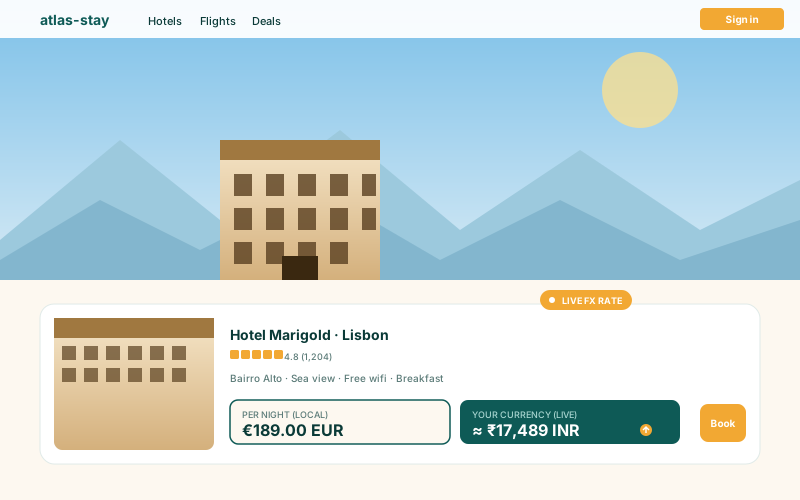
Travel booking sites
Hotel, flight, and tour pages: let visitors convert nightly rates into a familiar currency without leaving the page for a separate currency lookup.
Embed a live exchange-rate converter with 20+ major world currencies, BTC, ETH, and SOL where selected, and 10 ready-made layouts.
Built for no-code website teams























Live demo, not a screenshot. Pick currencies, change layouts, restyle it. What you see here is what ships to your site.
Before and after Poper
Pick your base currency and default target currency in the Poper builder, then embed the converter. Supported list layouts also let you choose which currencies appear in the dropdown or list.
 Before
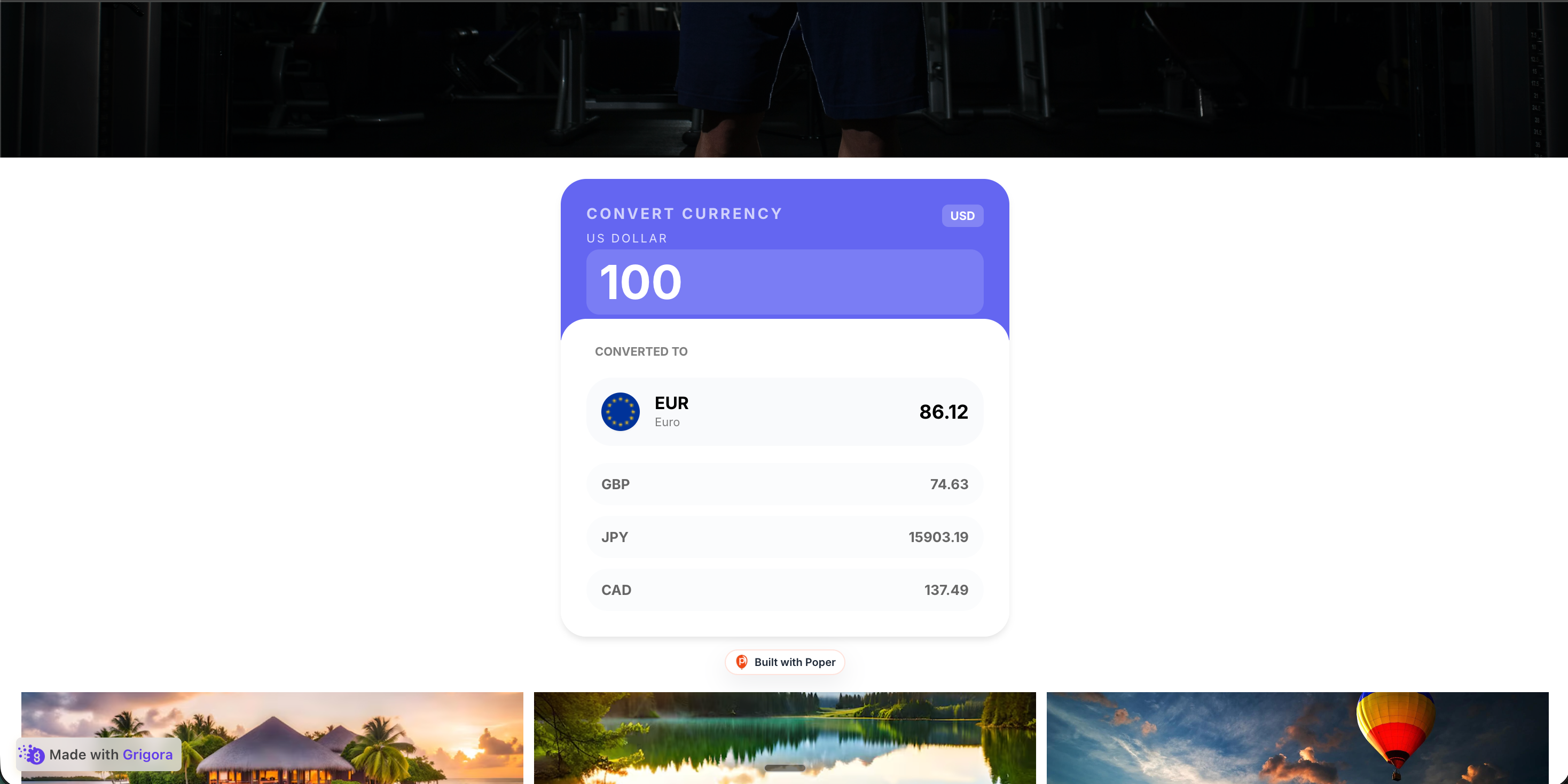 Poper widget live
Mockups for illustration. Style the widget to match your site and embed in 90 seconds.
How to use it
Choose currencies, select a layout, and embed where your Poper snippet is supported.
Choose your base currency (USD, EUR, GBP, JPY and more), then set the default target currency. Layouts that use an enabled-currency list can show a focused set of supported currencies.
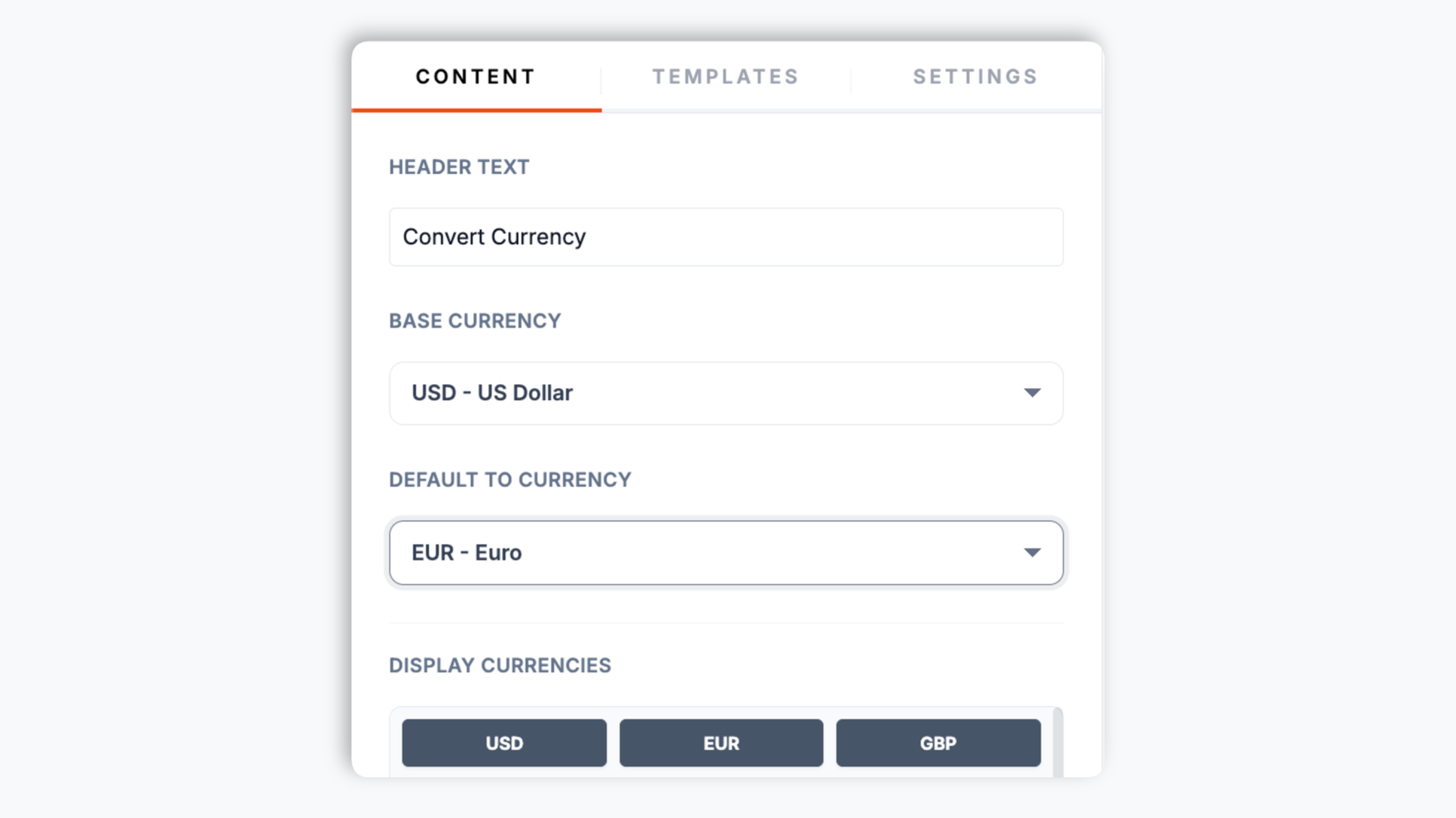
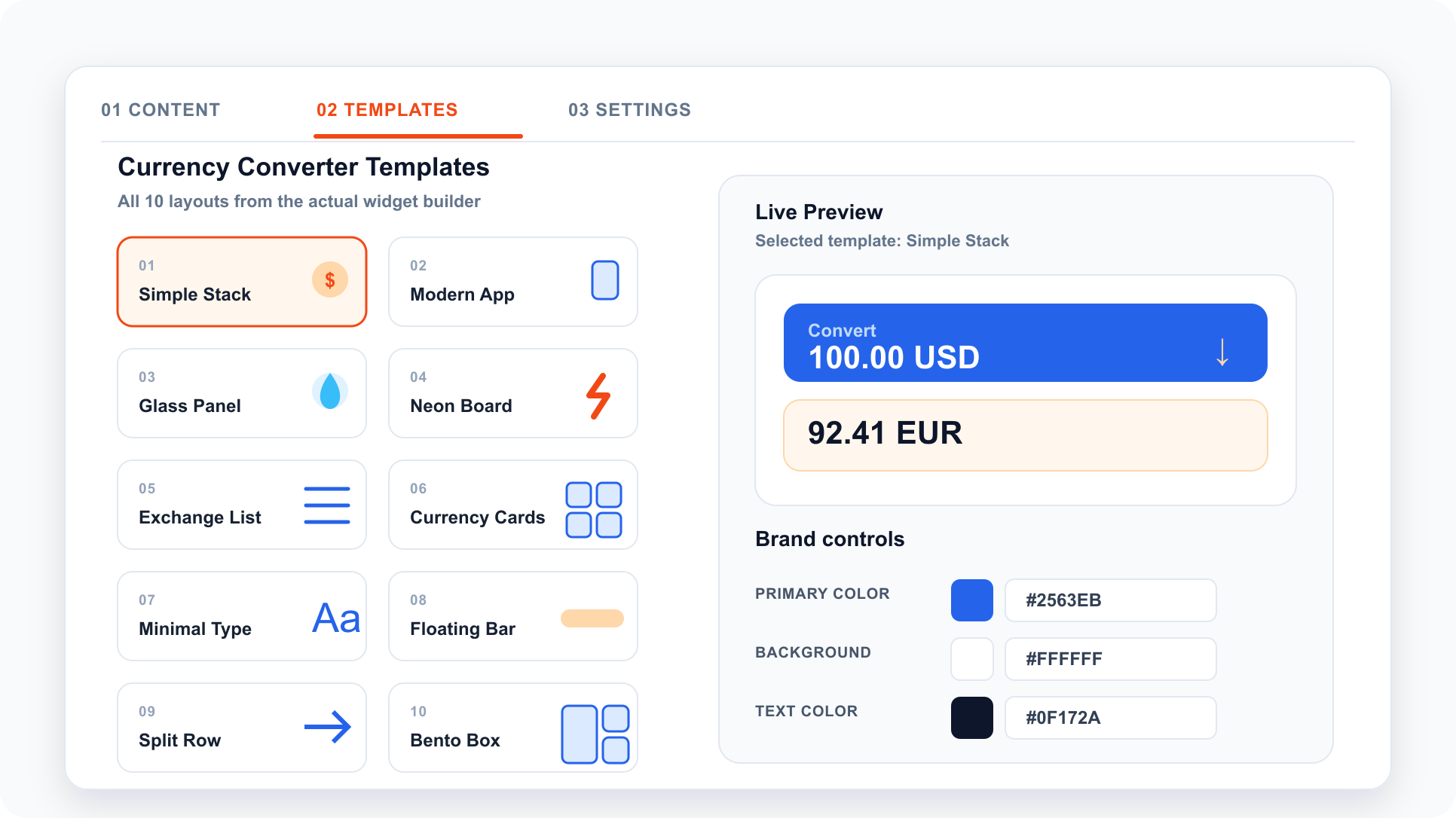
Pick from 10 layouts: Simple Stack, Modern App, Glass Panel, Neon Board, Exchange List, Currency Cards, Minimal Type, Floating Bar, Split Row, Bento Box. Available styling controls vary by layout.
Paste the Poper embed snippet into your site. Works anywhere your Poper embed snippet is supported.

Works everywhere
Drop-in install on WordPress, Shopify, Wix, Squarespace, Webflow, Framer, Ghost, and any HTML-friendly stack. No build step, no developer needed.


Plus 250+ other platforms via the embed snippet. If your site can render a <script> tag, it can render the Currency Converter Widget for Website: Live FX Rates, 10 Layouts.
Six things that matter when you embed live FX rates, not 30 features no one uses.
Visitors enter an amount, pick two currencies, and see the converted value instantly. Rates are served from widget data or Poper's backend endpoint when needed. The widget covers 20+ major world currencies plus BTC, ETH, and SOL where included, with enabled-currency lists on supported layouts.
Major world currencies including USD, EUR, GBP, JPY, AUD, CAD, CHF, CNY, INR, BRL, ZAR, and more, each with a country flag icon. BTC, ETH, and SOL can appear in supported selectors when those codes are included in the layout's enabled currency list.
Pick the base currency and the default target currency so the converter opens on the pair that fits your audience.
Simple Stack, Modern App, Glass Panel, Neon Board, Exchange List, Cards, Minimal, Floating Bar, Split Row, Bento Box. Switch any time.
Embed where your Poper snippet is supported, then validate performance on your own page.
The currency picker includes a type-to-search box so visitors can jump straight to the currency they want instead of scrolling. Each option shows the currency code, full name, and a flag or coin icon.
Use cases
Four buyer types who get the most lift from embedding Currency Converter Widget for Website: Live FX Rates, 10 Layouts on their site.
Hotel, flight, and tour pages: let visitors convert nightly rates into a familiar currency without leaving the page for a separate currency lookup.
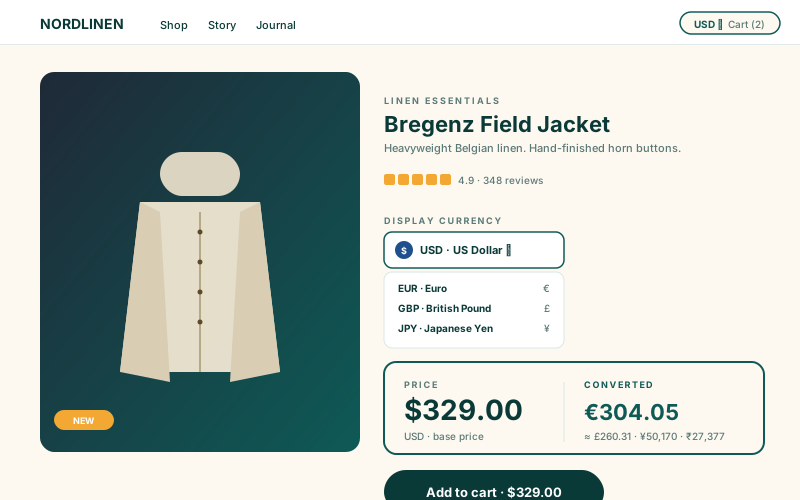
Show a converter near product prices so international shoppers can estimate the value in a familiar currency before checkout.
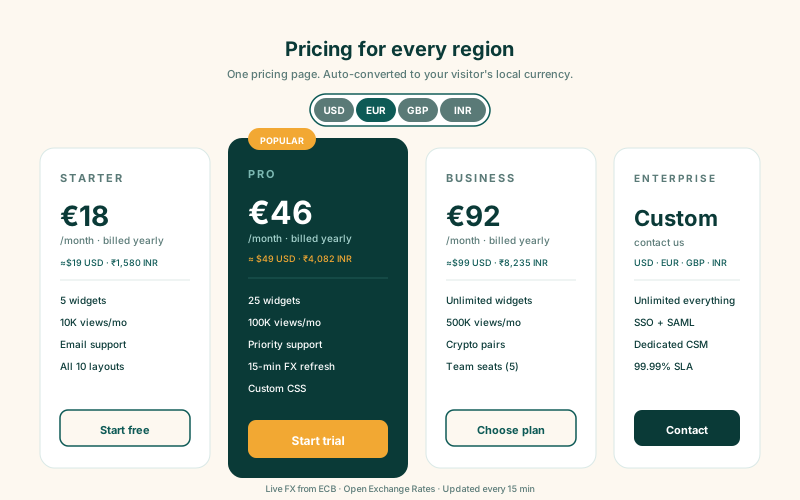
List your USD pricing once and let visitors convert it to EUR, GBP, JPY, INR, and the other major currencies they care about. Closes the cognitive gap for international buyers without splitting your pricing page into geo-redirected versions.
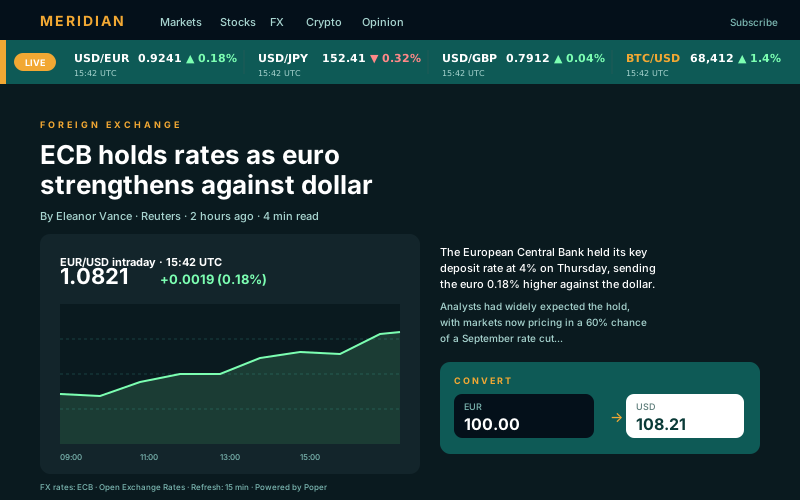
Inline converters inside articles plus a list layout that displays several supported rates against your base currency. Include BTC, ETH, or SOL when those codes fit the page.
Most converter options are either ad-supported, paywall multi-currency, or come with a single fixed layout. Here is how the popular ones stack up.
| Recommended Poper | Wise (TransferWise) | XE.com | Elfsight | |
|---|---|---|---|---|
| Poper workspace available | Limited | |||
| Live exchange rates | ||||
| Major world currencies (20+) | ||||
| Crypto pair support (BTC, ETH, SOL) | Supported codes | |||
| 10 layouts included | 1 fixed | 1 fixed | Few layouts | |
| Layout-specific design controls (colors, radius, shadow) | Limited | |||
| Choose which currencies appear | Supported layouts | Limited | ||
| Branding behavior follows your workspace settings (no upstream logo) | Paid only | |||
| Plan-dependent currency widgets | Plan details vary | No-code + branded | No-code + ads | Vendor pricing varies |
| Bundled with popups, forms, quizzes, more widgets |
Comparison reflects external competitor positioning. Verify current details on each provider's site.
International ecommerce, travel, B2B SaaS, and crypto brands who switched from broken converter widgets to Poper.
“We added the Poper currency converter next to our product prices. International shoppers can estimate what an item costs in a selected currency without leaving the page.”

“The Exchange List layout was exactly what our travel pages needed. It shows several currencies against USD at once, and we trimmed the dropdown to just the markets we sell to.”

“The converter matched our selected layout and brand controls, and we validated performance after embedding it.”

Pricing
All plans are billed yearly. Each card shows the per-month equivalent. Start free, then upgrade only when you need more campaigns, websites, or AI credits.
Yearly billing · save up to 40%Essential lead capture for solo creators and growing businesses.
billed $180/year
Full engagement suite with A/B testing, gamification & unlimited leads.
billed $348/year
Unlimited everything with white-label, API access & advanced analytics.
billed $948/year
Prices shown for the 50k monthly visitor tier on yearly billing. A Free Forever plan ($0) and a custom Enterprise plan are also available. No contracts, cancel anytime.
Currency conversion is one of the most common lookup tasks for international visitors. Embedding a live converter on your own site keeps that estimate close to the price, itinerary, article, or pricing table the visitor is already reading. This guide walks through what actually matters when you add a currency converter widget to your website in 2026: how an embedded converter differs from a money-transfer service, why exchange rates are reference rates rather than the price a visitor will be charged, which currencies are worth exposing, where BTC, ETH, and SOL fit, and how to place and style the widget so it is useful on travel, ecommerce, and pricing pages.
An embedded currency converter widget has one job: let a visitor see what an amount in one currency is worth in another, without leaving your page. The Poper currency converter handles that job well. The visitor types an amount, picks two currencies, and gets the converted value using a live exchange rate. What it is not is a money-transfer or payment service. It does not move money, hold balances, or charge the visitor anything; it simply displays a rate and a calculation. That distinction matters for how you present it. The number the widget shows is a market reference rate, useful for orientation (roughly how much is this hotel in my currency, roughly what does this plan cost me), not a quote for a transaction. When a visitor actually pays, their bank or card network applies its own rate and fees. So the right place for the widget is anywhere a visitor is sizing up a price: a travel listing, a product page, a SaaS pricing table. It keeps the do-the-math moment on your site instead of sending the visitor to a search engine.
An embedded converter should be framed as an orientation tool, not a payment quote. The amount shown by the widget is useful for helping visitors estimate scale, but the final charged amount can depend on the visitor's bank, card provider, payment processor, or checkout flow. If your site is in a regulated space such as travel or finance, add your own note near the widget explaining that the displayed rate is indicative.
More currency options is not always better. A visitor scanning a dropdown of dozens of unfamiliar codes can hesitate, and a long list is slower to scan on mobile. The Poper converter covers 20+ major world currencies (USD, EUR, GBP, JPY, AUD, CAD, CHF, CNY, HKD, NZD, SEK, KRW, SGD, NOK, MXN, INR, RUB, ZAR, TRY, BRL and more) plus BTC, ETH, and SOL. Some layouts use an enabled-currency list, so a US store that ships to the UK, Canada, and the EU can show just USD, GBP, CAD, and EUR if that matches its buyers. Always keep your own base currency and the few top markets visible, and trim the rest when the selected layout supports it. The searchable dropdown helps either way, since a visitor can type a code instead of scrolling.
The converter includes BTC, ETH, and SOL as supported currency codes. Include those codes when your audience genuinely expects them, for example a fintech product, a Web3 project, a crypto-aware merchant, or a finance or markets publication. Crypto prices can be more volatile than fiat exchange rates, so if you put a crypto code on a page where a visitor might treat the figure as a firm price, add a short note of your own that the crypto rate is indicative. For fiat-only sites, keep the enabled list focused on fiat currencies.
Where you put the converter matters as much as having one. On a travel listing or a product page, place it close to the price the visitor is evaluating so the conversion tool is easy to find. The Floating Bar layout works well as a sticky footer on long-scroll pages, while the Exchange List and Currency Cards layouts are good for a dedicated rates section or a finance article. Available styling controls vary by layout and can include color, corner radius, shadow, and padding. Pick a layout that fits the surrounding page and test the final placement with your own visitors.
A currency converter widget is an embeddable script that displays live exchange rates and lets visitors convert between currencies directly on your website. The Poper currency converter covers 20+ major world currencies plus BTC, ETH, and SOL where selected, uses rates served through Poper, and ships with 10 layouts.
Last fact-checked: . We re-verify every quarter.
Tutorial
A quick walkthrough of setting up and embedding this widget.
Tutorial video coming soon
Can't find the answer you're looking for? Chat with our support team.
Contact SupportLet visitors convert prices into a selected currency on your page.
Free plan available forever