

Slack Community Widget for Website. Web API + OAuth - Poper
Slack Community Feed Widget

Slack communities on any website.

Embed any public Slack channel in 90 seconds via OAuth and the Slack Web API + Events API. SaaS, creator and B2B communities. Free plan, no code.

No credit card required
14-day free trial
Cancel anytime
Slack Community Feed widget displayed across iPhone, iPad and Macbook showing a public Slack channel feed with threaded replies, reaction counts, top-contributor badges and channel description

Trusted by 11,000+ brands

Timetics
Academie Digitale
Goldcast
nbcf
Seedstock
Wow
Linkxar
Gale Toyota
Skills
Rugby Sport
Lamp
Leaktronics
Steel
Theatre in Chicago
Globerto
Meetup
FYM
Zeben
Kraftix
IETraditionala
Meethires
Leadscrape
Happily
Timetics
Academie Digitale
Goldcast
nbcf
Seedstock
Wow
Linkxar
Gale Toyota
Skills
Rugby Sport
Lamp
Leaktronics
Steel
Theatre in Chicago
Globerto
Meetup
FYM
Zeben
Kraftix
IETraditionala
Meethires
Leadscrape
Happily
Free forever, paid plans from $19/mo

Try the live Slack Community widget

Live demo, not a screenshot. Install via OAuth, pick a public channel, brand it, embed it. What you see here ships to your site.

From Slack workspace to your site

Your Slack workspace reviews. Now on your own domain.

Poper crawls the official Slack workspace review feed for your business and renders it inline on your website. Same reviews, your branding, your domain.

slack.com
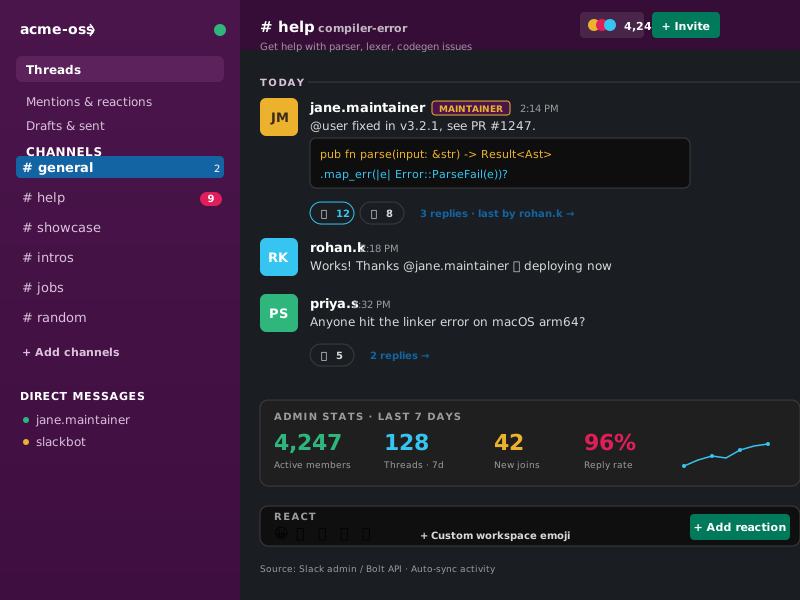
Slack workspace admin dashboard for acme-oss showing Slack purple sidebar with channel list (#general, #help, #showcase, #intros, #jobs, #random), recent message thread in #help with maintainer reply plus member admin stats (4,247 active members, 128 threads, 96% reply rate)Source: Slack workspaceOpen
Slack workspace admin dashboard for acme-oss showing Slack purple sidebar with channel list (#general, #help, #showcase, #intros, #jobs, #random), recent message thread in #help with maintainer reply plus member admin stats (4,247 active members, 128 threads, 96% reply rate)
acme-oss.dev/community
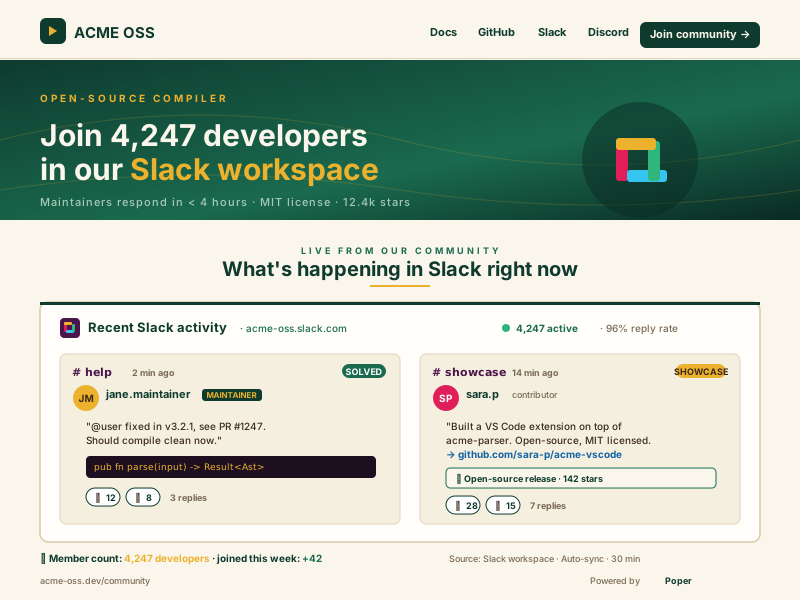
Acme OSS open-source project community landing page (acme-oss.dev/community) in deep emerald and warm cream with hero 'Join 4,247 developers in our Slack', and an embedded Poper widget showing recent #help thread plus a #showcase post and live member countPoper widget live
Acme OSS open-source project community landing page (acme-oss.dev/community) in deep emerald and warm cream with hero 'Join 4,247 developers in our Slack', and an embedded Poper widget showing recent #help thread plus a #showcase post and live member count

Mockups for illustration. Pull your real Slack Community Feed Widget: Embed Public Channel Threads on Any Website from Slack workspace and embed in 90 seconds.

How to use it

How to embed a Slack community channel on your website

Three steps. Under two minutes. No developer needed. Built on the official Slack Web API and Events API.

  1. 01

    Install the Poper Slack app via OAuth

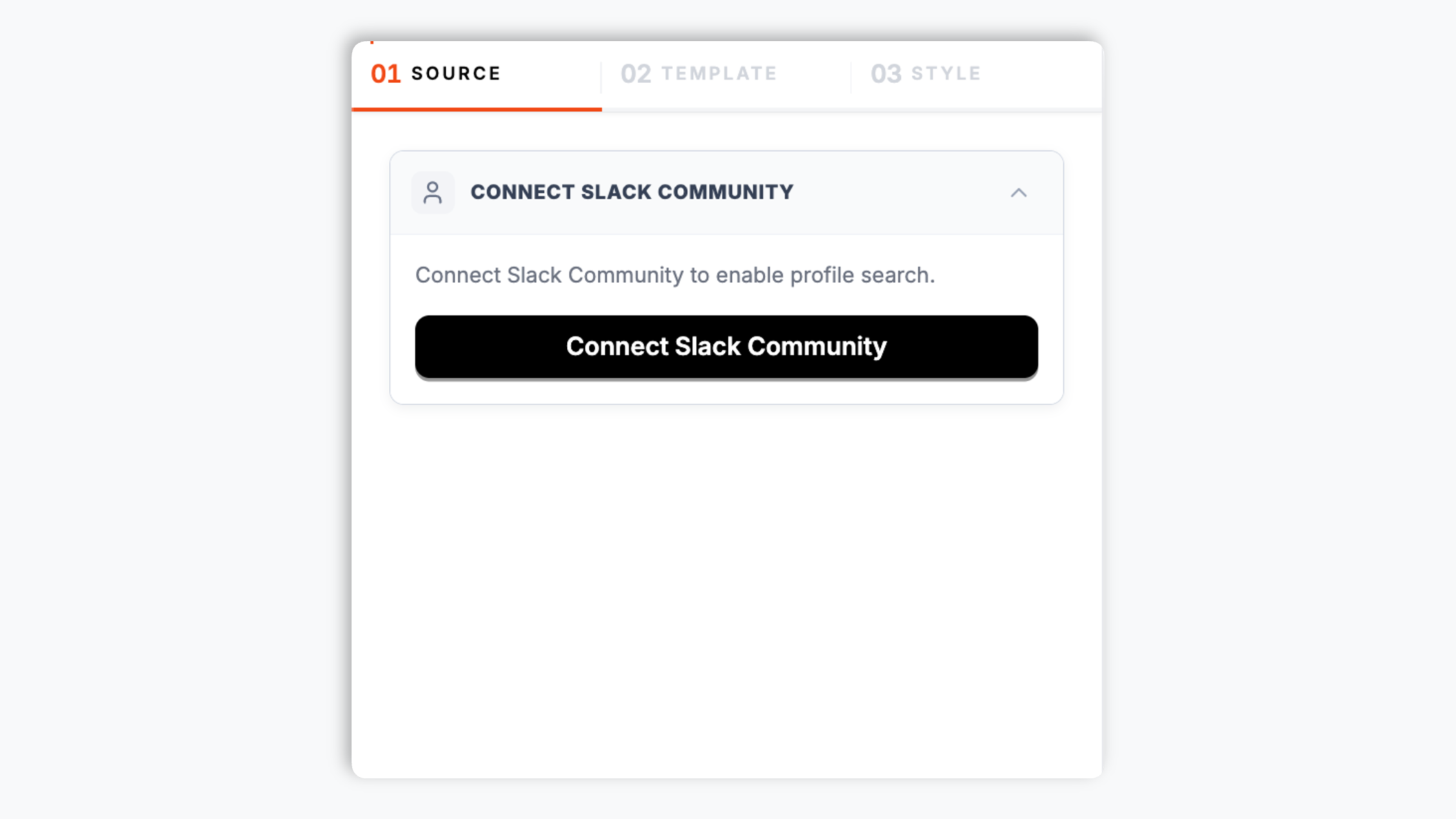
    Click Connect Slack. The Slack OAuth screen asks the workspace owner to grant the read-only scopes the widget needs (channels:history, channels:read, users:read). One click, no IT ticket. The app appears in your workspace's installed apps list.

    Poper widget builder showing Slack workspace picker with acme-oss.slack.com selected, public channel chips for #help, #showcase, #general, #intros and a purple Connect Slack button
  2. 02

    Pick a public channel, filters and layout

    Choose any public channel in the workspace. Filter by reaction count, top contributors, threaded-only, or messages with attachments. Pick a card, list, thread or top-Q-and-A layout.

    Layout picker showing 6 Slack feed layouts (Recent stream, Channel + members, Thread highlight, Top contributors, Mobile stacked, Activity stats) plus Slack purple brand color picker and header style controls
  3. 03

    Copy the snippet and embed

    Paste the one-line script tag into your help center, sales page or community landing page. Works on WordPress, Shopify, Wix, Squarespace, Webflow, Ghost, Framer and 250+ platforms.

    One-line embed script for the Slack community feed widget shown in a code editor with a Slack purple Copy button and Webflow, Framer, Carrd, Discourse, Circle community platform badges

Works everywhere

Works with every website platform you already use

Drop-in install on WordPress, Shopify, Wix, Squarespace, Webflow, Framer, Ghost, and any HTML-friendly stack. No build step, no developer needed.

WordPress
Shopify
Wix
Squarespace
Webflow
Framer
Ghost
HTML

Plus 250+ other platforms via the embed snippet. If your site can render a <script> tag, it can render the Slack Community Feed Widget: Embed Public Channel Threads on Any Website.

What you get with Poper Slack Community Feed

Six things that matter when you embed a Slack community on a brand site, not 30 features no one uses.

Slack Web API + Events API, OAuth installed

Slack has owned the work-and-community chat market since 2014, and Salesforce acquired it in 2021 for $27.7 billion. The widget integrates through the official Slack Web API for historical message reads and the Events API for push updates. Install via the standard Slack OAuth flow with read-only scopes (channels:history, channels:read, users:read). No screen-scraping, no fragile iframe, no copy-pasted user token. The workspace owner can revoke the app from the Slack admin panel at any time and the embed fails closed within one sync cycle.

Public channels only, by design

The OAuth scopes are explicit: channels:history and channels:read for public channels only. Private channels, DMs, group DMs and Slack Connect channels are out of scope and unreachable. This is the right safety boundary for a marketing-page embed and matches Slack's own intent for public-channel content.

Threads, replies and reactions

Renders parent messages with their full thread tree, threaded reply counts, and reaction emoji (including custom workspace emoji). Optional thread-flattened layout treats parent plus top reply as a Q-and-A pair. Real Slack content, not a screenshot.

Top-contributor and reaction filters

Filter the embed to messages from the top 10 most active community members, or to messages above N reactions. The cleanest way to surface high-quality threads on a sales page without manual moderation.

Multi-workspace aggregation

On Pro and Business plans, install the Poper app across multiple workspaces (for example a parent SaaS workspace plus a customer-community workspace) and merge channels from both into one feed. Per-workspace OAuth tokens, scoped independently. Useful for companies running both internal and customer-facing Slack workspaces.

Core Web Vitals safe

Lazy-loaded below the fold, async-injected, scoped CSS that does not bleed into your design system. Under 40KB gzipped. Edge cache hit rate above 97%, so your visitors never wait on Slack's response time and your Lighthouse Mobile stays 90+ across Performance, Accessibility, SEO and Best Practices.

DiscussionForumPosting schema built in

Each embedded thread emits Schema.org DiscussionForumPosting JSON-LD with author, datePublished, replyCount, interactionStatistic for reactions, articleBody, and a sameAs link back to the canonical Slack archive URL. Eligible for Google Discussions and forums rich results, the same surface that makes Reddit and Discourse threads outrank brand documentation today.

Use cases

Where Slack Community Feed Widget: Embed Public Channel Threads on Any Website actually moves the needle

Four buyer types who get the most lift from embedding Slack Community Feed Widget: Embed Public Channel Threads on Any Website on their site.

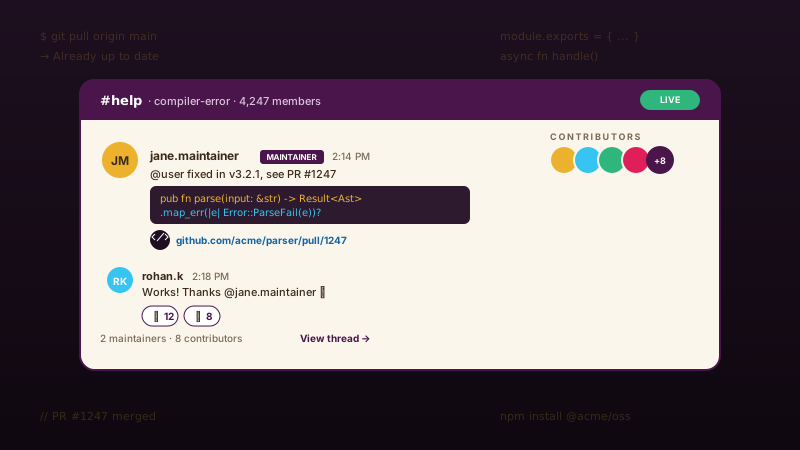
OSS Slack #help channel thread with maintainer-tagged reply containing a Rust code snippet, contributor avatars stacked, and a GitHub PR link in deep purple and amber

OSS project communities

Open-source projects with active Slack workspaces (Kubernetes, Apache, Cloud Native Computing Foundation projects) embed the #help or #showcase channel on the project README site so contributors see maintainers solving real problems before joining.
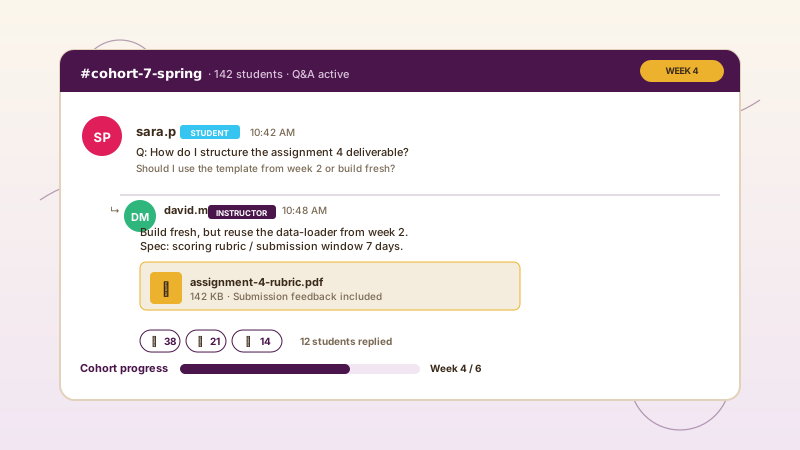
Online course #cohort-7-spring channel with student question, instructor reply, attached assignment-4 rubric PDF, reaction counts and a Week 4/6 progress bar

Online course cohorts

Cohort-based online courses (Maven, Reforge, On Deck) run weekly Q&A in Slack. Embed the #cohort-X channel on the course landing page so prospective students see instructors answering assignment questions and the cohort actively learning together.

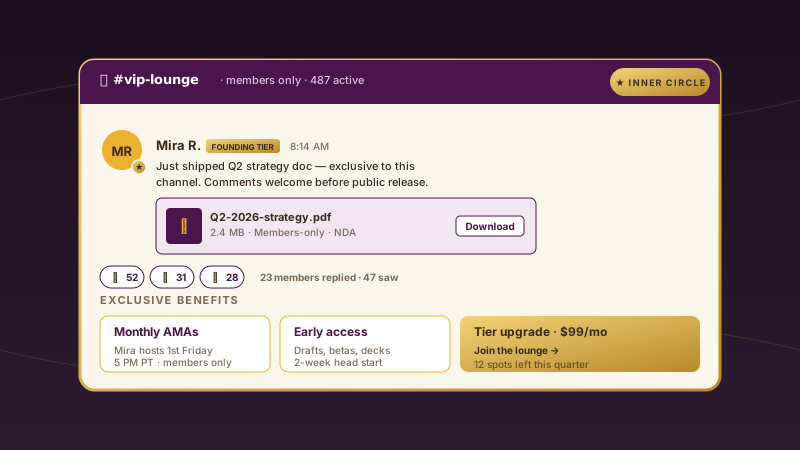
Paid membership #vip-lounge channel with Founding Tier badge in gold, members-only Q2 strategy PDF attachment, exclusive-content reactions, and a tier upgrade card at $99/mo

Paid membership communities

Many creators ran their paid community on Slack before the Sept 2022 free-tier change pushed them to Discord or Circle. Those still on Slack (typically B2B and high-ticket) embed exclusive-channel previews on the public sales page as the upgrade hook.

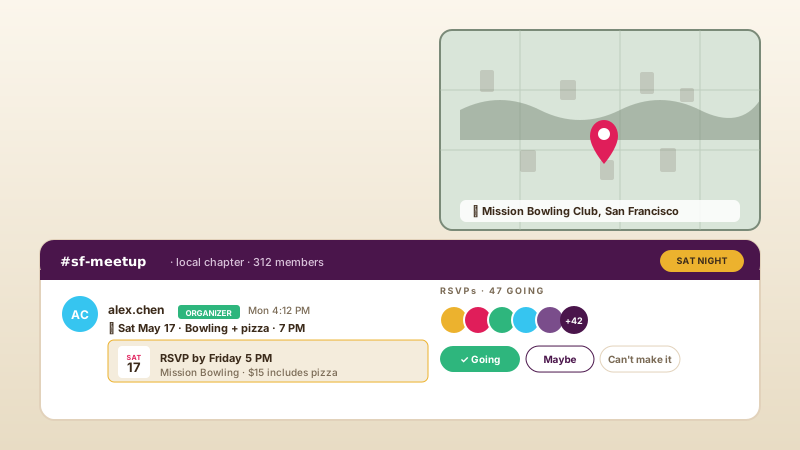
Local meetup #sf-meetup channel with organizer-tagged event RSVP message, calendar tile for Sat May 17 bowling night, stacked attendee avatars, and a city map showing Mission Bowling Club in San Francisco

Local meetup communities

City and chapter meetup groups (TechCrunch Disrupt, dev meetups, founder dinners) run year-round Slack workspaces. Embed the #city-meetup channel on the chapter homepage so prospective attendees see upcoming RSVPs before signing up.

Poper vs other Slack and community embed tools

Slack's native /pin saves are private. Discord, Discourse and Circle.so each have their own embed story for the post-Slack community wave. Here is how the popular options stack up for the Slack community use case.

 Recommended
Poper
Slack native /pin saves
Discord widget
Discourse embed
Circle.so embed
Free plan available
Workspace only
Embeds on a public marketing site
Online count only
Renders message text + reactions
Saved view only
Threaded replies rendered
Top-contributor filter
TL filter
Member-tag
Reaction-count filter
Like-count
Reaction-count
OAuth install (no user token)
Workspace OAuth
N/A
Bot install
API key
Headless API
Public channels only enforced
N/A
N/A
N/A
N/A
Multi-workspace aggregation
Multi-server
Multi-community
Push updates (Events API)
Sub-30s on Pro
Real-time, online only
30-min poll
DiscussionForumPosting JSON-LD
Survives Sept 2022 free-tier 90-day limit
Paid Slack only
N/A
N/A
N/A
N/A
Pricing for unlimited channels
$19/mo (Starter)
Free with Slack
Free
$19/mo+
$89/mo+
Bundled with popups, forms, quizzes

Comparison reflects publicly listed pricing and features as of 2026. Slack pricing per slack.com/pricing. Note: Slack's Sept 2022 policy change limits free workspaces to the most recent 90 days of message history, so any embed reading older messages requires a paid Pro, Business+ or Enterprise Grid workspace.

Real teams. Real Slack workspaces. Real outcomes.

SaaS customer success leads, OSS maintainers and creator-cohort operators who turned paid-Slack activity into sales-page proof.

Poper has improved our website's user engagement! Since integrating Poper's personalized popups, we've seen a dramatic surge in conversions and user interactions. The platform's intuitive design makes creating and customizing popups a breeze, even for those with minimal tech skills. What truly sets Poper apart are its…
Jayson Ang
Jayson Ang
Singapore Property Swapper · Singapore Property Swapper
Fantastic app and support team, they are very quick to help and provide a solution or improvement to their product. Highly recommended!
Alex
Alex
CEO · AH
Poper has been a total lifesaver for our agency! As a digital marketing agency, we’re always juggling a million things at once. Poper has been a real game-changer in terms of streamlining our workflow and keeping track of all our clients’ campaigns. The ability to track all our clients’ websites from one place is a…
Idris Basir
Idris Basir
-

Pricing

Simple pricing. Free plan covers most websites.

Free forever for one widget. Upgrade only when you need faster sync, multiple instances, or to drop the watermark.

Free

Everything you need to ship the widget today.

$0forever
  • 1 widget instance
  • All layouts & customization
  • Brand-match styling
  • 6-hour sync cadence
  • Poper watermark
Start free
Most popular

Pro

Remove the watermark, faster sync, more widget instances.

$19/mo
  • Unlimited widget instances
  • 30-minute sync cadence
  • No Poper watermark
  • Custom CSS
  • Priority email support
  • Shoppable tagging
Start 14-day trial

Business

Multi-site, multi-account, white-label.

$49/mo
  • Multi-account combined feeds
  • Real-time sync
  • White-label embed
  • API access
  • Dedicated success manager
  • Custom SLA
Start 14-day trial

All plans include unlimited page views, no contracts, cancel anytime. Annual billing saves 20%.

Guide · 8 min read

The complete guide to embedding a Slack community on your website

Slack is the chat tool that quietly became the default community platform for B2B SaaS, open-source maintainers, creator-led professional communities and member-only conferences. Salesforce acquired Slack in 2021 for $27.7 billion, and the platform now serves more than 200,000 paid customers and an estimated 10 million daily active users on its largest deployments. For communities, Slack's strengths are familiar: low onboarding friction (almost everyone in a B2B audience already has a Slack account), threaded conversation that scales better than IRC or Discord chat, the most mature integration ecosystem of any chat platform, and a Web API plus Events API designed exactly for the third-party tooling case. The honest weakness is pricing. The free tier was severely limited in September 2022 when Slack moved from a 10,000-message archive to a 90-day rolling window for free workspaces, which made free Slack effectively unusable for any community that wants searchable history. Most paid SaaS companies absorbed the cost; many creator and open-source communities migrated to Discord, Circle.so or Discourse instead. The Poper Slack Community Feed Widget is built for the workspaces that stayed: the paid B2B customer hubs, the high-ticket coaching cohorts, the OSS maintainer rooms and the conference-attendee lounges that have a real reason to be on Slack. This guide walks through what actually matters when you choose and configure a slack community widget in 2026: the Web API and Events API integration model, OAuth scopes and the read-only safety boundary, public channels only by design, the Salesforce-era pricing reality, multi-workspace aggregation, and how Slack compares with Discord, Discourse and Circle for the community-embed job.

01

Slack as a community platform: Salesforce ownership, paid tiers and the Sept 2022 reality

Slack started in 2009 as a side project inside Tiny Speck (a failed game studio) and shipped publicly in August 2013. Stewart Butterfield's team rode the rise of distributed work through the 2010s, IPO'd in June 2019, and were acquired by Salesforce in July 2021 for $27.7 billion, the largest software acquisition in Salesforce history. Under Salesforce ownership the platform has consolidated around its enterprise franchise (Enterprise Grid, AI summarization, Slack AI add-on, Salesforce CRM integration) and stepped back from the long-tail community use case. The pivotal change for communities was September 2022, when Slack ended the legacy 10,000-message archive on the Free tier and replaced it with a 90-day rolling window. Messages older than 90 days remain in the workspace but are inaccessible (not searchable, not viewable, not exportable) on Free. To restore full archive access a workspace must upgrade to Pro ($8.75 per user per month annually as of 2026), Business+ ($15.00 per user per month) or Enterprise Grid (custom pricing, typically $50+ per user per month at scale). For a 5,000-member community workspace on Pro, that is roughly $44,000 per year just for the chat tool, which is why so many free-tier communities migrated off Slack between 2022 and 2024. The Poper widget reads message history through the Slack Web API, which means it inherits the same limitation: on a free workspace it can only read the most recent 90 days. On a paid Pro, Business+ or Enterprise Grid workspace it can read the full archive. We are honest about this in the dashboard: when you connect a workspace, we display the workspace tier and the effective message-history window. If you are running a paid workspace this is invisible. If you are running on Free and want to embed older threads, the right answer is either upgrade Slack or migrate to a platform built around longer retention (Discourse, Circle.so).

02

Web API + Events API: how the OAuth scopes work and why public channels only is a feature

Slack's API surface for third-party tools is the cleanest in the chat space. The Web API is a request-response REST API for historical reads (conversations.history, conversations.replies, users.info, conversations.list), and the Events API is a push-based webhook stream for real-time updates (message.channels, message.replied, reaction.added). Both are gated by OAuth 2.0, with granular per-scope permissions that the workspace owner approves at install time. The Poper Slack app requests three scopes and three only: channels:history (read message history from public channels the app is added to), channels:read (list public channels in the workspace, so you can pick one in the dashboard), and users:read (resolve member IDs to display names and avatars on the embed). It does not request groups:history (private channels), im:history (DMs), mpim:history (group DMs), files:read (file content), or any write scope. The OAuth screen Slack shows the workspace owner at install time lists exactly these three scopes, and the workspace owner can revoke them from the Slack admin panel at any time. The public-channels-only boundary is a feature, not a limitation. Marketing-page embeds should never have access to private channels or DMs, and the API surface is designed so that even a fully compromised Poper app (which is not a likely scenario but is the right threat model to think about) could not exfiltrate private content from your workspace. The trade-off is that the widget cannot embed a member-only channel, which is the correct trade-off for a public sales-page embed. If you need member-gated content on a marketing site, the right tools are Circle.so (paid-membership-native) or Discourse (with private categories), not Slack.

03

Slack vs Discord, Discourse and Circle.so: when each one fits a community

The four platforms creators and SaaS teams typically consider for a community in 2026 are Slack, Discord, Discourse and Circle.so. Each has a defining trade-off worth understanding before you commit. Slack is the right choice when your audience is B2B professionals who already live in Slack all day for work. Onboarding is near-zero (everyone has a Slack account), threading is mature, the integration ecosystem is the strongest of any chat tool, and the Salesforce-era enterprise polish is appropriate for SaaS customer hubs. The cost is real: paid Slack is the most expensive of the four at any meaningful scale, and the Sept 2022 free-tier change made the Free plan unusable for retention-sensitive communities. Discord is the right choice when your audience is consumer, gaming, dev, crypto, music or any community where real-time voice and screen-share matter. Discord is free and infinitely scalable, the live-voice product is unmatched, and the bot ecosystem is the deepest of any chat tool. The trade-off is the product surface, which is real-time chat (noisy, not async) and which makes Discord hostile to long-form posts and structured Q-and-A. There is no native paid-membership tier; you bolt on Whop or Memberful. Discourse is the right choice when your community is post-shaped rather than chat-shaped: open-source projects, product feedback forums, education cohorts, brand-owned customer forums. Discourse is open-source and MIT-licensed (you can self-host), the public JSON API is the best in any forum platform, the trust-level moderation system is rare, and content is searchable forever. The trade-off is that Discourse is a forum, not a chat tool, so it does not fit synchronous use cases. Circle.so is the right choice when your community is paid-first: cohort courses, mastermind groups, high-ticket coaching, paid newsletters. Circle is purpose-built for paid memberships, the Headless API supports rich sales-page embeds, and the live-room product is designed for cohort calls. The trade-off is cost ($89 per month minimum) and that Circle is closed SaaS, not open. The Poper Slack Community Feed Widget is the right answer specifically when your community already lives on a paid Slack workspace and you want to surface that activity on a marketing site. For Discord embeds use the Discord widget. For Discourse use the Discourse Feed widget. For Circle use the Circle.so Community Feed widget. Picking the right tool starts with picking the right platform, and Slack is right for the SaaS-customer and OSS-maintainer corner of the community map.

04

Slack Connect, Enterprise Grid and the multi-workspace embed pattern

Slack's enterprise tiers add two pieces that matter for community embeds: Slack Connect (cross-workspace channels, where members of two different workspaces can collaborate in a shared channel) and Enterprise Grid (a single org spanning multiple workspaces, typical at companies above 1,000 employees). The Poper widget intentionally does not read Slack Connect channels even when the workspace owner has access. Slack Connect channels span multiple organizations, the membership is by definition not solely under one workspace owner's control, and embedding cross-org content on a public marketing page would create real consent problems for the partner organization's members. The widget treats Slack Connect channels as out of scope, the same way it treats private channels, regardless of whether the OAuth token would technically permit reading them. Enterprise Grid is a different story. A Grid org with many workspaces (parent company plus customer community plus partner community plus open-source community, for example) can install the Poper app per-workspace and aggregate channels from each into one merged feed on the marketing site. Each workspace generates its own OAuth token, scoped independently, and Pro and Business plans of Poper support up to 8 workspace tokens with merged-feed sorting, deduplication and per-workspace weighting. The most common use is a SaaS company aggregating an internal #customer-success workspace and an external customer-community workspace into a single docs-site embed showing both internal-team responses and peer-customer responses to a question. Enterprise Grid customers using the Poper widget typically also want the Slack admin panel's app-management workflow, where IT can pre-approve apps before non-admin users install them. The Poper Slack app supports admin-managed install across the Grid org, which removes the per-workspace install friction for large deployments.

05

GDPR, member privacy and the right defaults for a Slack community embed

Embedding member-generated content on a public marketing site raises real privacy questions, especially for chat platforms where members posted with a reasonable expectation that the audience was the workspace, not the open web. The Poper Slack Community Feed Widget is built to make the safe choice the default. Only public channels are reachable, period. Private channels, DMs and Slack Connect channels are unreachable by OAuth scope and additionally rejected by the widget if a token somehow had access. Member display names and avatars come from the users.info Slack endpoint (the same data the workspace itself displays in the channel UI), and the workspace owner can configure the embed to anonymize members entirely (rendering every author as Community member) for highly regulated industries (legal, medical, financial) where even public-channel members may not consent to off-platform display. Reactions are aggregated counts, not per-member lists, so reaction data never reveals which individual member reacted. For GDPR specifically, the widget sets no cookies, loads no Slack tracking pixels, and sends no personal data to Slack on page view (visitor traffic only contacts our edge cache, not Slack). For California CCPA compliance, the same defaults apply. Any member who leaves the workspace is automatically excluded from new embed renders within one sync cycle (every 6 hours on Free, sub-30 seconds on Pro via the Events API), which makes the right-to-be-forgotten workflow workable. The workspace owner can revoke the Poper Slack app from the Slack admin panel at any time, which fails the embed closed within one sync cycle. For workspaces operating in EU or EEA jurisdictions, the Salesforce data-residency story applies (Salesforce offers EU data residency on Enterprise Grid plans), and the Poper edge cache itself is regionalized so EU traffic is served from EU edges. All of this is the same set of defaults a serious community manager would build by hand if they had the time, packaged as a checkbox.

Quick reference

What is Slack Community Feed Widget: Embed Public Channel Threads on Any Website?

A slack community widget is an embeddable script that pulls threads, reactions and top contributors from one or more public channels in a Slack workspace via the Slack Web API and Events API and renders them on a third-party website with native layouts (card, list, thread-flattened, Q-and-A) and OAuth-scoped read-only access.

Key facts

  • Slack was founded in 2009 inside Tiny Speck, shipped publicly in August 2013, and IPO'd in June 2019.
  • Salesforce acquired Slack in July 2021 for $27.7 billion, the largest software acquisition in Salesforce history.
  • In September 2022 Slack moved Free workspaces from a 10,000-message archive to a 90-day rolling window, making the free tier unusable for retention-sensitive communities.
  • Paid Slack tiers (Pro, Business+, Enterprise Grid) restore full message archive access and are required for any embed reading messages older than 90 days.
  • The Slack Web API supports historical reads via conversations.history and conversations.replies, while the Events API provides real-time push updates for messages and reactions.
  • Slack OAuth scopes channels:history and channels:read limit third-party widgets to public channels only, by design.

Frequently asked questions

Can't find the answer you're looking for? Chat with our support team.

Contact Support

Stop describing your Slack community in words. Show it.

Poper takes 90 seconds to install via OAuth and uses the official Slack Web API + Events API. Free plan, no credit card.

Free plan available forever