
DTC storefronts
Show a steady stream of recent purchases on collection and product pages to keep browse momentum high.
Turn purchases into lightweight corner toasts: buyer name, city, product, and time ago. You add each notification yourself, so you control exactly what shows.
Built for no-code website teams























Live demo, not a screenshot. Tune fields, styling, and motion.
How to use it
Two steps. Under two minutes. No code required.
Add each sale notification yourself in the builder: buyer first name, last name, city, state, product name, and an optional product image. Then pick alignment, animation, colors, and typography so the toast feels native to your theme.
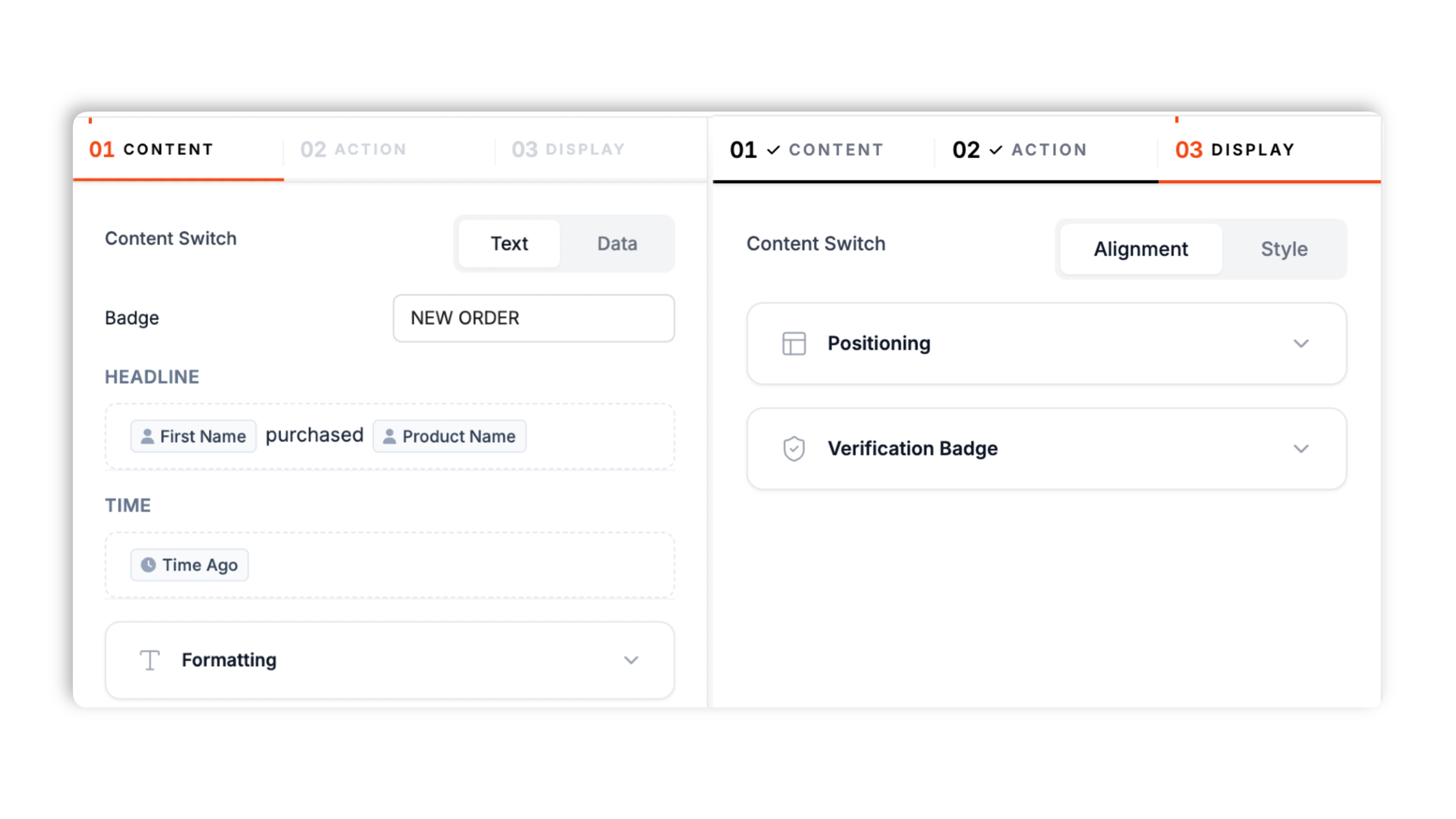
Paste the Poper embed snippet into a supported page. Scoped CSS keeps your layout stable.

Works everywhere
Drop-in install on WordPress, Shopify, Wix, Squarespace, Webflow, Framer, Ghost, and any HTML-friendly stack. No build step, no developer needed.


Plus 250+ other platforms via the embed snippet. If your site can render a <script> tag, it can render the Recent Sale Notification Widget for Website. No-code - Poper.
Everything you need for tasteful, on-brand purchase notifications.
Add each sale notification yourself in the builder with buyer name, city, state, product, and time text. Nothing is generated for you, which means you decide exactly what every visitor sees on the page.
Place the toast in any of the four desktop corners, and choose top, bottom, or center on mobile. A compact mobile layout keeps it readable on small screens.
Upload a product image per notification. When you skip it, the widget shows an icon matched to the product name, with a shopping-bag fallback.
The widget cycles through every notification you added. Tune display duration, delay between toasts, and optionally randomize the order.
Designed to render as an embedded widget with its own styles. Hover pauses the toast so visitors can read it.
Set background, text, and accent colors, choose a shadow preset and font, add an optional call-to-action button, and show an optional verified badge.
Use cases
Four buyer types who get the most lift from embedding Recent Sale Notification Widget for Website. No-code - Poper on their site.
Show a steady stream of recent purchases on collection and product pages to keep browse momentum high.
Add a set of notifications for a limited release and let the widget rotate through them during the campaign.
Highlight different SKUs by adding one notification per product, each with its own image and copy.
Place a recent-purchase toast near the buy button on a sales page to reinforce that others are signing up.
Design control, performance, and a real free plan, compared with the popular widget providers.
| Recommended Poper | Fomo | Proof Pulse | TrustPulse | |
|---|---|---|---|---|
| Poper workspace available | Limited | Limited | Limited | |
| Add notifications yourself | ||||
| Product image per notification | Paid | DIY | ||
| Auto-matched product icon fallback | ||||
| Rotation and timing controls | ||||
| Desktop and mobile placement presets | Partial | Partial | Partial | |
| Available styling controls | Paid | Paid | Limited | |
| Bundled with popups + forms | ||||
| Paid plan details | Plan details vary | Vendor pricing varies | Vendor pricing varies | Vendor pricing varies |
Comparison reflects external competitor positioning. Verify current details on each provider's site.
Operators who wanted a clean, on-brand purchase notification.
“We swapped a clunky ticker for Poper's recent-sale toast. Adding each notification ourselves means the copy always matches our brand voice.”

“Name, city, and product is the perfect amount of detail. The auto-matched product icons saved setup time on common notification types.”

“Setup took ten minutes. We styled the toast to match our theme, embedded the snippet, and it was live on the product page the same day.”

Pricing
All plans are billed yearly. Each card shows the per-month equivalent. Start free, then upgrade only when you need more campaigns, websites, or AI credits.
Yearly billing · save up to 40%Essential lead capture for solo creators and growing businesses.
billed $180/year
Full engagement suite with A/B testing, gamification & unlimited leads.
billed $348/year
Unlimited everything with white-label, API access & advanced analytics.
billed $948/year
Prices shown for the 50k monthly visitor tier on yearly billing. A Free Forever plan ($0) and a custom Enterprise plan are also available. No contracts, cancel anytime.
A recent-sale notification is a small corner toast that shows a recent purchase: a buyer name, a city, a product, and a time. The Poper recent-sale widget is a content widget you fill in yourself, so you decide exactly which purchases appear and how they read. This guide covers what the widget shows, how rotation and timing work, how to brand it, and where to place it.
You add notifications one at a time in the builder. Each notification can include a first name, last name, city, state, product name, optional product image, and time text. The widget then cycles through every notification you added, one toast at a time, using the display duration and delay you choose.
If you upload a product image for a notification, the toast shows it. If you do not, the widget picks an icon based on the product name (for example a headphones icon for a product with headphone in the name) and falls back to a shopping-bag icon. This keeps every toast looking complete without extra work.
Choose any of the four desktop corners and a top, bottom, or center position on mobile, plus an enter animation. A compact mobile layout keeps the toast small on phones, and hovering the card pauses the rotation so visitors can finish reading.
Set background, text, and accent colors, pick a shadow preset, choose a font, and resize the card with a zoom control. You can add an optional call-to-action button with its own label and link, and show or hide the verified badge and close button.
Place the widget on product pages, collection pages, and sales pages where a visitor is deciding whether to buy. Add enough notifications to keep the rotation varied, and use the remember-visitor setting so returning visitors are not shown the same sequence every session.
A recent-sale widget displays short purchase notifications, with a buyer name, city, product, and time, in a small corner toast that you fill in yourself.
Last fact-checked: . We re-verify every quarter.
Tutorial
A quick walkthrough of setting up and embedding this widget.
Tutorial video coming soon
Can't find the answer you're looking for? Chat with our support team.
Contact SupportPoper turns your sale notifications into tasteful toasts in under two minutes.
Free plan available forever