

TripAdvisor Reviews Widget for Website. Free - Poper
TripAdvisor Reviews Widget

TripAdvisor hotel reviews on any hospitality site.

Embed your TripAdvisor hotel rating and rotating guest reviews in 90 seconds. Paste your hotel's TripAdvisor URL, pick a layout, and embed. Free, no code.

No credit card required
14-day free trial
Cancel anytime

Trusted by 11,000+ hospitality and travel brands

Timetics
Academie Digitale
Goldcast
nbcf
Seedstock
Wow
Linkxar
Gale Toyota
Skills
Rugby Sport
Lamp
Leaktronics
Steel
Theatre in Chicago
Globerto
Meetup
FYM
Zeben
Kraftix
IETraditionala
Meethires
Leadscrape
Happily
Timetics
Academie Digitale
Goldcast
nbcf
Seedstock
Wow
Linkxar
Gale Toyota
Skills
Rugby Sport
Lamp
Leaktronics
Steel
Theatre in Chicago
Globerto
Meetup
FYM
Zeben
Kraftix
IETraditionala
Meethires
Leadscrape
Happily
Free forever, yearly plans from $15/mo

Try the live widget

Live demo, not a screenshot. Style it, brand it, embed it. What you see here is what ships to your hotel site.

From TripAdvisor to your site

Your TripAdvisor reviews. Now on your own domain.

Poper crawls the official TripAdvisor review feed for your business and renders it inline on your website. Same reviews, your branding, your domain.

tripadvisor.com
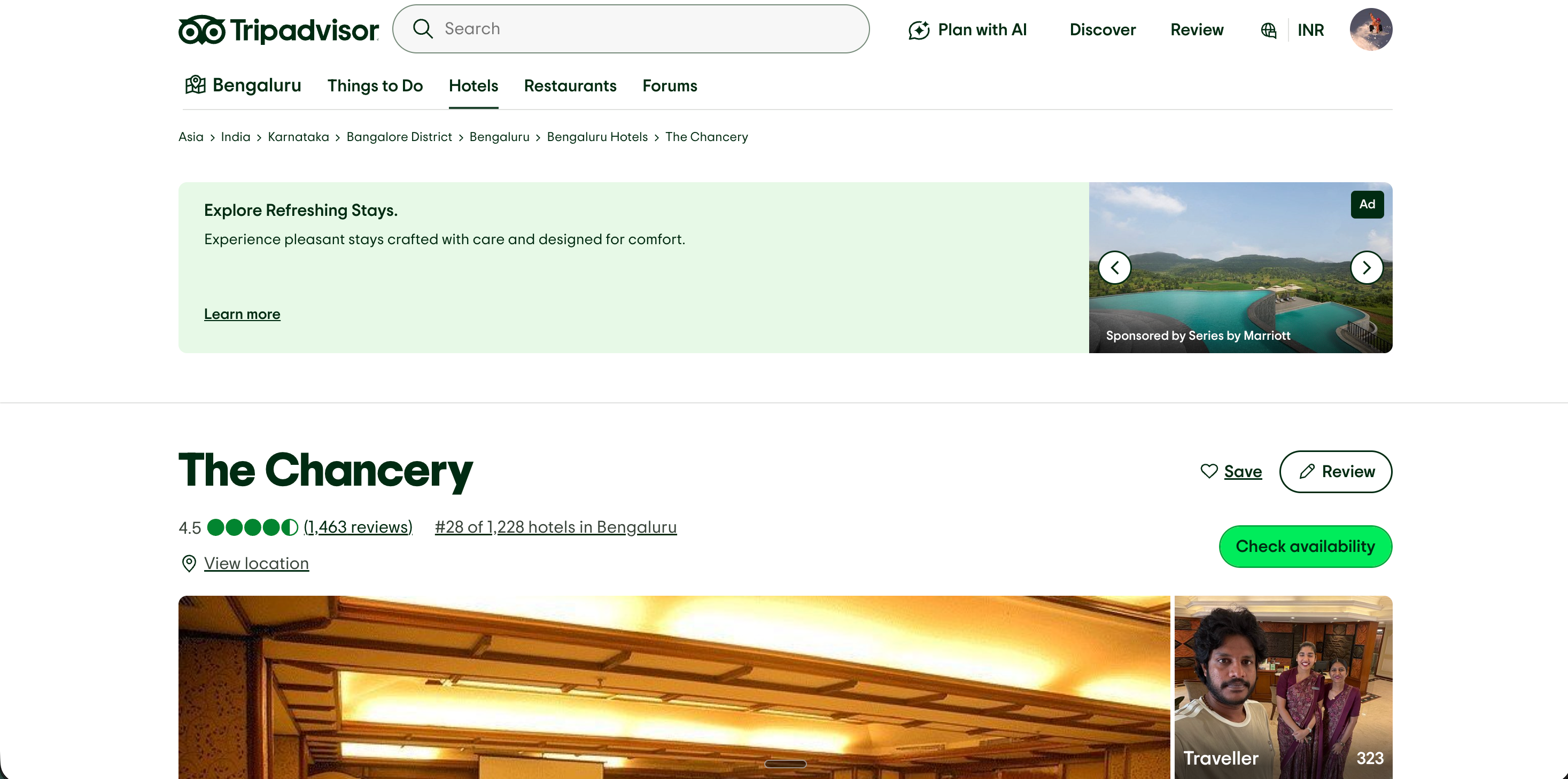
TripAdvisor.com hotel page for Aurora Boutique Hotel showing a 4.8 bubble rating from 1,847 guest reviews and amenity highlightsSource: TripAdvisorOpen
TripAdvisor.com hotel page for Aurora Boutique Hotel showing a 4.8 bubble rating from 1,847 guest reviews and amenity highlights
aurora-boutique.com
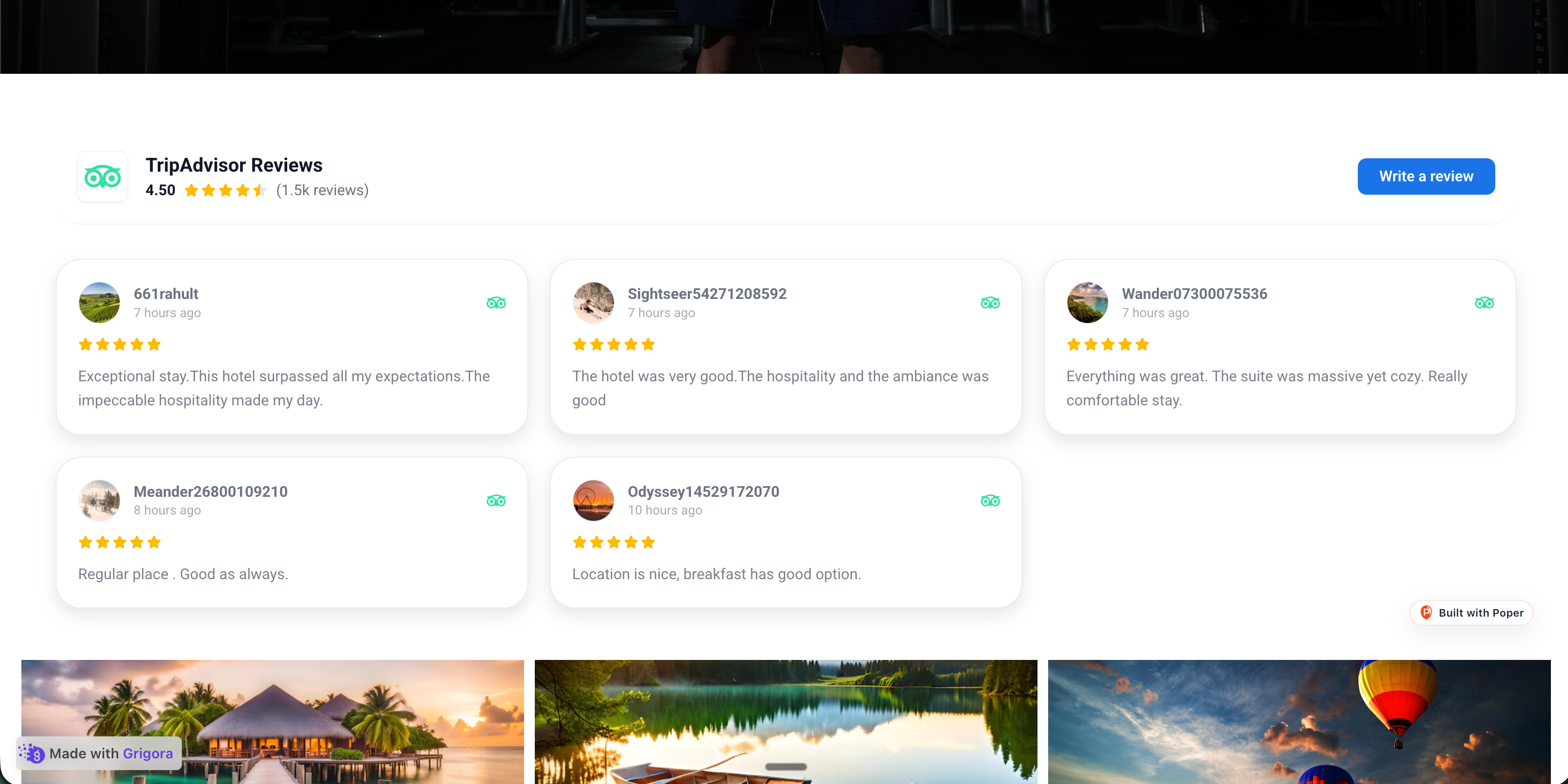
Aurora Boutique Hotel's own branded direct-booking site with the Poper TripAdvisor reviews widget embedded inline showing the same 4.8 rating and 3 guest reviewsPoper widget live
Aurora Boutique Hotel's own branded direct-booking site with the Poper TripAdvisor reviews widget embedded inline showing the same 4.8 rating and 3 guest reviews

Mockups for illustration. Pull your real TripAdvisor Reviews Widget: Embed Hotel Reviews on Any Site from TripAdvisor and embed in 90 seconds.

How to use it

How to add TripAdvisor reviews to your hotel website

Three steps. Under two minutes. No developer needed.

  1. 01

    Copy your hotel's TripAdvisor URL

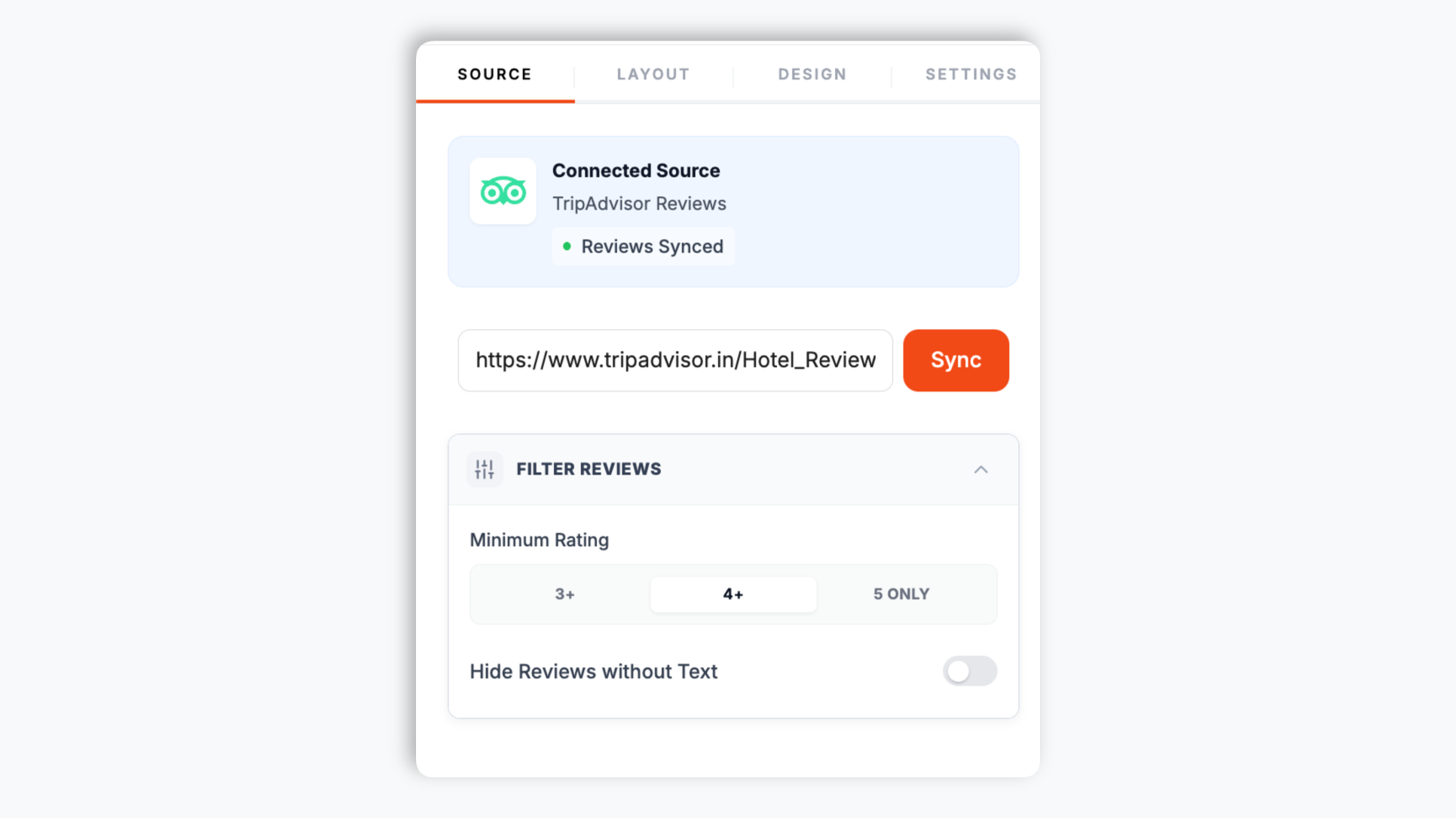
    Open your hotel's page on TripAdvisor and copy the URL from your browser. Paste it into the Poper builder. That is the only thing the widget needs to start pulling your guest reviews.

    Poper widget builder with a single input field where the user pastes their hotel's TripAdvisor page URL
  2. 02

    Choose your template and brand it

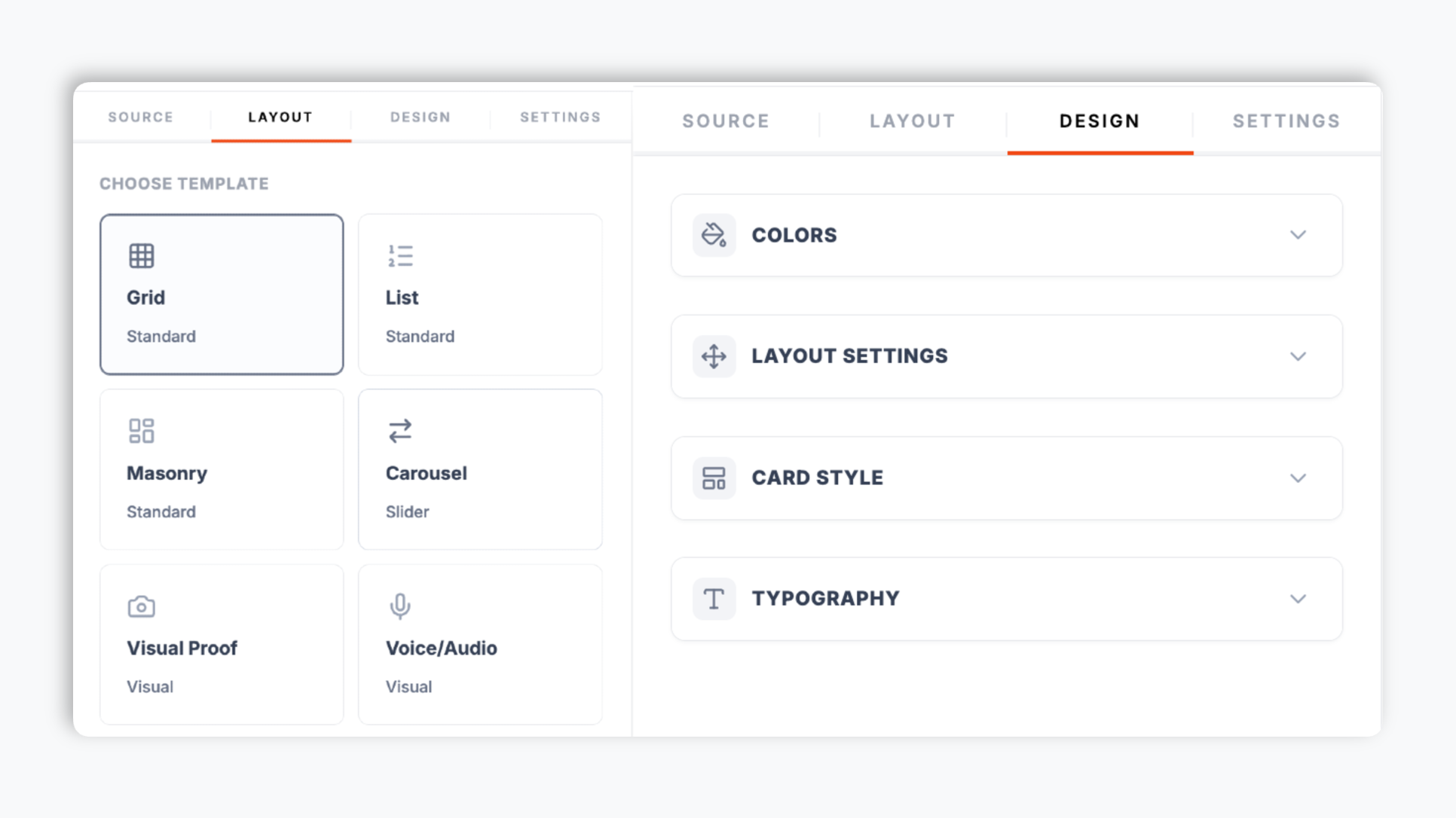
    Pick a layout from the Poper editor template chooser, then match your hotel brand colors, fonts, card corner radius, and shadow. The live preview updates as you adjust.

    Poper editor template chooser showing the review widget layout options the user can pick from
  3. 03

    Copy the snippet and embed on your booking page

    Paste the one-line script tag into your site. Works on WordPress, Shopify, Wix, Squarespace, Webflow, Framer, Ghost, and any HTML-friendly hospitality stack.

    One-line embed script tag for the TripAdvisor reviews widget shown in a code editor with a Copy button and WordPress, Shopify, Wix, Webflow, Squarespace platform badges

Works everywhere

Works with every website platform you already use

Drop-in install on WordPress, Shopify, Wix, Squarespace, Webflow, Framer, Ghost, and any HTML-friendly stack. No build step, no developer needed.

WordPress
Shopify
Wix
Squarespace
Webflow
Framer
Ghost
HTML

Plus 250+ other platforms via the embed snippet. If your site can render a <script> tag, it can render the TripAdvisor Reviews Widget: Embed Hotel Reviews on Any Site.

What you get with Poper TripAdvisor Reviews

The things that matter when you are paying for a hotel review widget, not 30 features no one uses.

Optional star-rating Schema.org for hospitality SERPs

Most TripAdvisor widgets only render a static rating image. Poper goes further: turn on the SEO schema toggle and the widget injects AggregateRating and Review JSON-LD into your page so Google can render gold stars next to your hotel in search results. For hospitality queries, where buyers compare several properties side by side, visible stars in the SERP help shift clicks toward your direct site.

Layouts tuned for hospitality pages

Carousel for above-the-fold homepage placement on hotel sites. Grid and Masonry for room and gallery pages. List for detail pages where guests write longer feedback. Quote Wall, Ticker, Trust Meter, Card Square, and more, all switchable from the editor.

Brand-match styling

Background, card, text, star, and border colors, corner radius, shadow depth, and four font families. Native to your hotel site, not bolted on.

Core Web Vitals safe

Under 40KB gzipped, lazy-loaded, scoped CSS. Booking pages stay fast.

Filter the reviews you display

Set a minimum star rating, hide empty reviews, and choose which elements appear on each card: reviewer name, avatar, date, rating, and the TripAdvisor logo. Your widget shows the guest sentiment you want on each hospitality page.

Use cases

Where TripAdvisor Reviews Widget: Embed Hotel Reviews on Any Site actually moves the needle

Four buyer types who get the most lift from embedding TripAdvisor Reviews Widget: Embed Hotel Reviews on Any Site on their site.

Boutique hotel facade with arched windows, ivy detail, and warm-lit rooms with embedded TripAdvisor reviews on the page

Boutique and independent hotels

Embed your TripAdvisor rating and recent guest reviews on the homepage and room pages so visitors engage with real guest sentiment before they leave for an OTA. The trust signal keeps shoppers reading and exploring your direct site.


Resort overlook viewpoint and grounds with embedded TripAdvisor guest reviews on the page

Resorts and lodges

Show TripAdvisor guest reviews across resort amenity, spa, and room-type pages. A carousel of recent stays gives travelers something to engage with on every page of the booking funnel.

Hotel group property pages each showing an embedded TripAdvisor reviews widget

Hotel groups and chains

Give each property page its own TripAdvisor reviews widget so guests engage with location-specific sentiment. Consistent review blocks across the listing build trust for the whole brand.

Direct-booking hotel page with a TripAdvisor reviews widget embedded near the booking form

Direct-booking hotel sites

Pair your TripAdvisor reviews with your direct-booking pages to keep booking-intent traffic engaged on your domain. Embedded reviews are the trust bridge that holds attention near the book button.

Poper vs other review widget tools

TripAdvisor is the source of the reviews, not a competitor. These are the widget providers that compete with Poper. Here is how they stack up.

 Recommended
Poper
Elfsight
Common Ninja
POWR
Free plan available
Carousel layout
Grid + Masonry layouts
Limited
Limited
Layout count
21 layouts
A few
A few
A few
Optional Review + AggregateRating Schema
Filter by minimum rating
Limited
Limited
Limited
Element visibility controls per layout
Limited
Limited
Limited
Yearly price (entry tier)
$15/mo (Starter)
~$5/mo single widget
~$4/mo single widget
~$5/mo
Bundled with popups, forms, quizzes, more widgets
Unlimited campaigns from the Pro plan

Comparison reflects publicly listed pricing and features as of 2026. Competitor pricing varies by plan and widget count. Verify current details on each provider's site.

Real properties. Real outcomes.

Hotels and hotel groups that switched from broken widgets to Poper.

19% direct booking lift
Adding Poper's TripAdvisor widget to our resort booking pages lifted direct bookings 19 percent in the first quarter. The schema injection also got our hotel stars in Google search within two weeks.
Sarah Mitchell
Sarah Mitchell
Director of Digital Marketing · Harborline Resort & Spa
14% look-to-book lift
We tried four different review widgets before Poper. The Quote Wall layout pulls our best guest quotes onto the boutique-hotel homepage cleanly. Look-to-book ratio jumped 14 percent.
James Wilson
James Wilson
Marketing Director · Stoneharbor Inn Group
Lighthouse 94 maintained
Lighthouse score stayed at 94 on our room-detail pages after embedding. We are very protective of mobile speed because most guests book from their phone. Most other review widgets dropped us 15+ points.
Maria Garcia
Maria Garcia
Hospitality Tech Lead · Marisol Coastal Kitchen

Pricing

Simple, yearly pricing. Save up to 40%.

All plans are billed yearly. Each card shows the per-month equivalent. Start free, then upgrade only when you need more campaigns, websites, or AI credits.

Yearly billing · save up to 40%

Starter

Essential lead capture for solo creators and growing businesses.

$15/mo

billed $180/year

  • 5 active campaigns (5 widget instances)
  • 1 website, 1,000 leads/mo
  • 100+ templates, 10+ display formats
  • Smart triggers & basic analytics
  • No Poper branding
  • 500 AI credits
Start with Starter
Most popular

Pro

Full engagement suite with A/B testing, gamification & unlimited leads.

$29/mo

billed $348/year

  • Everything in Starter
  • Unlimited campaigns & leads
  • 10 websites, 5 team seats
  • A/B testing & gamification
  • Multi-step forms & quiz builder
  • Custom domain (CNAME), 2,000 AI credits
Start with Pro

Business

Unlimited everything with white-label, API access & advanced analytics.

$79/mo

billed $948/year

  • Everything in Pro
  • Unlimited websites & team seats
  • White-label (add-on) & API access
  • Logic jumps, live quizzes & polls
  • Payment forms (Stripe/PayPal)
  • Advanced analytics, 5,000 AI credits
Start with Business

Prices shown for the 50k monthly visitor tier on yearly billing. A Free Forever plan ($0) and a custom Enterprise plan are also available. No contracts, cancel anytime.

Guide · 5 min read

The complete guide to embedding TripAdvisor hotel reviews on your website

TripAdvisor is one of the largest travel review platforms on the open web, with hundreds of millions of reviews covering hotels worldwide. For hotels and hotel groups, embedding a TripAdvisor reviews widget on your direct-booking site is one of the highest-ROI conversion moves in the hospitality marketing playbook, and one of the few that requires no ongoing operational overhead once installed. BrightLocal data confirms that the large majority of consumers read online reviews for local businesses, with hospitality near the top of the categories most influenced by review volume and recency. This guide walks through what actually matters when you choose and configure a TripAdvisor reviews widget in 2026: pasting your hotel URL, picking the right layout for each hospitality page type, the optional schema toggle for SERP star ratings, and keeping your booking-engine page fast. The TripAdvisor integration in Poper fetches reviews for a hotel listing URL, so every example here is scoped to hotels.

01

How the Poper TripAdvisor widget works

The widget is built around one input: your hotel's public TripAdvisor URL. You open your hotel's page on TripAdvisor, copy the URL from your browser, and paste it into the Poper builder. Poper fetches the guest reviews shown on that page and renders them in the layout you choose. There is no account login, no password, no OAuth, and no search by hotel name or city. This is the whole reason setup takes under two minutes: you are not connecting an integration, you are pointing the widget at a public page. Once the reviews are pulled, you control how they look. You can set a minimum star rating, hide empty reviews, and toggle which elements appear on each card: reviewer name, avatar, review date, the star rating, and the TripAdvisor logo. The widget then ships as a single async script tag you paste once. New guest reviews that appear on your TripAdvisor hotel page are reflected when the widget next fetches them, so you are not maintaining a static screenshot that goes stale after a season.

02

Earning hotel stars in Google search results

When Google sees a properly formatted AggregateRating JSON-LD block on your page, it can render gold stars next to your organic search result. The Northwestern Spiegel research, the most-cited study on review-driven CTR, found that adding stars to a SERP listing lifts click-through rate by an average of 17 percent, with some queries lifting more. For hospitality queries this matters because travelers comparing several hotel options in the same city scan stars before they read titles or descriptions. The Poper widget includes an Enable SEO Schema toggle in the Settings panel. Turn it on and the widget injects AggregateRating and Review JSON-LD into your page based on the reviews it displays. After embedding, validate your page using Google's Rich Results Test at search.google.com/test/rich-results; you should see Review and AggregateRating both detected. Within one to three weeks Google typically re-crawls your page and the stars start appearing beside your organic SERP listing. For hotels competing for high-intent local queries, this is one of the highest-leverage SEO moves available, and it ships in the same script tag that displays the reviews on your page.

03

Layout choice by hospitality page type

Carousel works on the homepage above the fold of hotel sites where vertical space is limited and you want to rotate a variety of guest experiences across rooms, spa, and amenities in a single slot. Grid is best on room-type pages where shoppers want to scan multiple reviews to spot patterns like cleanliness and service mentions. Masonry suits photo gallery pages where reviews of varying length flow naturally beside images of the property. List is the right choice on detail-heavy pages such as cancellation and accessibility pages where guests tend to write longer feedback that needs full visibility. Quote Wall pulls short, punchy guest quotes into a dense block, useful on a dedicated reviews page. Ticker gives an ambient scrolling strip of recent sentiment. Trust Meter presents the aggregate rating prominently. Card Square and Card Vertical are compact options for sidebars and narrow columns. Pick one layout per page based on the traveler's intent at that point in the funnel: discover at the top, compare in the middle, and commit near the book button. All 21 layouts are switchable from the editor at any time without re-embedding.

04

Keeping your booking engine fast

Hospitality sites are uniquely sensitive to page speed because the booking engine is itself a heavy third-party iframe such as SiteMinder, Cloudbeds, RoomRaccoon, or Mews. Layering a slow review widget on top of a slow booking engine is the most common way look-to-book conversion collapses on mobile. The worst review widgets move your Largest Contentful Paint by one to two seconds and push your Cumulative Layout Shift score into the poor band, which Google penalizes in mobile search rankings. For hotel queries that lean heavily mobile, that ranking penalty compounds with the trust loss from a sluggish page. Poper's widget loads asynchronously below the fold by default, uses scoped CSS that cannot bleed into your booking engine styling, and clocks in under 40 KB gzipped. After embedding, run Lighthouse Mobile against your room-detail page and your reservation-confirmation page; you should see no measurable change to Performance, Accessibility, or Best Practices scores. Verify Core Web Vitals, LCP under 2.5 seconds, CLS under 0.1, and INP under 200 milliseconds, before and after the change so you can prove the widget paid no performance tax.

05

Styling the widget to match your hotel brand

The official TripAdvisor embed forces TripAdvisor's own colors and a fixed card style that often clashes with a hotel brand. The Poper widget gives you a focused set of design controls that cover what a hotel marketing team actually needs. In the Design panel you set the background color, card background, text color, star color, and border color. You adjust the card corner radius and pick a shadow depth from none, small, medium, or large. You choose a font family from Inter, Roboto, Lato, or Montserrat. For the Carousel layout you also control autoplay, arrows, and dots. Combine these and the review block reads as a native part of your hotel site rather than a bolted-on third-party panel. There is no custom CSS field; the design controls listed here are the full set, and they are deliberately scoped so a non-technical marketer can brand the widget in a couple of minutes without touching code.

Quick reference

What is TripAdvisor Reviews Widget: Embed Hotel Reviews on Any Site?

A TripAdvisor reviews widget is an embeddable script that displays your TripAdvisor hotel guest reviews directly on your hotel website, with star ratings, review text, traveler names, and review dates. You paste your hotel's public TripAdvisor URL and Poper fetches the reviews from that page.

Key facts

  • The Poper TripAdvisor integration fetches reviews for a hotel listing URL; you paste the hotel's TripAdvisor page URL
  • Setup needs no account login, no password, and no OAuth, only the public hotel URL
  • Adding star ratings to your Google search snippet lifts organic CTR by an average of 17 percent (Northwestern Spiegel research)
  • Poper includes an optional Enable SEO Schema toggle that injects AggregateRating and Review JSON-LD
  • The widget offers 21 switchable layouts plus per-layout element visibility and a minimum-rating filter
  • TripAdvisor reviews are public by default; embedding them on your hotel site is permitted under fair use of public content

Last fact-checked: . We re-verify every quarter.

Tutorial

See the TripAdvisor Reviews Widget in action

A quick walkthrough of setting up and embedding this widget.

Tutorial video coming soon

Frequently asked questions

Can't find the answer you're looking for? Chat with our support team.

Contact Support

Stop sending booking-intent traffic back to TripAdvisor

Poper takes 90 seconds to embed and can earn you star ratings in Google search for your hotel.

Free plan available forever