
Website Conversion Score Checker
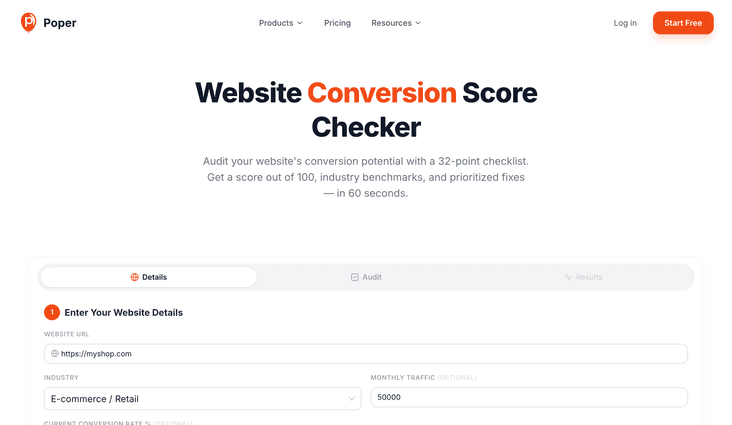
Audit your website's conversion potential with a 32-point checklist. Get a score out of 100, industry benchmarks, and prioritized fixes — in 60 seconds.
1Enter Your Website Details
Ready to boost your conversion score?
With Poper, you can fix every gap this audit finds — smart popups, forms, sticky bars, countdown timers, FOMO notifications, and gamification widgets with A/B testing, smart targeting, and 96+ integrations.
How to Check Your Website Conversion Score?
Enter Your Website Details
Add your website URL, select your industry, and optionally enter your monthly traffic and current conversion rate for personalized benchmarks and revenue impact analysis.
Complete the 32-Point Audit
Review your website against 6 conversion categories — CTA clarity, trust signals, form design, page speed, urgency elements, and content quality. Check every item that applies.
Get Your Score & Action Plan
See your overall conversion score out of 100, category-by-category breakdown, industry benchmark comparison, estimated revenue impact, and prioritized recommendations to fix first.
The 32-Point Website Conversion Audit Explained
This free website conversion score checker grades your site's ability to turn visitors into customers across 6 research-backed categories. Unlike generic website graders that focus on SEO or speed, this CRO audit tool targets the conversion-specific factors that actually impact your bottom line — CTA clarity, trust signals, form optimization, mobile UX, urgency mechanics, and content quality.
Why Use This Free Website Conversion Score Checker?
Why Your Website's Conversion Rate Matters More Than Traffic
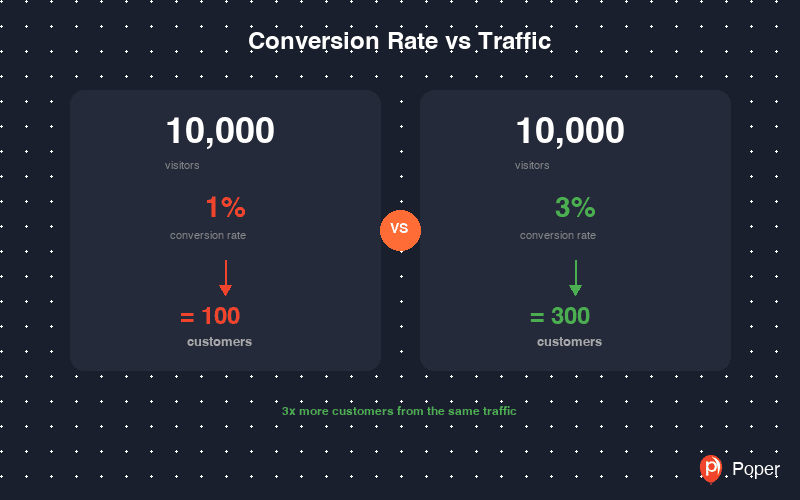
Most businesses obsess over traffic — more visitors, more ads, more SEO. But doubling your conversion rate has the same impact as doubling your traffic, at a fraction of the cost. A website converting at 1% vs 3% means the difference between 100 and 300 customers from the same 10,000 visitors. Every conversion optimization you make compounds over time.
The problem is that most conversion leaks are invisible. A weak CTA, a missing trust badge, a form with too many fields — each one silently costs you customers every day. This 32-point conversion audit systematically uncovers those leaks across every category that matters, giving you a clear score and actionable fix list.
How the Weighted CRO Scoring System Works
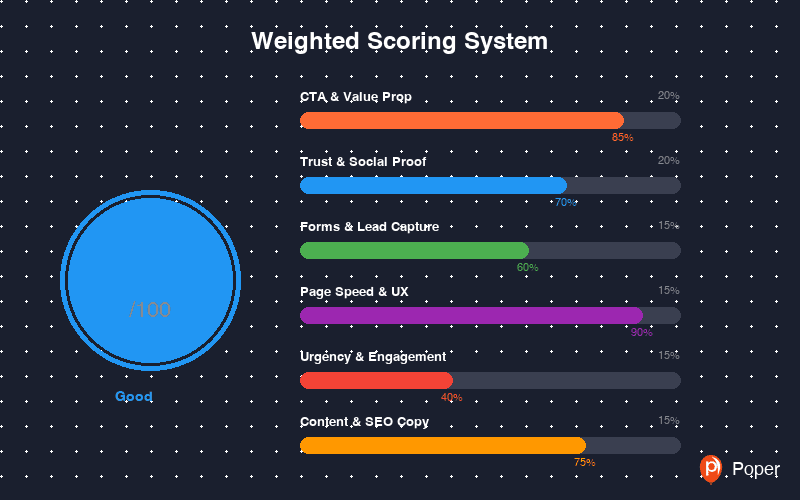
Not all conversion factors are equal. Research shows that CTA clarity and social proof have a larger impact on conversion rates than page speed or content formatting. That's why this website grader uses a weighted scoring system: CTA & Value Proposition (20%), Trust & Social Proof (20%), Forms & Lead Capture (15%), Page Speed & Mobile UX (15%), Urgency & Engagement (15%), and Content & SEO Copy (15%).
Your final conversion score is the weighted average across all 6 categories. This means a perfect CTA section contributes 20 points to your total, while a perfect content section contributes 15. The prioritized fix recommendations target your weakest categories first — where the biggest conversion gains are waiting.
From Conversion Score to Revenue: Closing the Gap
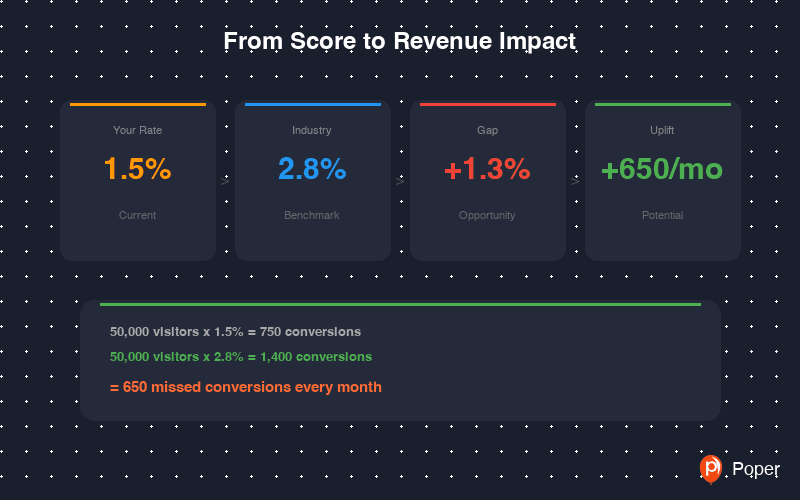
When you enter your monthly traffic and current conversion rate, this conversion rate calculator estimates your gap versus the industry benchmark. For example, if you run an e-commerce store with 50,000 monthly visitors converting at 1.5% (750 sales), but the industry average is 2.8% (1,400 sales) — that's 650 missed conversions every month.
The prioritized fix list tells you exactly where to start. Poper makes implementation fast: add social proof notifications, countdown timers, exit-intent popups, multi-step lead forms, sticky bars, and gamification widgets — all without code, with built-in A/B testing to measure the real-world conversion impact.
How This Compares to Other Website Audit Tools
Tools like HubSpot Website Grader and Google PageSpeed Insights focus primarily on technical performance, SEO, and page speed. While those metrics matter, they don't directly measure whether your website convinces visitors to take action. This conversion score checker fills that gap — it's a dedicated CRO audit that evaluates the persuasion, trust, and engagement elements that drive actual conversions.
Unlike automated crawlers, this is a guided manual audit — you review your own website against each criterion. This means you can audit password-protected staging sites, competitor landing pages, or pages behind login walls. The self-assessment approach also forces you to look at your website through a conversion lens, which often reveals blind spots that automated tools completely miss.
Similar Tools
Website Conversion Optimization Best Practices
Follow these CRO best practices to maximize your conversion score and get the most from every audit
Only check items that truly apply to your website. A slightly inflated score gives you a false sense of security and hides real conversion leaks. Honest self-assessment leads to the highest-impact improvements.
Run the conversion checklist before making changes, implement fixes, then re-audit. Track your score improvement over time to measure ROI on your conversion optimization efforts.
A category scoring 20% has more upside than one scoring 80%. The prioritized fix list shows you where the biggest conversion gains are waiting. Focus on low-hanging fruit with high impact.
Don't fix everything at once. Make one conversion optimization change, measure the impact with A/B testing, then move to the next. This way you know exactly what actually moved the needle.
Run separate audits for your homepage, pricing page, landing pages, and product pages. Each page has different conversion strengths and weaknesses — a homepage CTA strategy differs from a pricing page.
This audit identifies potential conversion issues. Pair it with actual analytics (Google Analytics, heatmaps, session recordings, Hotjar) to validate which fixes have the highest real-world impact on your conversion rate.