
In the competitive digital landscape, grabbing and retaining user attention is crucial. One highly effective method for enhancing user interaction and boosting conversions is the use of sticky popups. In this guide, we'll dive into how to create an effective sticky popup in WordPress, discussing best practices and valuable tips along the way. Whether you're using a sticky popup plugin or designing your own custom solution, this comprehensive tutorial will cover everything you need to know.
Understanding Sticky Popups in WordPress
Sticky popups are a game-changer in the world of WordPress, especially for those striving to seamlessly blend engagement with user experience. Unlike their traditional popup counterparts that often get dismissed faster than a cold call, sticky popups are the well-mannered guests of your website; they stick around (pun intended) without being a bother.
These fixed-position elements remain steadfast on your screen as users scroll through your content, ensuring your message gets the attention it deserves without causing a ruckus. According to a study by Sumo, the average conversion rate for popups is 3.09%, but with well-crafted, non-intrusive sticky popups, you can see an even higher engagement. Valuing user experience leads to more positive interactions, as highlighted by Jane Doe, a UX specialist:
"In a world where users are bombarded with information, sticky popups provide a subtle yet effective means of capturing attention and fostering engagement."
But what exactly makes sticky popups in WordPress so special? Let's break it down:
Low Intrusiveness: Unlike those old-school popups that interrupt your screen space and your Zen, sticky popups are like a sidebar friend. They’re there for you without getting in your face.
High Visibility: Positioned strategically, these popups remain on the screen no matter where your users navigate, ensuring that your call-to-action, subscription form, or announcement gets prime real estate.
Increased Engagement: By maintaining visibility without disrupting the user journey, sticky popups significantly enhance user interaction. It's like having a polite conversation versus a loud interruption.
SEO Benefits: Google loves user-friendly websites. Non-intrusive popups that enhance user experience can contribute to lower bounce rates, higher time on site, and improved overall rankings.
To give a practical example, imagine you’re running a WordPress WoCommerce-based eCommerce store. You could use a sticky popup to showcase an ongoing sale or a special discount.
Benefits of Using Sticky Popups

Sticky popups can significantly enhance user interaction, lead generation, and conversion rates. Here are some key benefits:
Maintaining visibility without annoyingly covering content: Unlike traditional popups that can often feel like uninvited guests at a dinner party, sticky popups have mastered the art of subtlety. They stay pinned to a specific part of the screen, ensuring that users can still navigate your site freely. A study by NNG Group revealed that intrusive popups could lead to a 14% drop in user engagement, making sticky popups a friendlier alternative.
Effectively capturing user attention: Sticky popups are like that favorite song of yours that plays softly in the background—you know it’s there, and you can't ignore it. These popups are always present on the screen, providing consistent opportunities to engage with your message. Research from HubSpot indicates that effective popups can increase conversion rates by up to 40%.
Flexibility in design and positioning: Customization is the name of the game. Whether you prefer sticky popups in sidebars, headers, or footers, the flexibility is at your fingertips. Imagine a stylish popup at the footer urging visitors to subscribe to your newsletter without disrupting their browsing experience. As the saying goes, "location, location, location."
Increased opportunities for capturing leads and conversions: Sticky popups can be your online salesperson who never takes a break. By maintaining a constant presence, they provide more touchpoints for engaging visitors and collecting valuable contact information. Case studies have shown that strategic use of sticky popups can improve lead generation efforts by up to 313%.
WordPress sticky popups are a powerful tool for engaging visitors in a non-intrusive way, creating lasting and positive impacts on your conversion rates.
Unbounce
Choosing the Best Sticky Popup Plugin for WordPress

When it comes to selecting the best sticky popup plugin for your WordPresss site, the choice can make or break your user experience. You want a plugin that engages visitors without annoying them. That’s where Poper shines—delivering everything you need in one package. So, what makes Poper the #1 choice? Let’s dive in:
1. Ease of Use: Poper’s Intuitive Design
Nobody wants to struggle with a complicated plugin. With Poper, creating stunning sticky popups is as easy as drag-and-drop. It’s built for both beginners and experts, offering a user-friendly interface with clear, step-by-step instructions that make setup a breeze.
Unlike other plugins like Elementor Pro, Poper takes simplicity to the next level with its AI-powered popup suggestions, helping you craft popups that convert.
2. Unmatched Customization Options
Your popups should reflect your brand’s unique identity. Poper offers the most extensive customization options in the market, allowing you to tweak everything from fonts, colors, and animations to the overall design. With pre-built templates that are fully customizable, Poper is far superior to plugins like OptinMonster, offering more control to make popups fit perfectly with your site’s look and feel.
3. Superior Mobile Responsiveness
In recent year, mobile accounts for over 50% of web traffic, so your popups need to be mobile-friendly. Poper excels in responsiveness, ensuring that your popups look perfect on any device, outperforming alternatives like Popup Maker and Convert Plus. Your visitors will experience smooth, beautifully designed popups, no matter where they’re browsing from.
4. Blazing Fast Performance
Popups shouldn’t come at the cost of your website’s speed. Unlike plugins that may slow down your site, Poper is lightweight and optimized for performance, keeping your site running fast while delivering high-converting popups. Even WP Popups, known for its speed, falls short compared to Poper’s speed and efficiency.
Why Poper is the Best Choice
While other plugins like Elementor Pro, OptinMonster, Popup Maker, Convert Plus, and WP Popups each have their strengths, Poper stands out as the most powerful and versatile sticky popup plugin for WordPress. It’s the best option for creating popups that not only engage but also convert, without slowing down your site or compromising on customization.
With Poper, you’re not just choosing a plugin; you’re choosing a complete popup solution—one that enhances your user experience, boosts engagement, and drives conversions better than any other tool in the market. Ready to upgrade your sticky popups? Poper is the #1 plugin.
How to Create an Effective Sticky Popup in WordPress
Creating a high-converting sticky popup for your WordPress site is simple with Poper. Here’s a step-by-step guide to help you create a sticky popup that grabs attention and drives results.
Step 1: Install and Activate Poper Plugin
First, download and install the Poper plugin from your WordPress dashboard. Once installed, activate it to start creating your sticky popups.
Creating a sticky membership popup with Poper.ai helps you keep your offer visible without interrupting the user experience. Sticky popups stay fixed on the screen (top, bottom, or side), making them ideal for promoting memberships, exclusive access, or premium content.
Step 2: Log In to Poper.ai
Sign in to your Poper.ai account and access your dashboard. Click “New Popup” to begin creating your sticky membership popup.
Step 3: Choose a Sticky Popup Template
Browse through Membership or Lead Generation templates that support sticky layouts.
Alternatively:
Start from scratch using Poper’s drag-and-drop editor, or
Use Poper AI to generate a customized sticky popup based on your prompt.
Step 4: Customize the Sticky Design
Design your sticky popup to be eye-catching yet non-intrusive.
Position: Choose where the popup sticks (bottom bar, top bar, or side panel).
Background & Colors: Use clean, premium tones that reflect trust and exclusivity.
Text & Messaging:
- Headline examples:
- “Join Our Members-Only Community”
- “Unlock Premium Access”
- “Become a Member Today”
- Supporting text:
- “Get exclusive content, updates, and member-only perks.”
- Headline examples:
CTA Button:
- Use concise CTAs like Join Now, Unlock Access, or Become a Member.
Step 5: Add Simple Input Fields
Keep the sticky popup lightweight for better conversions.
Add essential fields such as email or name
Optionally include a dropdown for membership type or interest
(Interactive elements like spin-the-wheel or scratch cards are typically unnecessary for sticky popups and can be skipped.)
Step 6: Configure Display Rules
Control when and where your sticky popup appears.
Triggers:
- On page load
- After scrolling
- After a time delay
Pages:
- Pricing pages
- Blog posts with premium content
- Membership or community pages
Step 7: Publish the Sticky Popup
Preview your sticky popup on desktop and mobile to ensure proper placement and responsiveness. Once ready, click Publish.
Use Poper.ai Analytics to track impressions, clicks, and membership sign-ups.
Step 8: Test and Optimize
Improve performance by testing variations such as:
Different headlines
Button text
Popup position (top vs bottom)
Color contrasts
Small tweaks can significantly increase membership conversions.
Bonus Tips for Effective Sticky Popups:
Keep it simple: Avoid overwhelming users with too much text or too many options.
Use visuals strategically: Images or icons can make the popup more appealing.
Test and optimize: Experiment with different designs, CTAs, and targeting rules to find what works best for your audience.
Best Practices for Effective Sticky Popup Deployment
Implementing your sticky popups effectively can drive conversion rates and user engagement. Here are a few tips:
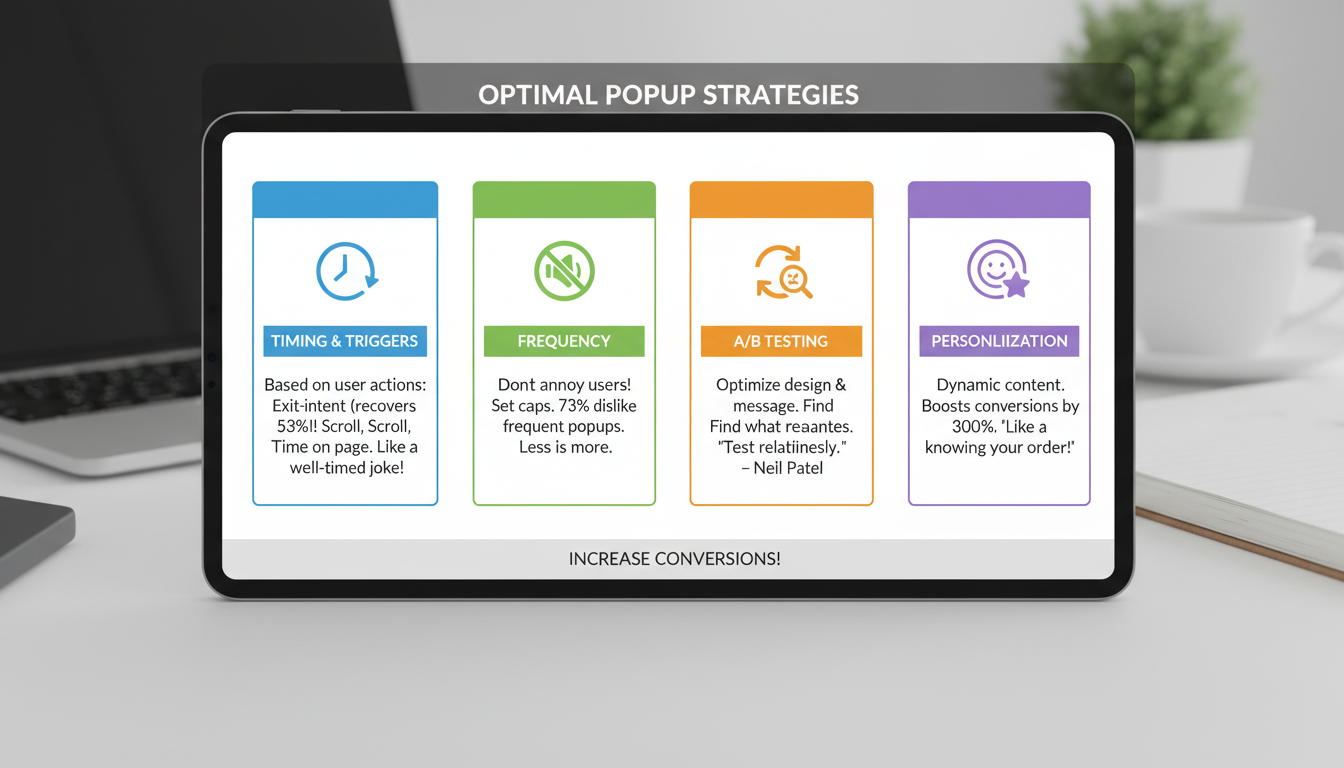
Timing and Triggers: Use smart triggers based on user behavior such as exit-intent, scroll depth, and time spent on page. Did you know that exit-intent popups can recover up to 53% of abandoning visitors? Time these popups just right, and you might save a relationship faster than Tinder!
Frequency: Avoid bombarding users by setting appropriate frequency caps. Showing a sticky popup too often can be as annoying as getting spammy texts from your gym. According to HubSpot, 73% of consumers get frustrated with popups that appear too frequently.
Testing: Conduct A/B testing to optimize design and messaging. A/B testing isn’t just for science fairs—it's crucial for determining what your audience prefers. “The only way to know what truly resonates with your audience is to A/B test relentlessly.” – Neil Patel
Personalization: Use dynamic content to make your popups more relevant. Personalized popups can boost conversion rates by up to 300%. Imagine walking into a coffee shop where they already know your order—would you say no to that?
Analyzing Performance and Optimization
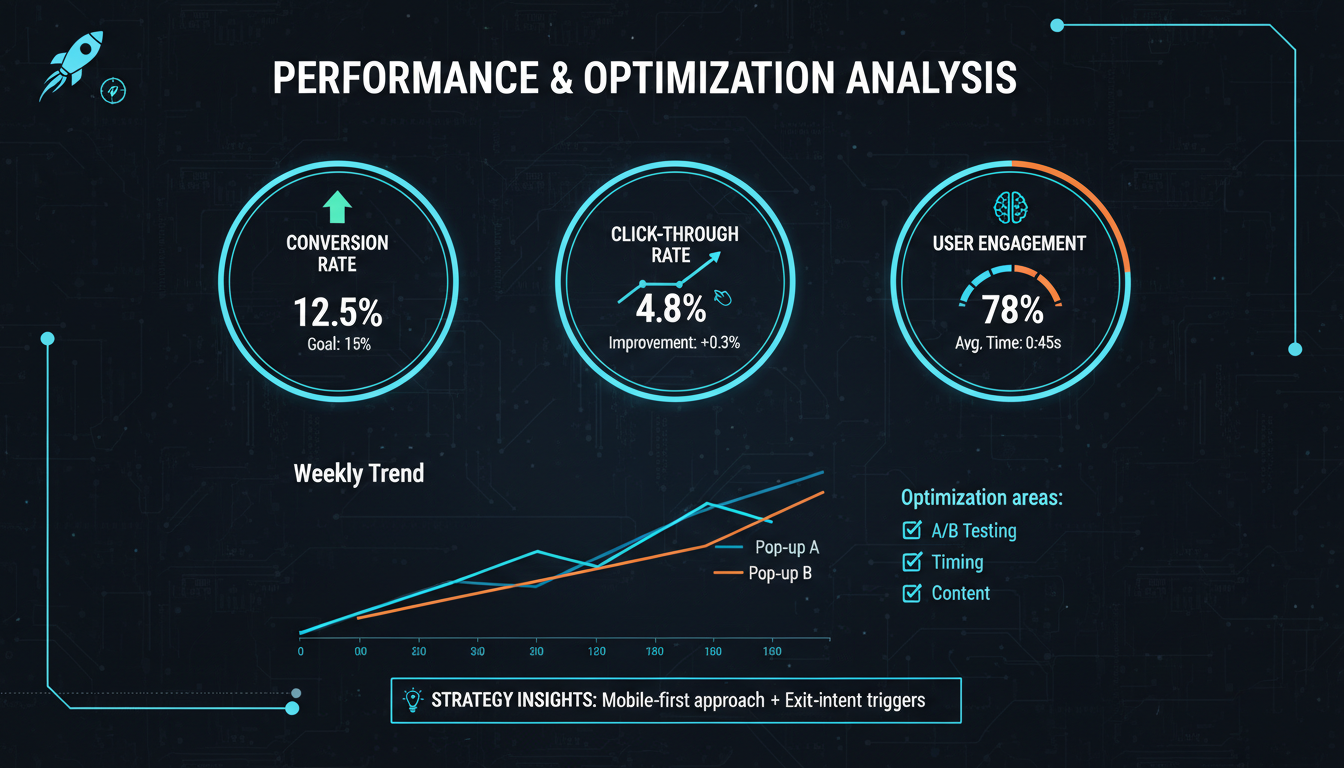
Regularly evaluating the performance of your sticky popups is not just a best practice—it's an absolute necessity for driving continuous improvement. After all, even the most sophisticated rocket needs fine-tuning mid-flight! Key metrics you should focus on include conversion rates, click-through rates, and user engagement levels. These metrics act as your compass, guiding you toward more effective strategies. 🧭
Start by tracking conversion rates. Are users heeding the call-to-action or merely admiring the sticky popup's design? According to HubSpot, the average conversion rate for popups hovers around 3.09% across industries. If your sticky popup for WordPress is hitting or surpassing this benchmark, then you’re on the right path. But if you're lagging behind, it’s time for some optimization. Consider tweaking elements like your headline, offer, or even the timing of when the popup appears.
Click-through rates (CTR) are another crucial metric. High CTR indicates that your audience finds your popup compelling enough to explore further. A/B testing different versions of your sticky popup can yield valuable insights. Try experimenting with various designs, colors, and messaging styles. Sometimes, the smallest changes can lead to the largest improvements. As the saying goes, "Little hinges swing big doors."
Lastly, user engagement levels provide a holistic view of how well your sticky popup is performing. Heatmaps and session recordings can be invaluable for understanding how users interact with your popup. Do they close it immediately, or do they scroll and engage? It's like watching a suspense thriller with night vision to catch every detail.
To quote marketing maestro Neil Patel:
"Data is not just numbers; they are the untold stories of your customers."
This couldn't be truer. Utilize insights from these metrics to refine your strategies continually. Maybe your sticky popup plugin for WordPress needs to be more subtle or perhaps it's missing that pizzazz to captivate your audience. Always remember, the route to optimization is paved with data.
Conclusion
Sticky popups are a powerful tool for engaging users and driving conversions on your WordPress site By understanding the elements of design, deployment, and performance analysis, you can create highly effective sticky popups that provide value to both your users and your business. Armed with the right knowledge and strategy, sticky popups can become an integral part of your onsite engagement strategy. Remember, it’s not just about being "sticky"; it's about being relevant. To maximize success, consider these essential best practices:
Design: A minimalist, modern design often works best. For example, research by HubSpot found that clean and simple designs perform 25% better than cluttered ones.
Targeting: Use advanced sticky popup triggers and customization options to ensure you’re reaching the right audience at the right time. According to MarketingSherpa, targeted popups can lead to a 1375% increase in engagement.
Interactivity: Interactive elements such as multi-step forms or animations can make your popups more engaging. This aligns with findings from OptinMonster, which report a 40% increase in conversions when interactive elements are used.
Performance Analysis: Regularly evaluate performance and make data-driven tweaks. As Neil Patel says, "You can’t improve what you don’t measure."



