

A friend of mine runs a small bakery site on Wix. Last week she texted me a screenshot of her FAQ page and asked the question I hear constantly: how to add accordion to website no code, without breaking her theme, without paying a developer, and without learning HTML overnight. She had already tried two plugins, both of them looked like they came from 2012, and she was ready to give up.
I want to save you from the same loop. There are five clean ways to figure out how to add accordion to website no code in 2026, and each of them suits a different kind of site owner. By the end of this post, you should know which of the five methods fits your stack, how long it actually takes, and where each option starts to fall apart.
I will also flag how we built the Poper accordion widget for exactly this audience, because the entire reason we shipped it was that every existing answer to how to add accordion to website no code involved either a brittle plugin or a copy-paste of HTML the user did not understand.
Why so many people search how to add accordion to website no code
The demand is not random. Statista's overview of the low-code and no-code market [1] tracks the no-code segment growing from $26.9 billion in 2023 toward $65 billion by 2027. That is the audience asking how to add accordion to website no code. They are not developers. They are founders, marketers, store owners, and creators who want a working FAQ live before lunch.
A industry report covered by Adalo found that nearly 60% of custom applications are now built outside traditional IT departments, with about 30% built by people who do not write code at all. That shift is why every honest answer to how to add accordion to website no code has to start with the platform you are on, not the framework a developer would prefer.
The 5 Methods at a Glance
Before going deep, here is the short comparison. Each method delivers a working accordion. The difference is in setup time, customization, performance, and where you can use it.
| Method | Setup time | Best for | Customization | Watch out for |
|---|---|---|---|---|
| Embeddable widget | 3 to 7 minutes | Any platform that allows embed code | Medium to high | Monthly cost beyond free tier |
| Native CMS block | 2 to 5 minutes | Simple FAQs, single page | Low | Locked to that CMS |
| Page builder plugin | 10 to 20 minutes | WordPress sites with Elementor or Divi | High | Plugin bloat, load time |
| HTML details element | 1 to 3 minutes | Anyone who can paste HTML once | Low | Plain look without styling |
| Theme-bundled accordion | 5 to 10 minutes | Shopify and Webflow theme users | Medium | Tied to theme upgrades |
Each of these methods is a real answer to how to add accordion to website no code, but they suit very different setups. Now let us walk through them in detail.
Method 1: Embeddable Widget (Easiest Way)
Embeddable widgets are the most platform-agnostic answer to how to add accordion to website no code. Tools like Poper all give you a hosted accordion that you configure in their dashboard and paste onto your site as a small embed snippet. The same snippet works on WordPress, Shopify, Webflow, Wix, Squarespace, Webnode, Weebly, and even raw HTML.
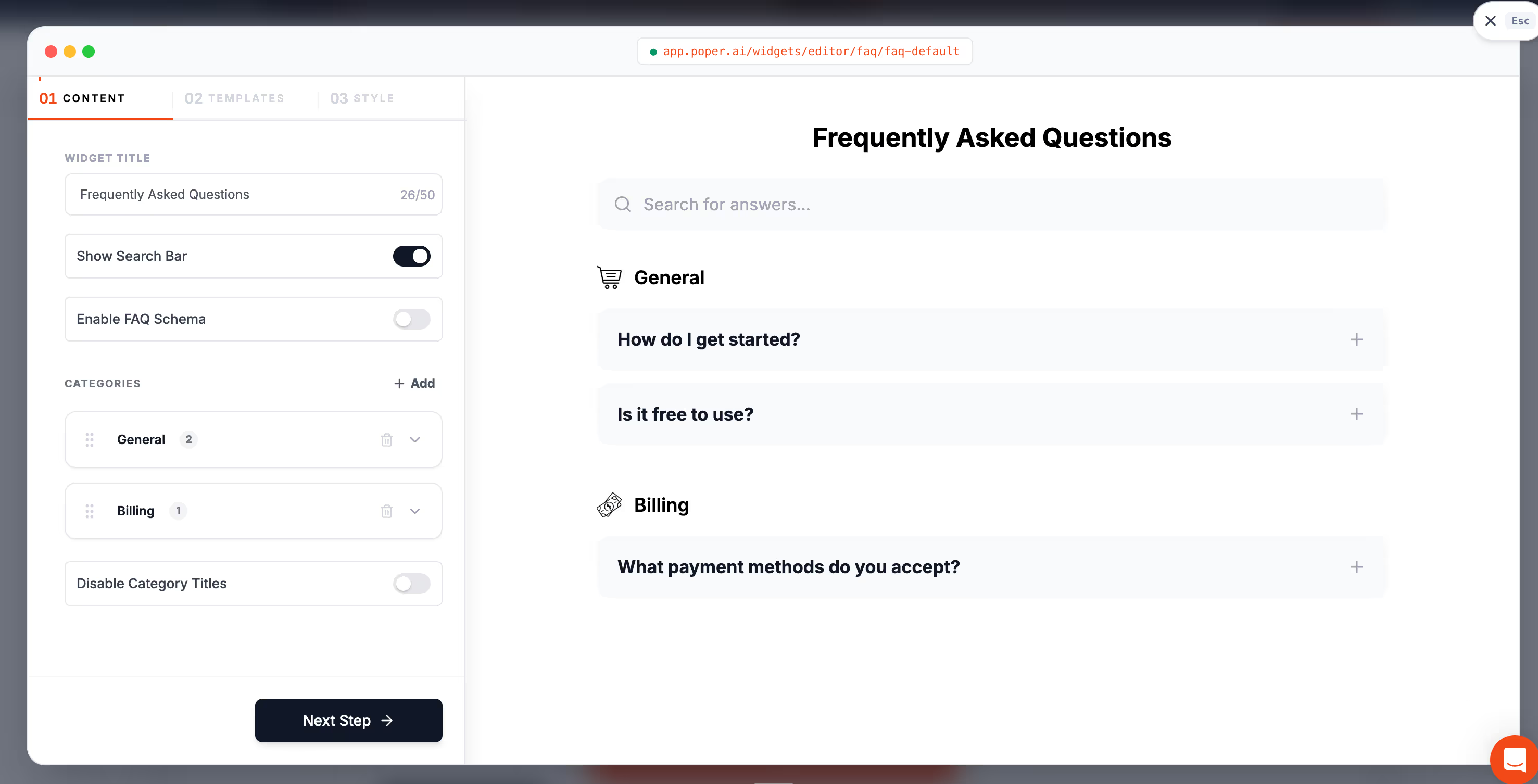
This is usually the right answer to how to add accordion to website no code when you run multiple sites or when you switch platforms more than once a year. The widget travels with you. You change the snippet location, the accordion stays consistent across sites.
The two costs to know are pricing and analytics. Free tiers usually cap views per month or add a vendor badge. When users ask us how to add accordion to website at the Poper team, this is the route I recommend most often, because the same widget can be ported to a Webflow staging site, then to a Shopify production site, with one line of code.
Method 2: Native CMS block
The first answer to how to add accordion to website with no code is the one most people miss. Almost every modern CMS now ships with a built-in accordion or disclosure block. WordPress added a Details block to Gutenberg in 2023, Webflow has a dropdown element under the Add panel, Wix offers a built-in FAQ section, Grigora has a dedicated FAQ block and Squarespace has accordion blocks in its Fluid Engine editor.
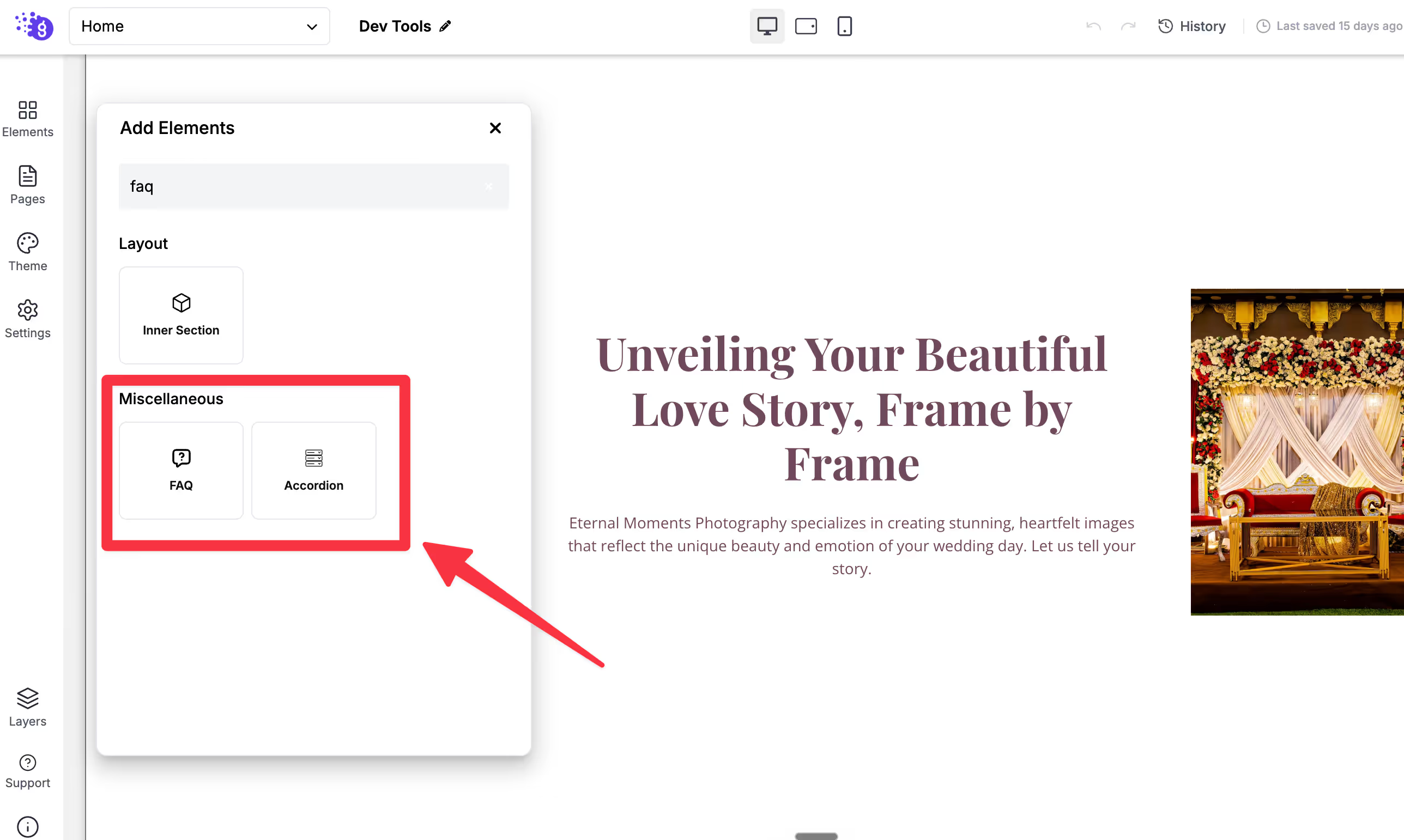
For a small FAQ, this is the fastest answer to how to add accordion to website no code. You open the editor, drag the block onto the page, type your question, type the answer underneath, and you are done. No plugin install, no embed code, no maintenance worries.
Where this method falls short is styling. Native blocks usually look exactly like the rest of the theme, which is what you want until it is not. If you need a chevron icon swap, a coloured open state, or a sticky header, the native block will hit a ceiling. That is when how to add accordion to website no code stops being a one-block answer and turns into a tooling question.
Method 3: Page Builder Plugin
For WordPress users running Elementor, Divi, Bricks, or Beaver Builder, the page builder is the answer to how to add accordion to website no code. Every major page builder ships with a styled accordion module that you can configure visually. You pick the typography, the open state colour, the icon, the spacing, and the animation, all without touching a stylesheet.
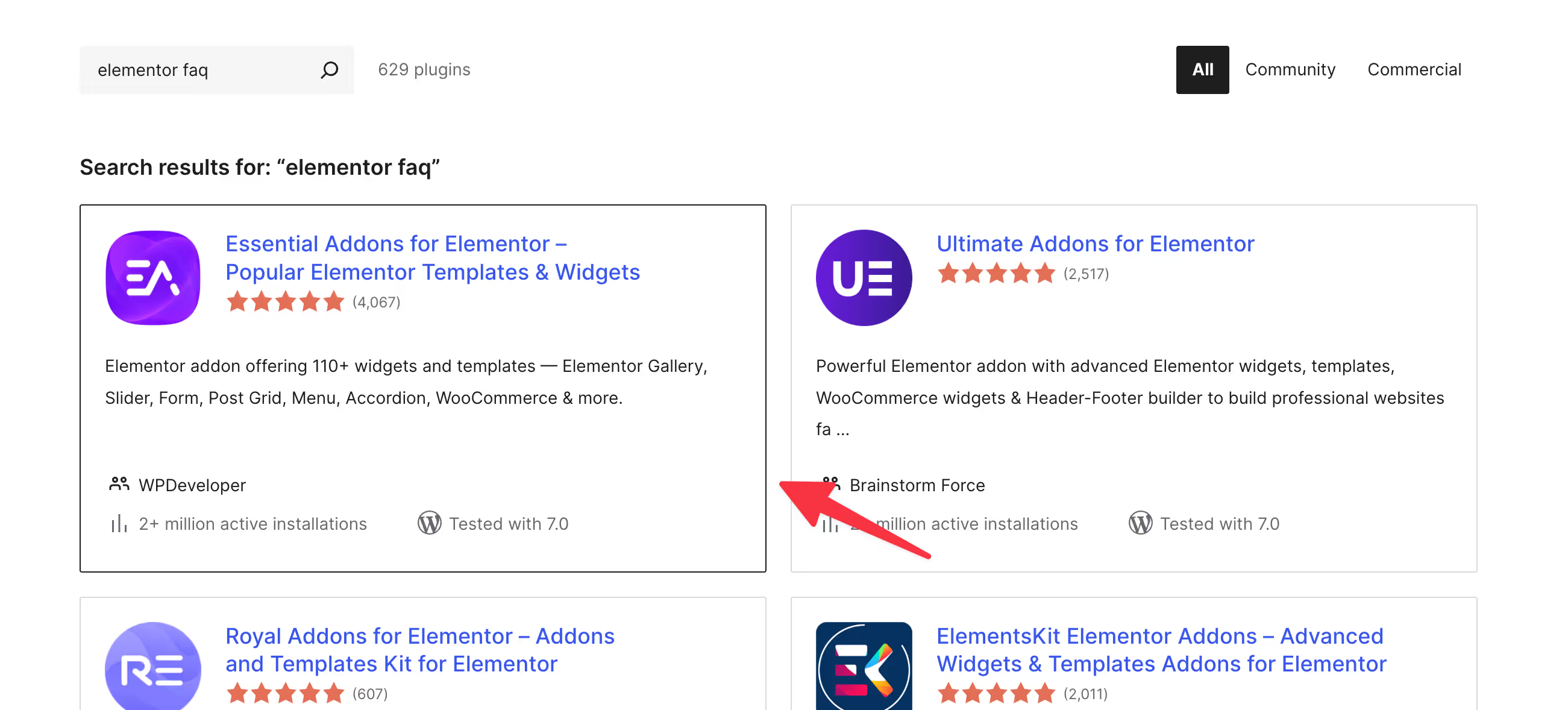
The cost of going this route is real. WordPress plugins are still the leading cause of bloated front-end performance on small business sites, and a heavy page builder can add hundreds of kilobytes to every page load. If you are choosing how to add accordion to website no code through a page builder, it only makes sense if you are already using that builder for the rest of the page. Installing a builder just for the accordion is overkill.
The advantage is integration. Once the accordion sits inside your builder, you can tie it into your global colour palette, your responsive breakpoints, and your animation library. For sites that use Elementor heavily, this answers how to add accordion to website no code with the lowest friction.
Method 4: HTML details element
Okay, I agree this is not purely a no-code solution, but yeah, it's worth exploring if you are comfortable with it. If you get a code snippet, then you can also try this.
The most underrated answer to how to add accordion to website no code is the native HTML details element. It is built into every modern browser, requires no JavaScript, and works in any CMS that allows you to paste raw HTML into a block.
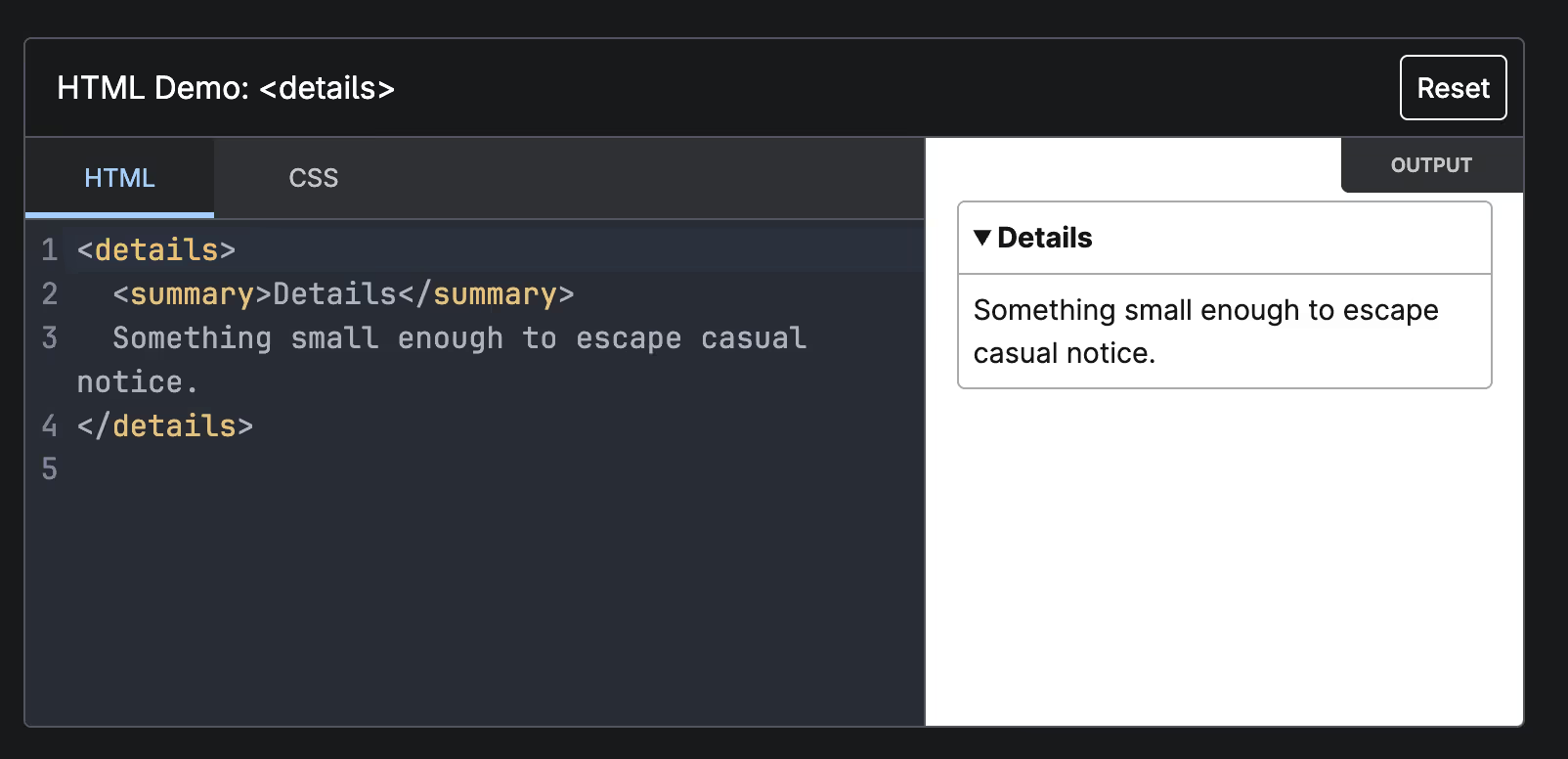
The full markup looks like this. You wrap each question in a details tag, put the question inside a summary tag, and put the answer in a paragraph. The browser handles open and close behaviour for you. That is the entire answer to how to add accordion to website no code at its simplest.
The catch is styling. Out of the box, the details element looks plain, with a small triangle icon and no transition. For a quick FAQ on a developer blog or a documentation page, that is fine.
Method 5: Theme-bundled Accordion
Many Shopify and Webflow themes already include an accordion section as part of the theme. On Shopify, themes like Dawn and Sense ship with collapsible row sections that you can drop into any page from the theme editor. On Webflow, Finsweet's free Attributes library gives you a no-code accordion that you wire up by adding data attributes to existing elements.
If your theme already includes an accordion, this is often the cleanest answer to how to add accordion to website no code. There is no third-party dependency, no monthly fee, and no extra script tag.
The risk is that you tie the accordion to a theme. If you change themes, your accordion disappears with it. That single risk is the reason I do not default to this method when someone asks how to add accordion to website no code with a long lifetime in mind.
How to Pick the Right Method
The decision tree is short. If you need a basic FAQ today on a single page, native blocks are the answer to how to add accordion to website no code. If you are already deep in a page builder, use its accordion module. If you run more than one site, an embeddable widget is the durable choice. If you want zero dependencies and can live with a plain look, the HTML details element wins. If your theme already includes an accordion and you do not plan to switch themes, the theme-bundled option is the fastest.
Most site owners I talk to start with method 1, find the styling too limiting after a month, and then graduate to method 3 or method 2. That is a healthy path. There is no right answer to how to add accordion to website no code in the abstract. The right answer depends on which of those constraints actually applies to your site.
What to test before you publish
No matter which method you pick, a few quick checks separate a good launch from a buggy one. These checks are key for good accordion accessibility. Test the accordion on a real phone, not just a desktop preview, because mobile is where most accordion bugs hide. Confirm that the panel content remains in the page source even when collapsed, so search engines can still read it. Tap the entire header row, not just the icon, and make sure the full row triggers the expand. Check that nothing inside the panel breaks if a user uses the browser back button.
None of those checks needs code. They are visual and behavioural. If your chosen method passes all four, your answer to how to add accordion to website no code is production ready.
One more honest note
If you want my personal preference, I lean toward embeddable widgets for any team running marketing pages, because the lifetime cost is lower than people think. A widget that survives three theme migrations and two CMS swaps pays for itself in saved hours. That is also why we built the Poper accordion the way we did. We wanted how to add accordion to website no code to be a question with a one-minute answer, regardless of which CMS the user wakes up on tomorrow.
Whichever path you take from here, the important part is that how to add accordion to website no code is no longer a tricky question. It is a question with five clear answers, and the only thing left is matching the right one to your site.



